Summary
The 2026.1 update introduces several features to the New UI for STEP (also referred to as Instrument), aimed at expanding the functionality and improving efficiency and the user experience.
The following updates have been made:
-
The functionality of the conditional attribute field defined in the workbench has been extended to support new operators, multi valued attributes values, calculations on whether an attribute is empty, and the conditional validity of reference types.
-
Tab level indicators have been added to the Details View for perspectives, providing a summary count of all validation and data quality issues. Additionally, missing mandatory fields data issue types are now included in the types of issues indicated in the section bar for perspectives.
-
Handling collections in New UI is now possible with full support for manual collections, improved browsing, and enhanced management capabilities.
-
The New UI now delivers an enhanced experience with better embedded content handling.
-
Simplified node selection with search capabilities in the Configuration Tool.
Details
Conditional attribute field changes
The conditional attribute field for a numeric attribute defined in the workbench determines whether or not an attribute is visible for a product in New UI. Previously, this field only supported using very simple calculations such as attribute X = value A, but now supports calculations for a numeric attribute type including < (less than), <= (less than or equal to), > (greater than), >= (greater than or equal to), and != (not equal to) symbols. Additional enhancements include support for validations within a multi valued field attribute type, the use of reference types included in the value, and validation on whether a value is empty. This added functionality broadens the scope of common use cases that are solved using this feature.
For more information, refer to the Conditional Attribute Display topic in the System Setup documentation.
Tab level indicator added and missing mandatory data issue types included in section bar
The number of validation and data quality issues for errors, warnings, missing mandatory fields, and flags are now available in a counter icon located next to the name of a tab. The icon is a circle displaying the consolidated number of all data issues for the tab with the color reflecting the highest level of severity. Hovering over the icon displays a tooltip with a summary of the number of issues per issue type.
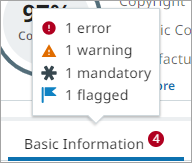
All data issues continue to be captured in the section bar where the user can quickly go to the location of the issue by clicking on the indicator. Previously, missing mandatory field issues were not included in the section bar but will now be indicated using a gray asterisk icon. This new functionality allows users to quickly understand any data issues and their severity within a tab where the issues are located.
For more information, refer to the Tabs topic in the Instrument User Interface documentation.
Improved support for Collections
Users now have a more consistent and unified experience when working with collections. This enhancement introduces full support for creating and managing non‑search‑based collections, improves usability for preset collection browsing, and progresses the planned deprecation of legacy collection perspectives.
New features include:
-
Create and manage manual collections: You can now create manual (non‑search‑based) collections directly in the UI and add or remove items as needed. This helps in maintaining curated sets of nodes for frequent access, temporary grouping, or sharing.
-
Add and remove items from collections: The new 'Add to a collection' action enables users to add one or more nodes to newly created or existing manual collections. Users can also delete items from manual collections, provided they hold the required privileges.
-
Delete entire collections: Users with the Delete Collection privilege can now delete both search‑based and non‑search‑based collections.
-
Configurable columns for preset collection browsing: Configuration Tool now supports defining which columns appear when viewing collections in preset browse perspectives. This allows you to tailor views to ensure key attributes are visible when working with collections.
-
Collection header improvements: You can now view 'Last updated by' and refresh search‑based collections directly from the collection header in both table and details view.
Collection perspectives deprecated
Legacy collection perspectives can no longer be created. Existing collection perspectives remain temporarily accessible in 2026.1, but they are no longer extendable.
Important: As required, existing collection perspectives will be automatically deleted in a future STEP release.
For more information, refer to the Handling Collections Within the Browse Perspective topic in the Instrument User Interface documentation.
Enhancements to improve the look and feel of the New UI
Several usability and functional enhancements have been implemented. These updates remove obstacles that previously limited user efficiency, improve embedded‑content behavior, and streamlined access to Web UI screens.
Enhancements include:
-
Removed requirement for defining a primary product image: Previously, the New UI required a primary product image to be set in Workbench (Users & Groups) for the product details page to display. This dependency has been removed.
-
Improved Embedded Content Tab: The Embedded Content tab now supports relative URLs in HTML functions and HTML proof views.
For more information, refer to the Embedded Content Tab topic in the Instrument User Interface documentation.
Usability improvements to node selection and search in the Configuration Tool
This update improves node selection in the Configuration Tool for both administrators and end users. A Search tab has been added to node pickers, allowing you to search by name and, where applicable, by ID when configuring perspectives, tabs, or browse tables. The typeahead search now displays both the name and ID, making it easier to distinguish attributes, attribute groups, or fields with identical names. These improvements also make it easier for end users to configure columns for custom perspectives.
For more information, refer to the Configuration Tool topic in the Instrument User Interface documentation.