Summary
System updates are your first line of defense against security threats while also boosting performance, ensuring compatibility, and unlocking exciting new features that add value to your digital experience. Regular updates not only protect your data and keep your system running smoothly, but they also give you access to innovative tools and capabilities that can enhance your productivity and user experience.
Important: Customer action may be required.
-
Before updating to 2026.1 from an older version, be aware of system changes. The list that follows may not be comprehensive; however, along with the full update note-set, it provides a starting point for update evaluation.
-
On-premises installations are not supported.
-
Review the 2026.1 STEP Client Requirements topic, which can be found in the System Update and Patch Notes section.
-
Users should be familiar with two online help topics (License and Component Lifecycle and Deprecations and Lifecycle Changes) that provide more details about deprecations, other lifecycle changes, etc.
Details
New UI for STEP designed for SaaS systems
The new UI is designed for SaaS deployments and configured to receive continuous updates. This ensures users benefit from the latest enhancements and enjoy an improved, seamless experience.
Continued visual consistency improvements
Typography and color scheme changes have been implemented to align the visual design of the Performance Analysis Tool, the SaaS Self-Service UI, workbench launcher, and login screens. These updates create a unified look across the platform, providing a more cohesive user experience.
PDF option for STEP online help will sunset
The PDF option for the STEP online help is provided with the 2026.1 release, but will sunset with the 2026.2 release later this year. For more information, refer to the Online Help / Documentation Changes section at the end of this update guide.
STEPXML schema changes from 2025.4 to 2026.1
The PIM.xsd has been corrected for the MultiValueType to show that the 'InheritedFrom' attribute is valid (in addition to the 'Value' attribute), which aligns it with the Multi Context splitter functionality.
AutoCare standards update
Beginning with 2026.1, several new schema versions are now supported by the AutoCare solution, including: Brand table, PAdb 2.0, PCdb 2.0, Qdb 2.0, and VCdb 2.0. These updated standards provide support for non-English languages, as well as simplified logic to better support the API. Support for new schema changes in ACES 5.0 and PIES 8.0 will be introduced in subsequent releases.
Instructions on how to migrate existing configurations can be found in the AutoCare Importers topic.
InDesign support update
With this update, InDesign 2026 (version 21) is now supported. Users may now integrate their STEP systems with InDesign 2024 (version 19), InDesign 2025 (version 20), or InDesign 2026. As previously mentioned in this guide, it should be noted that InDesign 2024 will no longer be supported with the 2026.2 release.
Elasticsearch infrastructure and library upgrade
Our Elasticsearch SaaS infrastructure and related STEP code have been upgraded to the latest Elasticsearch 8.x version. This upgrade is intended to enable a smooth future transition to Elasticsearch 9.
Elasticsearch version 8 will reach end-of-support in 2027. To ensure continued security, stability, and vendor support, Stibo Systems must upgrade Elasticsearch services from version 8 to version 9 during 2027.
Customer action required: Customers using Elasticsearch on older, unsupported STEP versions must update to STEP 2026.1 or higher before March 2027 to ensure compatibility with the upcoming Elasticsearch 9 services. Refer to the following important STEP update versions and calendar dates:
-
2026.1: Elasticsearch client libraries are upgraded to Elasticsearch 9-compatible versions (current release).
-
Before March 2027: Customers must complete their update to a supported STEP release (2026.1 or later).
-
2027.1: Stibo Systems will migrate Elasticsearch services to version 9.
Unsupported STEP versions (2025.4 and earlier) are not compatible with the Elasticsearch 9 services. Failure to update to STEP 2026.1 or higher may result in Elasticsearch service disruption.
Functionality desupported / removed / discontinued
-
The 'Keep File After Load' parameter is deprecated and will be removed from inbound integration endpoint (IIEP) receivers in a future update. This option offers no value in SaaS environments since retained files cannot be accessed directly, and can lead to unnecessary storage consumption and maintenance overhead. The impacted receivers include: Hotfolder Receiver, Hotfolder Receiver Using File Sequence, Hotfolder Receiver Using Meta Files, and REST Receiver, and all are defined in the Data Exchange documentation.
Functionality to be desupported / removed / discontinued
-
Support for InDesign 2024 will end with the 2026.2 release. Review your system requirements to make any changes required to enable a switch to a more current version.
-
The Reports online help and PDF documentation, which were removed in Update 2025.4, have been restored with this update. The Reports functionality is only available on Oracle-based systems. Both the functionality and its documentation will be deprecated in a future update.
End-of-life schedule for STEP updates
All feature updates are exclusive to SaaS customers.
Below is a table outlining the end-of-life schedule for the STEP updates shown. Dates in parentheses represent target dates for future updates, providing customers the information needed to plan ahead. In future updates, additional dates will be added as available.
Important: Refer to the updated STEP Update Information topic in the System Update and Patch Notes section for more information about quarterly update target dates and support end dates for future updates.
| Update | Testing Period | Mandatory Update to Production |
|---|---|---|
|
2025.3 |
September 24, 2025 - December 4, 2025 |
December 5, 2025 |
|
2025.4 |
(December 10, 2025 - March 19, 2026) |
March 20, 2026 |
|
2026.1 |
(March 25, 2026 - June 11, 2026) |
June 12, 2026 |
|
2026.2 |
(June 17, 2026 - September 17, 2026) |
September 18, 2026 |
|
2026.3 |
(September 23, 2026 - December 3, 2026) |
December 3, 2026 |
Customers should update as soon as possible to the latest version of the Stibo Systems Enterprise Platform (STEP). If you have questions and/or to receive help and guidance on how to update to a supported version, submit an issue within the Stibo Systems Service Portal. Also, refer to the SaaS 'How To' videos located on the Stibo Systems Service Portal for information about updating your version via the SaaS Self-Service UI.
Software errors reported for the versions shown above may be rejected once support ends and issues in progress for those updates will be closed. It is not possible to extend the support services for desupported versions.
Online Help / Documentation Changes
With every update, documentation updates occur. In addition to online help that is updated as part of the projects listed in this update note set, users should be aware of the following documentation updates when updating to 2026.1:
-
The Self-Service UI topic is updated with information about creating and managing new Self-Service UI (SSUI) users through federated authentication with an identity provider (IDP) and the availability of 'FixSpecific' configuration properties. Details are also included in the 'User guide' within SSUI.
-
The PDF option for the STEP online help posted to Jira and available on the documentation site, is provided with the 2026.1 release, but will sunset with the 2026.2 release later this year. As part of our commitment to provide the most up-to-date and easily accessible online help, we will publish documentation resources exclusively to our online platform to provide users with more robust search filtering tools, access to linked documentation, and a more dynamic user experience.
-
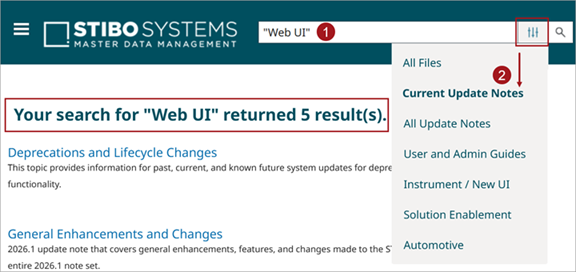
The search bar in online help now has more robust filtering options available with the addition of the 'Current Updates' filter and the updates to the 'Solution Enablement' and 'Automotive' filters to be more refined. Users type in their search criteria, click the filter, and pick a focus area of documentation to search within. The updated filters enable users to find what they are looking for more efficiently.
-
The PDX Onboarding Channel Configurator topic in the PDX section of the Data Integration documentation now includes three new resources:
-
PDX Onboarding Channel Quick Start Pack - A STEPXML quick start pack with pre-built STEP configurations.
-
PDX Onboarding Channel Quick Start Pack User Guide - A PDF that details procedures and configuration steps.
-
PDX Onboarding Channel Implementation Diagram - A PDF of a diagram illustrating the high-level implementation flow for setting up a PDX Onboarding Channel and showing where the quick start pack configurations are applied.
-