Requirements for running a private mirror server include:
- A 64-bit Linux host, not shared with STEP.
- 64-bit Java 11 (an updated version will be installed by SPOT, so the OS version is okay for bootstrapping).
- Enough storage to hold the entire mirror (currently 400 GB will suffice).
- Outgoing internet access to the Stibo Systems updates servers on port 443.
- Incoming access from the private network on port 443 for the SPOT hosts.
- A DNS entry on the local network that can be expected to never change, so updates.example.com would be preferable to pc2016-02-13-room7-linux-testdl120g9.dhcp.example.com.
The root mirrors that the private mirror connects to can be listed using spot --mirrors, but these are the current hosts:
- dk1.updates.stibosystems.com: Primary root mirror.
- dk2.updates.stibosystems.com: Secondary root mirror.
- updates.stibosystems.com: Fail-over mirror on a shared IP between the two root mirrors.
Outgoing TCP access on port 443 must be allowed to each of the root mirror IP addresses from the private mirror, this way the mirror has more upstream mirrors to pick from if one fails.
The mirror server listens on three ports:
- 10080: The Admin port of dropwizard, which is used to serve HTTP requests that allow monitoring the health of the server. The init script uses this port to check if the server is running.
- 10081: The stop port of Jetty. The init script uses this port to shut down the server in an orderly fashion. This port should not be accessed from outside the machine itself.
- 10082: The HTTPS service port that serves the actual mirror. This port should not be accessed from outside the machine itself.
These ports are all internal to the host that the server runs on and external systems should not connect directly to them (with the possible exception of having a monitoring system talking to port 10080.)
Important: Do not configure any STEP systems to talk to the mirror on port 10082. Port redirection (as described in the next section) must be set up.
IPTables Rules
It is impossible to listen to port 443 when running the Java process as an unprivileged user. To account for this, a set of iptables rules must be used.
There are two ways to install the required rules: either run the mirror script as root when starting the server or set up iptables at the OS level. If the init script is called by root, then it will install the needed port redirection, but if the administrator tasked with maintaining the mirror does not have sudo access to this script, then the rules can be inserted into the /etc/sysconfig/iptables config file, allowing the OS to load the rules at boot time.
These rules redirect all incoming requests to TCP port 443 over to port 10082 where the server listens.
To configure iptables on the server, switch to the root user and run the following command to view the current settings:
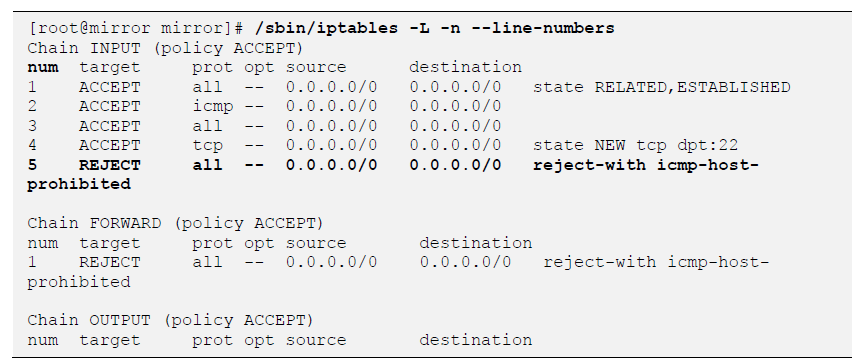
In the output, there will be a line that displays REJECT as the INPUT type, and in its first column (num), the line number is shown ('5' in the above example.) This line number will be the starting line for adding entries to the iptables configuration.
Once this information is known, run the following commands to add the needed port-opening entries:

In the example above, the line number shown is '5', and therefore, the commands would look like the following commands:

Afterwards, add the entries for redirection by executing these commands:

Once that has been done, the added entries can be checked by running the commands that follow:
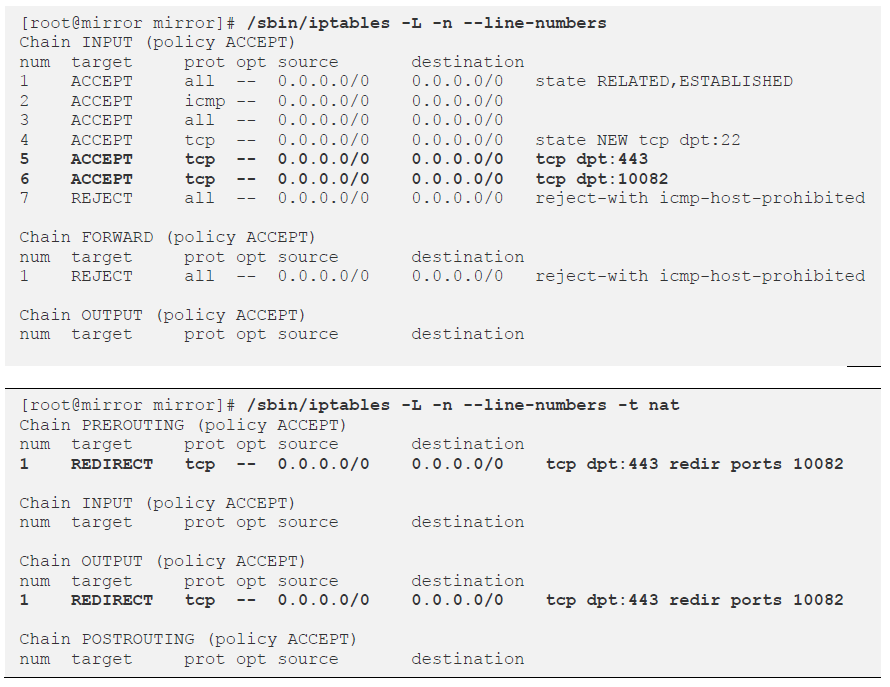
If everything looks to be correct, save the configuration so that it will be loaded each time the system reboots using these commands:

Important: If the mirror server is a RHEL 7.x system, the above /sbin/service iptables stop and /sbin/service iptables start commands should be replaced with the following: /bin/systemctl stop iptables and /bin/systemctl start iptables.
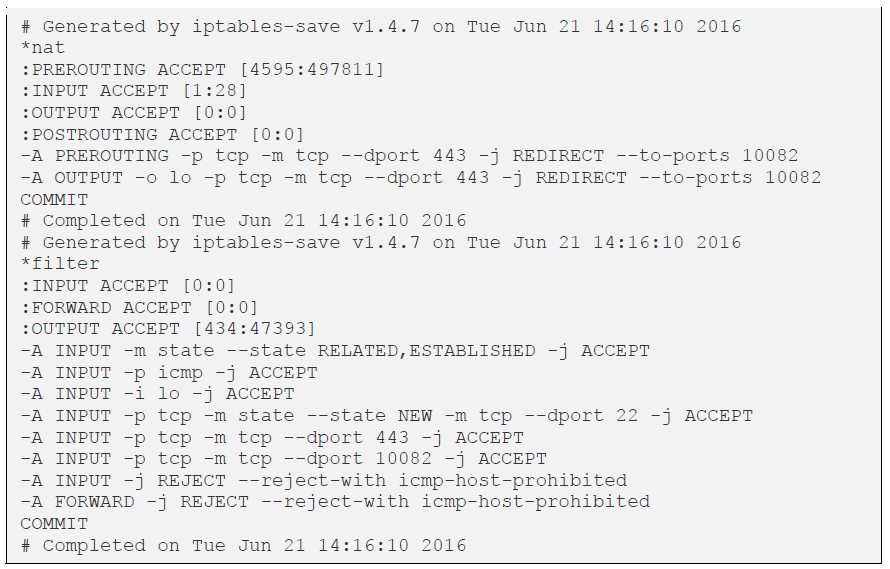
Once complete, the /etc/sysconfig/iptables config file should look similar to the following:
Installing a Private Mirror
- Satisfy all requirements mentioned above.
- Make a note of the DNS name which all the SPOT hosts will be using. In this example we will call it mirror.customer.com.
- Contact Stibo Systems Technical Services and request that a system name is created for the mirror. This must be human readable and unique. The system name in this example is your-mirror.
- Create a directory for the mirror.
- Unzip the SPOT foothold (must be newer than the March 2016 release).
- Run: ./spot --enroll=mirror:your-mirror:mirror.customer.com.
- Run: ./spot --apply=to:updates/mirror/latest.spr.
- Edit the mirror.yaml file and review the options in the file. Some of them, particularly those dealing with mailing of errors, will need to be changed.
- Run: ./mirror start.
- Your mirror should now be running on mirror.customer.com.
- On a system with STEP installed, run the following command:
./spot --updates=https://mirror.customer.com --ping
- As root, create a symlink to the mirror script into the appropriate sysv init directories using a command similar to the following:
ln -s <mirror_home>/mirror /etc/rc3.d/S90stibo-updatesmirror
For example:
ln -s /home/mirror/mirror /etc/rc3.d/S90stibo-updatesmirror
Important: Do not run any of these commands as root. Make sure an unprivileged user exists for this mirror — e.g., mirrorsw.
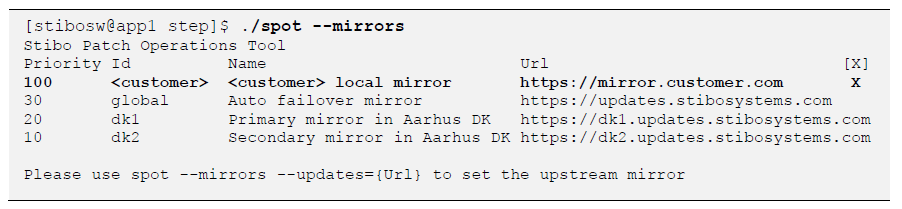
Once the private mirror has been configured, it can be verified by running the following command on the STEP application server as the stibosw (or equivalent) user:
The mirror can also upgrade itself using the init script by running: ./mirror upgrade. The upgrade command calls the spot --apply=to:updates/mirror/latest.spr and ./mirror restart commands.
If the iptables' rules have been added to the RHEL config file, the init script no longer needs root access and can be started by an unprivileged user. This is done by editing said user's crontab entries (such as crontab -e) and adding the following line:
@reboot <mirror_home>/mirror start
For example:
@reboot /home/mirror/mirror start
Preemptive Download
The mirror server can download files before the STEP systems ask for them. Doing this allows most files to be served from the local mirror without waiting for the upstream mirror, so better performance can be expected. This comes at the cost of more disk space being utilized and the possibility of downloading files that end up never being needed.
The download option has three possible values:
- download: HISTORIC: Downloads all the files available from the upstream mirror, regardless of age. This requires about 1.5 TB of space.
- download: RELEASED: Downloads newly released code as soon as it becomes available, this is the default and will steadily consume space. About 2 GB are consumed per month.
- download: ON_DEMAND: Nothing is downloaded until a client asks for it.
Note: When new content (e.g., monthly maintenance patches, add-on components, hotfixes, etc.) is downloaded to the mirror, it will be saved to the server's <mirror_home>/content/takeout directory (e.g., /home/mirror/content/takeout).
As no user is actively waiting for the preemptive downloads to complete and because the downloads can be quite large, the bandwidth consumed by the background downloads can be limited via the bulkDownloadSpeedInMbitPerSecond configuration option. The default limit is 10 Mb/s, so the expected lag after a release of STEP until the mirror is in sync should be less than an hour.
The bulk download speed limit is applied to the download of newly released files and historically released files separately, so if a historic download is running, then the two bulk processes can consume twice the speed limit in total.
If downloads take a long time to complete, it could be because the network or the upstream mirror is overloaded. To avoid contributing to the problem the bulk download threads will sleep for a while after completing a download. The amount of time to sleep after a download can be specified using the bulkBackoffFactor option, which defaults to '1.5'.
For example, if a download takes two seconds then a bulkBackoffFactor of '1.5' means that the process will sleep three seconds before downloading the next file.