In STEP, the architecture is split up into components, with each component having the ability to access other components through a new set of component APIs. This component-based architecture satisfies otherwise contradictory requirements for longer time between releases, and faster introduction of new improvements.
By using components, it is possible to keep the core and other components unchanged for a longer period of time while choosing to upgrade selected components to take advantage of new features and/or important updates within those components. Thus, the risk and workload involved in testing new updates is reduced.
There are three methods that can be used to apply a STEP patch:
Direct Connection method
The default method for patching is the Direct Connection method, where the STEP environment is configured to directly allow an encrypted connection via HTTPS to the release (updates) server. This method offers the recommended security.
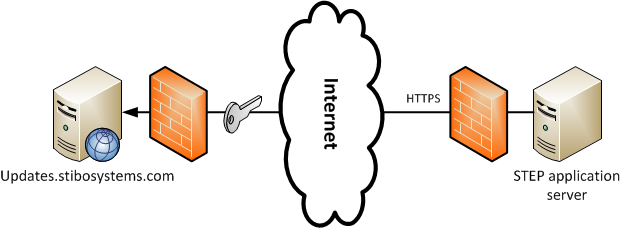
The advantages of using the Direct Connection method are:
- Faster support from Stibo Systems by providing complete version information.
- Simplified infrastructure.
Private Updates Mirror method
As an alternative to accessing the release server directly, it is possible to set up a Private Updates Mirror and configure SPOT on the internal STEP servers to use this mirror instead.
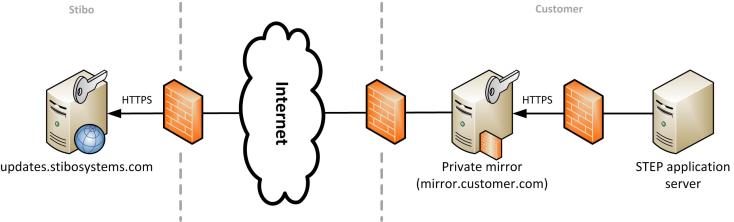
The advantages of using the Private Updates Mirror method are:
- If the internet connection or the global updates server breaks down, the files that have already been downloaded will still be available.
- The consumed internet connection bandwidth is reduced by avoiding repeated downloads.
- The network configuration is simpler since only the mirror requires access to the updates server, while the individual SPOT instances can be configured to talk only to the private mirror on the internal network.
Offline method
In some cases, especially production environments, access to Stibo Systems’ release server directly or via a private updates mirror is not permitted often due to stringent security policies. In this scenario, the only acceptable method available to patch a STEP environment is to use the Offline method.
The Offline method requires SPOT to be installed on a remote Desktop / Server that has access to Stibo Systems’ release server, but not necessarily a direct connection to the required STEP environment(s) that need(s) patching.
The Offline method is a manual, three step process:
- Using SPOT, take a snapshot of the STEP environment that requires patching and transfer the snapshot file to the remote desktop / server that has access to Stibo Systems' release server.
- On the desktop / server, use SPOT to prepare the required patch files using the supplied snapshot and transfer them back to the STEP environment.
- On the application server, apply the patch files to the environment using SPOT.
Use of the Offline method is not recommended based on the following information:
- Additional hardware in terms of the SPOT Desktop / Server is required.
- Risk that the thin snapshot found on the SPOT Desktop / Server is not recent and thereby results in downloading / applying and out of date patch.
- A more complex infrastructure is needed.
- Increased risk of human error due to the presence of more commands to execute.
- More manual work / automation is required.
Using SPOT to Patch a STEP System
It is recommended to test the connectivity to Stibo Systems' release server prior to attempting to patch the environment.
Patch STEP on all servers in the STEP cluster to the latest release
- Go to the directory where STEP is installed. The default path is /opt/stibo/step
- Using the appropriate substitutions, run the following SPOT command:
./spot --apply=to:step/trailblazer/step-trailblazer-<STEP_VERSION>-[mp<LEVEL>-]<RELEASE_TIMESTAMP>.spr
Example:
./spot --apply=to:step/trailblazer/step-trailblazer-9.0-mp5-2018-11-08-15-54-27.spr
It should be noted that the SPOT command above shows the general patch recipe format – i.e., the STEP version, monthly maintenance patch level (if applicable), and the release timestamp – for informational purposes. In most cases, Stibo Systems will provide the necessary recipe for your situation.
Use the --local option to patch individual servers one at a time. All servers in the cluster MUST be at the same STEP release.
Applying the latest release of STEP or a monthly maintenance patch (mp) will restart the STEP application, so be sure to plan for a bit of down time or perform these only during a proper maintenance window.
Patch a specific STEP component
In the example below, the RESTAPI component is being patched to 7.0.40.
- Go to the directory where STEP is installed. The default path is /opt/stibo/step
- Run the SPOT command as follows:
./spot --showupdates (This is an optional step to verify the latest component release.)
./spot --apply=to:restapi/7.0/restapi-7.0.40.spr
Certain STEP components can be applied using the --hot option. The Hot option allows a component to be upgraded without restarting STEP. Only certain components support the Hot option so to determine whether a component can be applied “Hot”, run the following command:
Determine whether a component can be applied hot
Some components can be applied hot, allowing the update to run without having to restart the STEP server.
- Go to the directory where STEP is installed. The default path is /opt/stibo/step
- Run the SPOT command as follows:
./spot --prepare=<COMPONENT_RECIPE>
If the component can be applied hot, the following message will be returned:
Notice: This upgrade can be applied without restarting STEP. To do so, rerun prepare using --hot when applying the recipe. --hot ensures that the system is not restarted by accident.
Patch STEP using the Offline method
The following example details the steps required to patch a STEP environment to the latest release using the Offline method. The same steps can be applied when patching a specific STEP component, hotfix, or customer add-on.
Important: Since you will typically use a single SPOT Desktop / Server to manage multiple STEP environments, the Offline method introduces the possible risk of downloading an update based on the thin snapshot from one STEP environment and applying it to another by mistake. Therefore, extreme caution must be exercised in order to not mix up the environments.
Patch an offline STEP environment to the latest release
Take a snapshot of the STEP Application Server:
- Go to the directory where STEP is installed. The default path is /opt/stibo/step
- Run the SPOT command as follows:
./spot --snapshot=<THIN_SNAPSHOT_FILENAME>.spr
- Copy the thin snapshot file to the SPOT Desktop / Server.
Prepare a patch file from the snapshot on SPOT Desktop / Server:
- Go to the directory where STEP is installed. The default path is /opt/stibo/step
- Using the appropriate substitutions, run the following SPOT command:
./spot --accessmode=offline --apply= to:step/trailblazer/step-trailblazer-<STEP_VERSION>-[mp<LEVEL>-]<RELEASE_TIMESTAMP>.spr --target=<THIN_SNAPSHOT_FILENAME>.spr --output=<PATCH_FILENAME>.spr
- Copy the prepared patch file to the offline STEP Environment.
Apply the patch on the STEP Application Server:
- Go to the directory where STEP is installed. The default path is /opt/stibo/step
- Run the SPOT command as follows:
./spot --apply=<PATCH_FILENAME>.spr