Business rules can use the event handling binds to access the selected event object. No parameter selection is required for the current object binds since they each use the current batch, queue, or type, respectively. For the Derived Event Type and the Event Queue binds, a parameter is required. Each is described below.
For examples of checking the current event and queuing a derived event via event binds and JavaScript, see the Event Bind Examples topic here.
Important: The example scripts should not be used as-is without thorough testing, including updating the script to match object and link types that exist on your system.
Configuration
To use any bind:
- Create a business rule as defined in the Creating a Business Rule or Library topic here.
- Edit the business rule as defined in the Editing a Business Rule topic here.
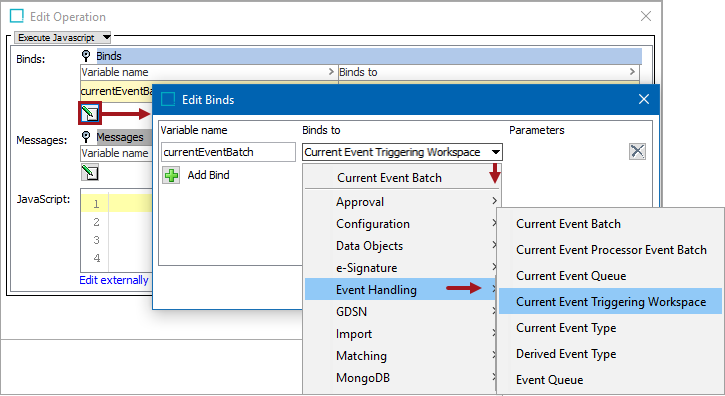
- In the Edit Operation dialog, add the bind to a business rule, as defined in the Adding a Bind topic in the Reference Materials documentation here.
- In the Edit Operation dialog, optionally add Messages, as defined in the Adding a Localized Business Rule Message topic here.
- In the Edit Operation dialog, add JavaScript to call the bind.
Current Event Batch
This bind is only available for actions used as an OIEP Preprocessor and gives access to the batch of events currently being handled. This makes it possible to examine the events in the batch and to add new objects to the batch.
For example, this JavaScript adds new product / node '(newNode)' to the current event batch.
eventBatch.addAdditionalNode (newNode); In this example, Current Event Batch is bound to the variable 'currentEventBatch'. For each event in the batch, the code accesses the object (node) for which the event was generated, checks if it is a product, and if so, adds the parent object to the batch.
eventsList = currentEventBatch.getEvents();
for (var i = 0; i < eventsList.size(); i++) {
var node = eventsList.get(i).getNode();
if (node instanceof com.stibo.core.domain.Product) {
currentEventBatch.addAdditionalNode(node.getParent());
}
} Current Event Processor Event Batch
This bind is for use with the Execute Business Action for Event Batch plugin. With this plugin, the configured business action will be executed once per event batch. The event batch can be accessed via the Current Event Processor Event Batch bind that resolves to 'com.stibo.core.domain.eventprocessor.batch.EventBatch.'
The business action referenced from the Execute Business Action for Event Batch plugin has no concept of 'current object.' Therefore, the JavaScript Current Object bind and most non-JavaScript business action plugins cannot be used. Also, business actions referenced from the plugin must be made applicable for all object types.
The following JavaScript example iterates the events in a batch and logs the ID of each associated node:
// logger bound to Logger
// batch bound to Current Event Processor Event Batch
var it = batch.getEvents().iterator();
while (it.hasNext()) {
var event = it.next();
var node = event.getNode();
if (node) {
logger.info("Handling " + event.getNode().getID());
}
}It is not recommended to have long running business actions. The plugin should only be used for cases where it is critical that the business action can work on a batch of events.
Current Event Queue
This bind is available for conditions and actions used as OIEP event filters / event generators. It gives access to the event queue tied to the OIEP and from an action makes it possible to, for example, add derived events to the queue.
For example, this JavaScript queues new product / node '(newNode)' using ‘eventType’, which is bound through Event Type bind (discussed later in this topic).
eventQueue.queuedDerivedEvent (eventType, newNode); In this example, Current Event Queue is bound to 'currentEventQueue', Current Object is bound to the variable 'currentObject', and a derived event is bound to the variable 'myEvent' via the Event Type bind. The code queues an event for the parent of current object if current object is a product.
if (currentObject instanceof com.stibo.core.domain.Product) {
currentEventQueue.queueDerivedEvent(myEvent, currentObject.getParent());
} Current Event Triggering Workspace
The functionality described below is currently in ramp-up status. See the License and Component Lifecycle topic for details about what this status means here.
The Current Event Triggering Workspace bind supplies the TriggeringWorkspace (Main, Approved, or Main and Approved) for current events about to be generated when publishing data to the Elasticsearch search engine for display on the Web UI faceted Search Screen.
To make it possible to identify which workspace(s) the event in question is generating changes from, the TriggeringWorkspace enum can be found in the Scripting API and Extension API documentation.
@Public
public enum TriggeringWorkspace {
/** Triggering on changes from Main workspace */
Main,
/** Triggering on changes from Approved workspace */
Approved,
/** Triggering on changes from both Main and Approved workspace */
MainAndApproved;
} Also in the API, com.stibo.core.domain.eventqueue.event.Event#getTriggeringWorkspace() identifies which workspace(s) the event in question is generating change.
Search Screen information can be found in the Web User Interfaces / Web UI Setup and User Guide documentation here. Triggering Workspace Flipper information for event-based OIEPs and EPs can be found in the Data Exchange documentation here.
Important: The Triggering Workspace functionality is in ramp-up status, and is tied to the enablement of the faceted Search Screen (Elasticsearch) functionality. This functionality is primarily intended for keeping Elasticsearch indexes up to date. Processing each and every event from the maintenance workspace can lead to bottlenecks, and in worst case, to overall performance decrease of the entire system. In particularly, never tie business rules doing complex processing to events reflecting frequent activities done in the maintenance workspace.
Current Event Type
This binds the current event type and can be hooked into an endpoint as filters / generators to examine the current event. It is available for conditions and actions used as OIEP event filters / event generators. Use this to examine the type of the current event.
In this example, Current Event Type is bound to 'currentEventType' and the code checks whether the current event is a core 'modify' event.
if (currentEventType.equals(com.stibo.core.domain.eventqueue.BasicEventType.Modify)) {
// Do something if core modify event
}Derived Event Type
This bind is available for actions and conditions, (though more typically used in actions), and binds a specified derived event to a JavaScript variable.
The same binds and variables are used in this example as in the one above for Event Queue.

Event Queue
This bind is available for conditions and actions, (though more typically used in actions). Use the bind from an action to queue an event on the selected event queue in STEP.
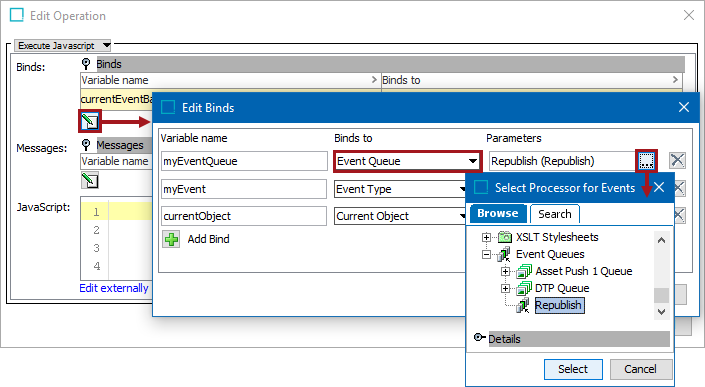
In this example, a derived event is bound to the variable 'myEvent' via the Event Type bind, an event queue is bound to the variable 'myEventQueue' via the Event Queue bind, and Current Object is bound to 'currentObject'. The example places a 'myEvent' event on the queue for current object.
myEventQueue.queueDerivedEvent(myEvent, currentObject);