Summary
There are a number of enhancements completed for Data Profiling, including:
- The new Metric Editor allows for more streamlined configuration of metrics across all metric types.
- The new Aggregator Metric allows users to display combined scores from multiple completeness metrics for a given node.
- Value metrics can now evaluate specification attributes.
- The Business Function Metric now includes the option of having a message displayed that details information determined by the metric configuration, if a score is received that is less than a predetermined threshold.
- Data profiles can display metric information for Value and Business Function metrics, both in the workbench and in Web UI.
- The new Data Sufficiency Calculator processor plugin allows users to calculate sufficiency scores for products when a certain event is generated.
- By combining configured metrics, business conditions, and business actions, the new Sufficiency Configuration Type gives users the ability to measure data quality and sufficiency, in the form of a score, on products.
Details
New Metric Editor
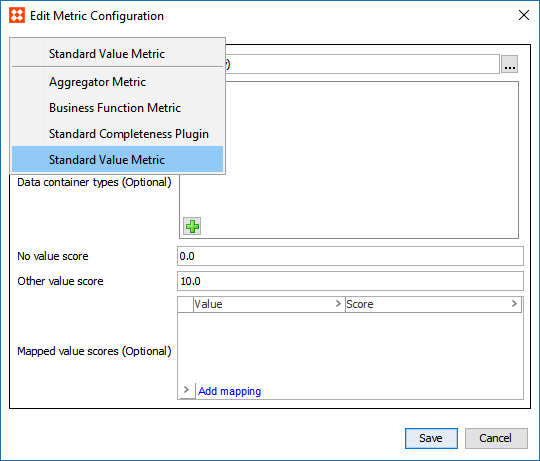
Previously, each metric had to be added to System Setup via its own context menu selection, and once a metric was created as a given type, it could not be changed.
For more information on creating and editing metrics, see the Creating and Editing Metrics section of the System Setup documentation here.
New Aggregator Metric
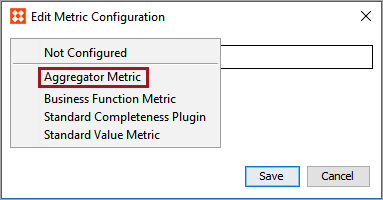
A new option, the Aggregator Metric, is available when selecting a completeness metric in the Edit Metric Configuration wizard. For a given node, the Aggregator Metric allows users to display combined scores from multiple metrics (basic metrics and/or other aggregator metrics). For more information, see the Aggregator Metrics topic in the Data Profiling documentation here.
Value Metrics usable with Specification Attributes
It is now possible to configure a Value Metric to evaluate a Specification Attribute. Previously, it was only possible to configure these metrics for Description Attributes.
During configuration, no distinction is made between the two attribute types.
For more information, see the Value Metrics section of the System Setup documentation here.
Updated Business Function Metric
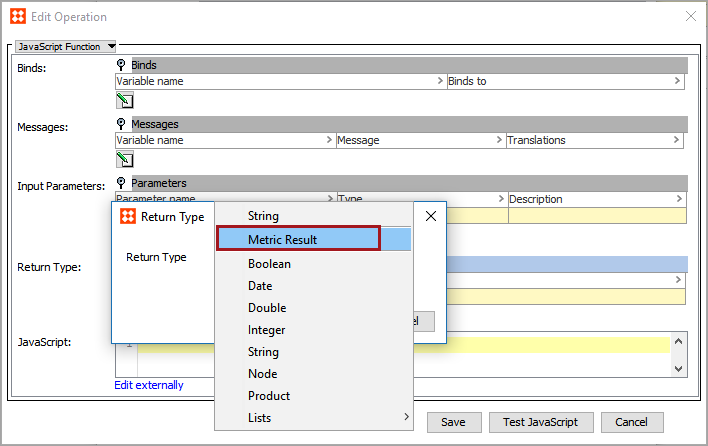
The Business Function Metric has been updated to include the ability to have a message returned with a completeness score when 'Metric Result' is chosen as the return type within the business function. The message, displayed in the Web UI sufficiency inspector, provides users with more information regarding the completeness score, including any error messages. For more information about Business Function Metrics, see the Business Function Metrics topic in the Metrics documentation here.
Profiling Value and Function Metrics
Objects can now be profiled using Value and Function metrics, both of which behave in a similar fashion to Completeness metrics. Previously, Completeness was the only metric type that could be profiled.
If specified on a relevant data profile configuration, both metric types can appear on the data profile screen in Web UI, and each can be configured for display on a data profile dashboard in workbench.
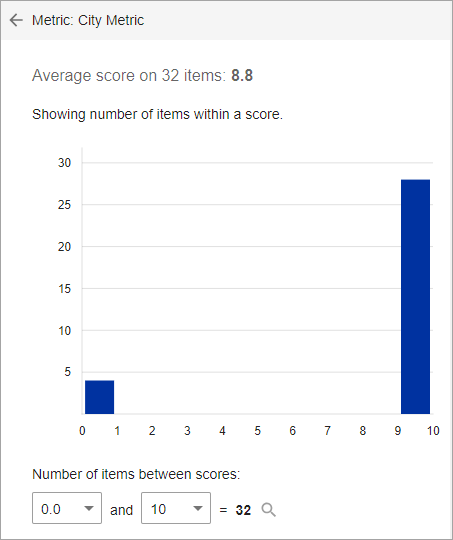
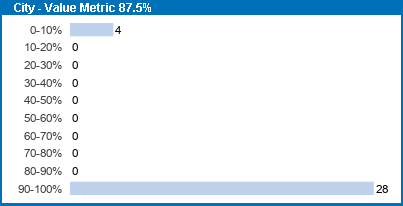
Additionally, if set as the default metric, either metric type can be used in place of a Completeness metric for the Completeness Meter. Note, however, that the Completeness Info window is not available for Value or Function metrics.
For more information, see the Metric Visualization section of the System Setup documentation here.
New Data Sufficiency Calculator processing plugin
With the new Data Sufficiency Calculator processing plugin, users are able to configure an event processor for calculating sufficiency scores for products when a certain event is generated. The sufficiency score results are stored in a data container and displayed within the sufficiency inspector in the Web UI.
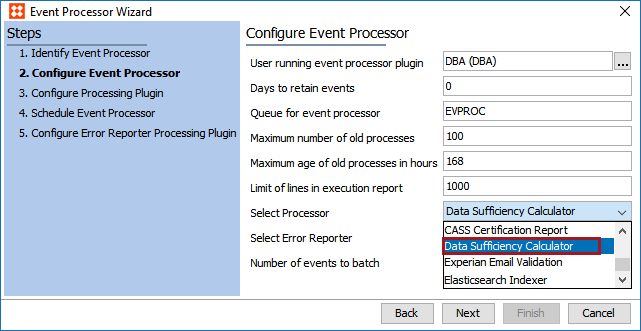
In order to access the Data Sufficiency Calculator Processor plugin, a 'data-sufficiency' add-on component must be activated on your system in addition to the normal update procedures for 9.2. See your Stibo Systems representative for more information.
For more information, see the Data Sufficiency Calculator Processing Plugin Parameters and Triggers topic in the Processing Plugins documentation here.
Sufficiency Configuration Type
By combining metrics with several configurable parameters, including (but not limited to) business actions, business conditions, and trigger gates, the new Sufficiency Configuration Type allows users to evaluate the quality and completeness of data on a given product. Additionally, the Display Configuration, Data Sufficiency Sequence Number, and the Severity Levels can be populated to further supplement the information about a product's sufficiency score in the Sufficiency panel located in the Web UI.
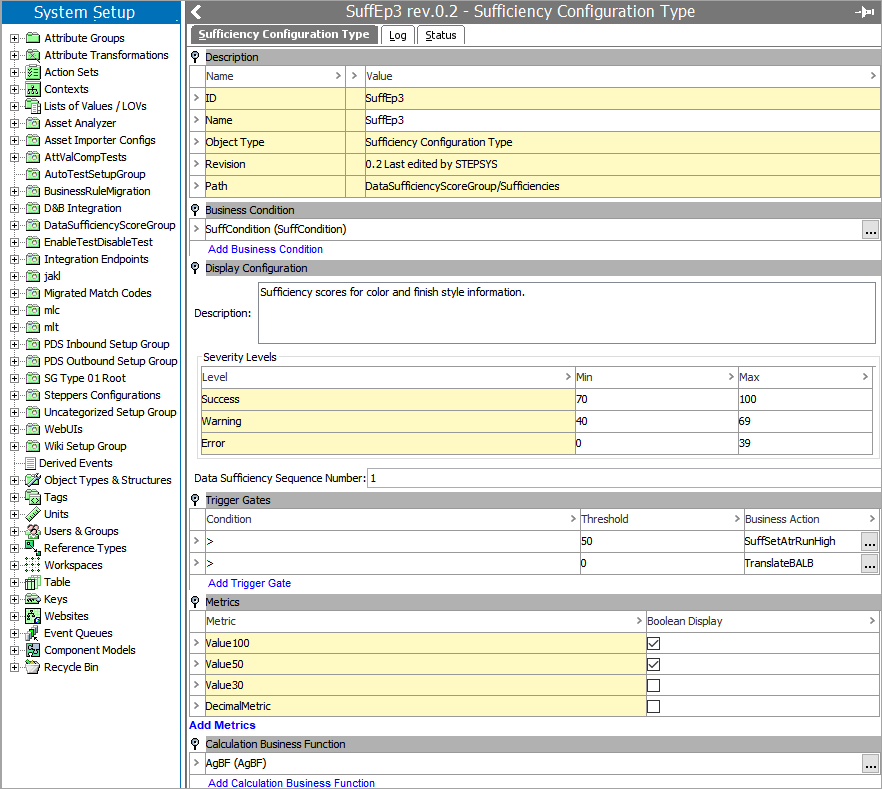
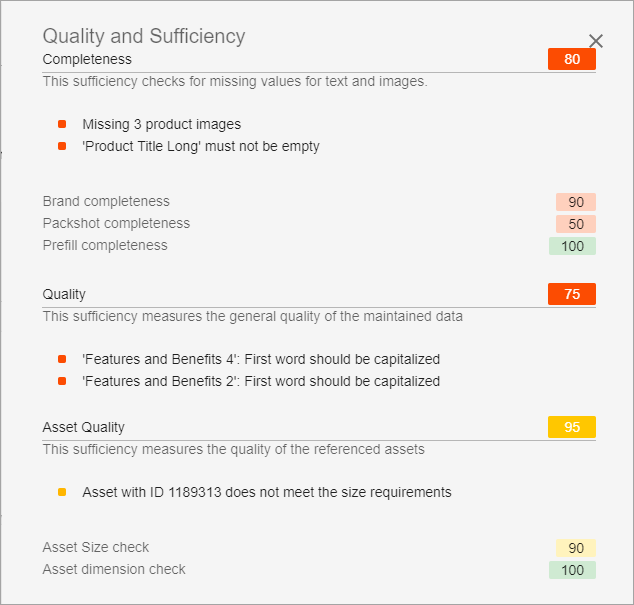
In order to access the Sufficiency Configuration Type and the Sufficiency panel, a 'data-sufficiency' add-on component must be activated on your system in addition to the normal update procedures for 9.2. See your Stibo Systems representative for more information.
For more information, see the Sufficiency Configuration Type topic in the Metrics documentation here.
Considerations
Any Business Function metrics created prior to 9.2 are not backwards compatible with the above data profiling enhancements. To use these new enhancements, create a new Business Function metric that uses the 'Metric Result' Input Parameter.