Working with a golden record setup often requires specific actions when a golden record is created or merged. The matching algorithm can be configured to call a business rule via a handler to allow for more granular processing of events. For example, when two existing golden records are merged, actions may need to occur in addition to the survivorship rules.
Note: These handlers are optional and may not be needed in all solutions.
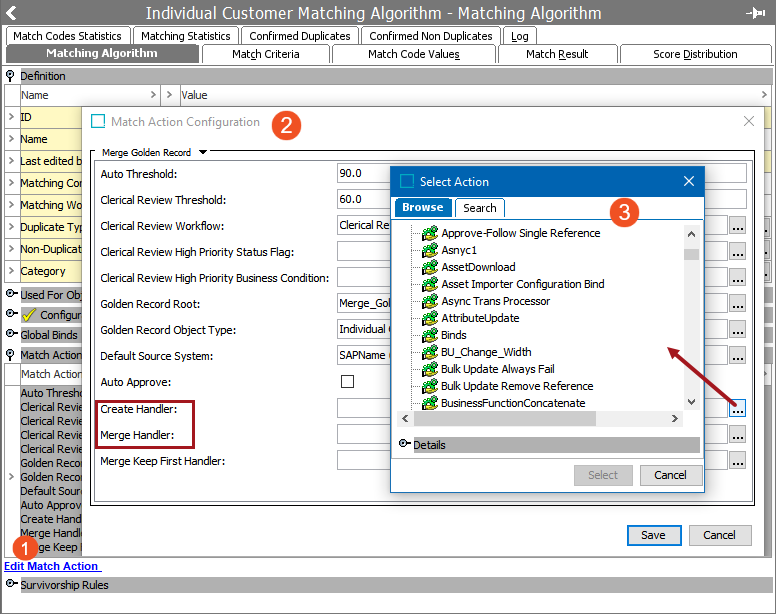
For all handlers, the supplied golden records are retrieved by the STEP manager with the context and workspace defined by the matching algorithm. Even if the Approved workspace is selected, the Main workspace is used since changes are not allowed in the Approved workspace.
The following handlers are available for the match and merge solution:
- Create Handler - Create a business action to run on the golden record after it has been created but before survivorship rules run.
-
The newly created golden record is bound to the 'Current Object' parameter. See the Current Object Bind topic in the online help Resource Materials documentation here.
- Merge Handler - Create a business action to run when two golden records are merged. This business action runs after the surviving record has been determined and the record to be deactivated has been merged.
-
The newly created golden record is bound to the 'Current Object' parameter. See the Current Object Bind topic in the online help Resource Materials documentation here.
-
The golden record to be deactivated / deleted is bound to the 'Secondary Object' parameter. See the Secondary Object Bind topic in the online help Resource Materials documentation here.
- Merge Keep First Handler - For both 'match and merge' and match and link' solutions, see the Creating a Merge Keep First Handler topic (here) for details.