This topic describes how to configure STEP to publish to the Stibo Systems' Data as a Service (DaaS) service, available as a cloud native service for Microsoft Azure.
Documentation for the DaaS service is available directly from the service. Thus, this topic focuses on the STEP configuration required to publish data to DaaS.
Note: The Data as a Service commercial license must be enabled to use this functionality. DaaS is still in a ramp-up phase, so not all customers will have access to it. To learn more about the ramp-up phase / status, see the License and Component Lifecycle in the System Release and Patch Notes section of online help here.
Data is published to DaaS via the ‘DaaS Event Processor’ event processor plugin, which uses the ‘Azure DaaS’ gateway integration endpoint plugin. Subsequent sections describe how to configure the plugins. A basic understanding of how the DaaS solution works is required in order to successfully configure the plugins.
DaaS Basics
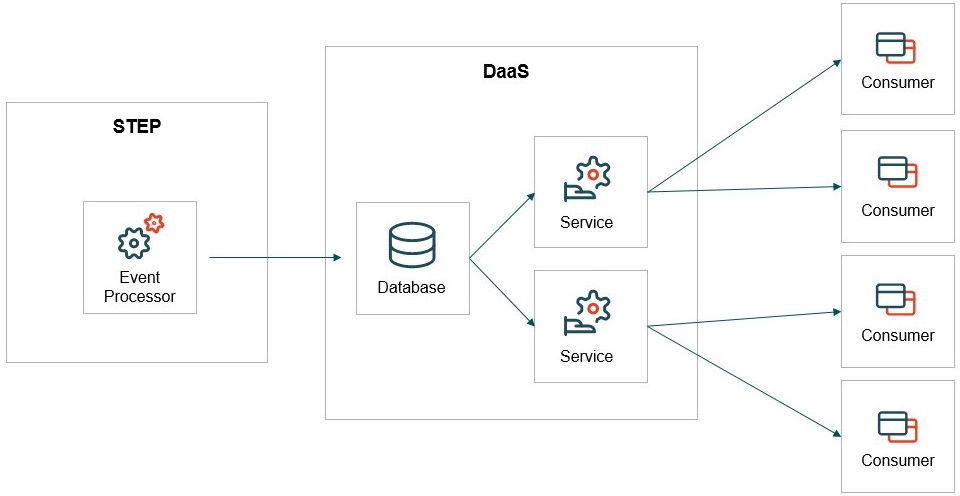
The diagram below illustrates the overall DaaS concept. With DaaS, data is published from STEP via a single event processor to a Cosmos database on the DaaS service side using a generic STEP schema. On the service side, it is possible to define multiple different services that draw upon the same data, but expose it to consumer systems in different ways via different GraphQL APIs. Data can be published from multiple different STEP contexts, allowing consumers to query specific context dependent versions of the data.
With the current release of DaaS, the service is capable of handling objects of the following STEP supertypes published from the Approved workspace:
-
Product
-
Entity
-
Classification
-
Asset (STEP object, not binary content)
-
Attribute
-
Unit
-
Attribute Group (called Data Type Group in DaaS)
-
Reference and Classification Product Link Type (grouped as Reference Type in DaaS)
-
Data Container Type
-
List of Values (a maximum of 5,000 list of values are published)
For Product, Entity, Classification, and Asset data node types, the following data will be published:
-
ID
-
Name
-
Parent ID
-
Object type ID
-
Attribute values
-
Outgoing references (including metadata)
-
Local outgoing attribute links (including metadata)
Note: Outgoing classification product links (including metadata) are grouped with references in DaaS.
For the remaining configuration types, ID, Name, attribute values and attribute group membership will be published.
Important: Only a single event processor should be configured to publish to a DaaS instance.
The DaaS service offers functionality for de-normalizing data when exposed to consumers, but this de-normalization is performed at runtime and data is, with the exception of hierarchically inherited data that can be localized (detailed below), not de-normalized during the publishing to DaaS. This generally means that if data owned by an object is to be exposed via DaaS, the object must be published.
The first step for configuring the publishing of data to DaaS is to define the subset of the STEP model that needs to be exposed. For many PMDM use cases, the data to expose via DaaS is centered around the item level in the product hierarchy, potentially including data on the variant and/or family level.
For this document, the example model shown below will be used.
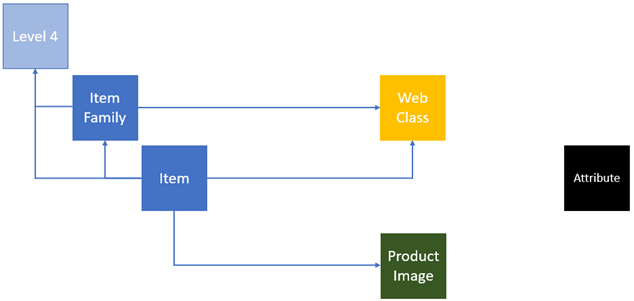
In this example, there are two relevant product object types: ‘Item Family’ and ‘Item’ that both inherit data hierarchically from Level 4 instances, with ‘Item’ instances also inheriting from ‘Item Family’ instances (the Level 4 type is dimmed in the illustration to indicate that instances of this type will not be published). Both types can be linked to classifications of the ‘Web Class’ type that, for the sake of the example, are assumed to hold data that must be exposed in DaaS. ‘Item’ instances can additionally reference assets of the ‘Product Image’ type that also hold data that must be exposed. Finally, when attribute values are exposed via DaaS, it is assumed that attribute names are also included. Since attribute names in STEP are owned by the attribute objects, these must be published as well.
The presented model is used in the following configuration examples in the ‘DaaS Event Processor’ section.
Horizontal Filtering (Assortments)
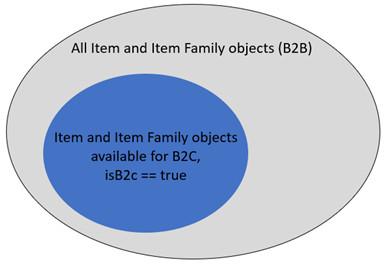
The publishing to DaaS is handled via an event processor plugin, where it is possible to use the standard event processor functionality for filtering events, enabling objects with specific characteristics to go into the associated event queue while also filtering away other objects (i.e., object type and business rule-based filters that are configured on the workbench Event Triggering Definitions tab). However, it is sometimes a requirement that different DaaS service consumer systems are exposed to different subsets of data. An example is if only a subset of the full product assortment can be sold directly to consumers (B2C) while the full assortment (or a different subset) is available to businesses (B2B). In DaaS, it is possible to handle such a setup via a concept known as ‘assortments.’ Assortments can be defined in the publishing setup and the DaaS service can be configured so that different endpoints (also known as services) have access to specific assortments. See the DaaS service documentation for details on how to configure the endpoints on the DaaS side. On the publishing side, the assortment filtering can be configured to only apply for objects of specific types, filtering on values for a configured attribute. The diagram below illustrates the concept.
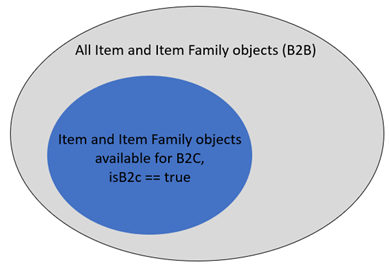
Additional information about how to configure assortments can be found in the ‘DaaS Event Processor’ section below.
Vertical Filtering
There are two options for configuring vertical filtering, i.e., configuring what data for the individual objects should be exposed to consumers. One option is on the DaaS service side where it is possible to define a GraphQL schema for a service that simply does not expose fields for data that should not be exposed to consumers (see the DaaS service documentation for details on how to configure this). For data that never should be exposed to any consumer via DaaS, run the STEP event processor from a system user account that is not privileged to view / read that specific data.
Azure DaaS Gateway Integration Endpoint
Communication between STEP and DaaS is handled via the ‘Azure DaaS’ gateway integration endpoint (GIEP) plugin. An endpoint URL and a management API key provided by Stibo Systems are required to configure the plugin. With this information, set the following configuration properties in sharedconfig.properties and restart the STEP system:
DaaS.Azure.Endpoint.<integer>=<endpoint-url>
DaaS.Azure.FunctionKey.<integer>=<api-key-name>,<mgmt-api-key>
Example:
DaaS.Azure.Endpoint.1=https://my-endpoint.com
DaaS.Azure.FunctionKey.1=APIKey1,MyAPIKey
Once the STEP system has restarted, create a new gateway integration endpoint, configure it to use the ‘Azure DaaS’ plugin and select the appropriate ‘Server URL’ and ‘API Key’ from the dropdown menus.
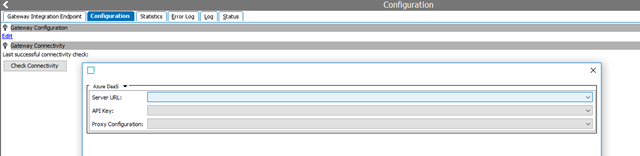
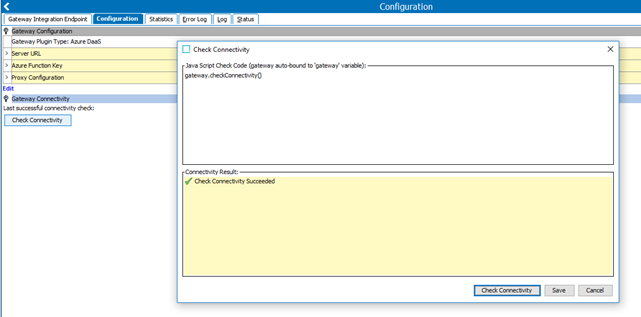
Before proceeding configuration of the the DaaS Event Processor, it is strongly recommended to test the connection from the gateway to Microsoft Azure. This can be done under the Configuration tab on the gateway integration endpoint by pressing the ‘Check Connectivity’ button. In the popup, write ‘gateway.checkConnectivity()’; and verify that the check passes with a green checkmark, as shown below.
Note: Once configured, the gateway integration endpoint needs to be enabled.
DaaS Event Processor
After having configured a gateway integration endpoint for handling the communication with DaaS, the DaaS Event Processor plugin must be configured.
Plugin Configuration
The DaaS Event Processor plugin has the following parameters:
DaaS Provider
The gateway integration endpoint to handle the communication with DaaS. Only GIEPs that use the Azure DaaS plugin can be selected.
Batch Size
The number of events to handle in each batch. Defaults to 1,000. Consult with Stibo Systems if the batch event number should be modified.
Inherit from Object Types
As mentioned above, hierarchically inherited data can be localized when objects are published to DaaS. As with all event-based publishing, care must be taken to ensure that relevant data objects are republished when hierarchically inherited data changes. Given that with DaaS, non-trivial configuration is required for this purpose (see Event Triggering Definitions section below), when configuring the event processor plugin, it is required that a conscious decision is made about which hierarchy levels to inherit data from.
The Inherit from Object Types parameter allows the user to select the uppermost object type in the object type hierarchy from which data should be inherited from and localized during publishing. If no object types are selected, inherited data will not be published. It is strongly recommended to not localize and publish data inherited from upper levels in the data hierarchies, as changes to such data can require that vast amounts of objects need to be republished.
To illustrate the Inherit from Object Types logic, consider the diagram below.
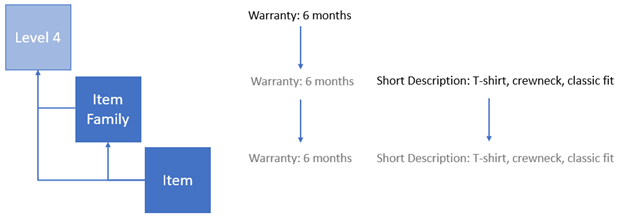
In this example, ’Warranty’ values owned by instances of the ‘Level 4’ object type and inherited by ‘Item Family’ and ‘Item’ instances are to be localized and published to DaaS. For this purpose, the ’Level 4’ object type must be selected for the Inherit from Object Types parameter although instances of this type are not themselves to be published. Since the selection is the uppermost type in the object type hierarchy, it is not necessary to also select ’Item Family’ for the parameter. When publishing an ’Item,’ values from both the ’Item Family’ and ’Level 4’ level will be localized.
A setup like this requires more configuration to ensure that descendant objects are republished when data inherited to these changes. This configuration is done via the event processor Event Triggering Definitions, which is described below.
Assortment Configuration
The Assortment Configuration text field holds a JSON data structure that defines assortments and, for each assortment, specifies which contexts to publish data for. If there is no requirement for assortment segregation, the configuration is simple. However, it is still required to specify a single assortment, and the list of contexts to publish data from. The data structure below defines a single assortment with ID of ‘default’ and specifies that data, for this assortment, should be published from the ’EN-US’ and ’DA-DK’ contexts.
[
  {
    "id": "default",
    "contextIDs": ["EN-US", "DA-DK"]
  }
]
Below, a more advanced example with two assortments matching the assortment example from above.
[
  {
    "id": "b2b",
    "contextIDs": ["EN-US", "DA-DK"]
  },
  {
    "id": "b2c",
    "contextIDs": ["EN-US", "DA-DK"],
    "filter": {
      "objectTypeIDs": ["Item", "Item Family"],
      "attributeID": "isB2c",
      "hasValue": "true"
    }
  }
]
In this example, two assortments, ’b2b’ and ’b2c’ are defined. No filtering is configured for the ‘b2b’ assortment, which means that all objects handled by the event processor plugin will be published to this assortment. For the ’b2c’ assortment, a filter has been configured for objects of the object types ’Item’ and ‘Item Family’, so that only instances of these types that have the value of ’true’ for the attribute ’isB2c’ will be published to the assortment. The filter only affects objects of the specified types, which means objects of other types handled by the event processor will be published to the assortment. The attribute used for filtering can be calculated and the value matching uses contains logic. I.e. it can match a single value in a multi-valued attribute.
Event Triggering Definitions
The configuration on the event processor Event Triggering Definitions tab determines which events go onto the event processor event queue and which objects are published to DaaS.
The screenshot below shows the required setup for the example model from the DaaS Basics section.
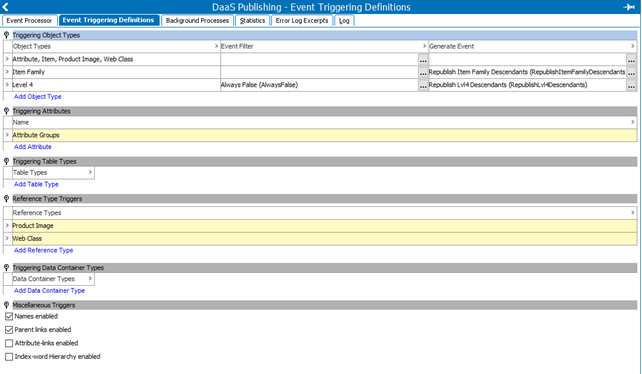
In this example, the first row in the Triggering Object Types section is for the object types for which no additional logic is necessary. For the Attribute type, events will be queued whenever an attribute is created / modified / deleted, or when republish events are generated. For the product, asset, and classification types, events will be queued either when instances of these types are approved and data matching the remaining triggering definitions has changed, or when publish / derived events are produced.
The Item Family type is in the second row. Events for this type will be queued following the same logic as for the types in the first row. However, since Item Family objects can hold data that is inherited by Item objects, whenever there are changes to such data in the Approved workspace, descendant Item objects must be republished via a JavaScript-based business action selected in the Generate Event column. The business action logic must, for the Item Family object for which an event is produced, find all descendant Item objects that exist in the Approved workspace and generate derived events for these. Since the third row will hold logic that produces derived events for Item Family objects, in order not to have Item objects republished multiple times based on the same change, the business action must be configured so that it does not produce derived events for descendants when the current event itself is a derived event.
The third row contains the logic for Level 4 objects. These objects are not to be published to DaaS, but as they hold data inherited by objects that are published, logic must be configured to ensure that descendants are republished when said data changes via a JavaScript-based business action selected in the Generate Event column. Similar to the action configured for Item Family objects, the action must find all descendant Item and Item Family objects that exist in the Approved workspace and generate derived events for these. Additionally, since Level 4 objects are not to be published, a business condition that always returns 'false' must be configured in the Event Filter column.
This document does not contain JavaScript business rule examples. For examples, see the Event-Based Example Leaf Products with Inherited Data topic (here) and the Event-Based Example Products Linked to Classification topic (here), both in the Data Exchange documentation.
Publishing
Once the gateway integration endpoint and event processors have been configured, data can be published to DaaS. For the initial publishing of data objects (products, classifications, entities, and assets), the recommended approach is to generate republish events via the Send Republish Event bulk update plugin. Bulk updates can be run on the contents of a collection or directly on a search result. I.e., one simple approach could be to go to the Approved workspace in the STEP workbench and run object type searches for the types that need to be published followed by a bulk update. The DaaS service is eventually consistent, meaning that the sequence that data is published in is not important.
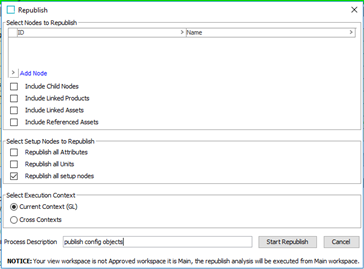
From 10.2-mp2, the Send Republish Event bulk update plugin can also be used for configuration objects like attributes and reference types. Alternatively, the Republish functionality is available from the event processor context menu.
Note: When doing the initial publishing of data to DaaS, the event processor Generate Event business actions should be disabled. If it is not disabled, then there is the possibility that large amounts of duplicate events will be queued.