The following list includes import elements known to minimize impact on system performance. This list can be used to troubleshoot existing imports and can also be reviewed prior to creating new imports to prevent performance problems.
For general information on imports, see the Data Exchange documentation here.
Use Term Lists for Price Data
The structure of the import file can be optimized for maximum import performance by using commercial data (also called terms lists) for price data where appropriate. Especially for complex, time-limited / quantity limited price data, terms lists can speed up imports.
For more information, see topics in the Commercial Data section of the STEP Publisher (InDesign) documentation here.
Use Business Rules Designed for Import Performance
If business rules are required on import, carefully map the business rule execution of each import (especially endpoints) to understand the full impact of the configurations. Ensure any business rules running on import (via approval, import actions, or through a workflow), has acceptable performance.
Review the following items to ensure business rules are used efficiently:
- Simplify complex business rule JavaScript logic being executed on the import.
- When possible, move business actions running on the import to event processors. This only applies if the actions can be performed asynchronously from import.
- Business rules that read or update objects other than the one being imported (reference sources or targets, parents, children, etc.) will reduce performance because only the imported product is likely to be resident in cache at the time. Business rules that iterate through children of the imported product are particularly common, but very expensive performance-wise.
- Consider if it is possible to ensure that no business conditions exist, allowing a logical exception or a lock contention. Business rule execution for the purpose of automation or transformation is secondary and should be treated as fail-tolerant. This means that the criticality of a rule failure is far less than that of the import operation itself. In the event of an exception, rules can be fixed and executed again, whereas import records that are skipped can be difficult to rectify on a busy system.
For more information, see the Business Rule Recommendations topic here.
Use Workflow Initiations Designed for Import Performance
When a product is initiated into a workflow, or a state transition is triggered by an import, all business rules configured on exit of an existing state, transition between, or entry to the next state execute as part of the import process.
The following scenarios can heavily impact the import performance:
- If workflow initiations and/or transitions are necessary, consider if the business rules trigger on entry or exit. The import performance may be heavily impacted by the executing of these transitions.
- If business rules initiate more workflows or auto submit to other states, a single workflow submission may cascade into hundreds (or even thousands) of lines of executed business rule logic.
- When a workflow business rule conditions fails, the current transaction is rolled back.
Use Approvals Designed for Import Performance
If approvals are necessary at import, then consider which approval conditions and actions will be executed.
Ensure that endpoints are importing externally-maintained data, since it requires no approvals. In this scenario, consideration for approval conditions and actions is not required. Also, externally-maintained data has no revision history. Therefore, revision history growth is not a consideration.
Use Event-Based Exports Designed for Import Performance
When importing externally maintained data, or importing and approving, all changes must be checked against any event-based outbound integration end points (OIEPs), to verify if an event should be generated.
Consider which approval events are queued on OIEPs and which event filter / generator rules will be triggered. If a large number of OIEPs exists, and if these have Event Triggering Definitions on attribute groups, for each check, the system must check if the attribute exists under the given attribute group. This can lead to performance degradation.
Ensure that the OIEPs are triggered to as specific and few attributes as possible. For more information, see the Creating an Event-Based Outbound Integration Endpoint topic in the Data Exchange documentation here.
Use Separate Queues for Important IIEPs
The inbound integration endpoint (IIEP) initiates a background process which handles the actual import.
-
The Queue for endpoint parameter stores the queue that is used by the background process to poll the inbound integration endpoint. The default value is InboundQueue.
-
The Queue for endpoint processes parameter stores the queue that is used by the background processes to handle the actual import. The default value is In.
STEP allows you to define separate queues for the endpoint and the endpoint process of an IIEP in the Configuration flipper of the IIEP editor. In this example, the queue for endpoint processes for the inbound integration endpoint is renamed to InIIEP1.
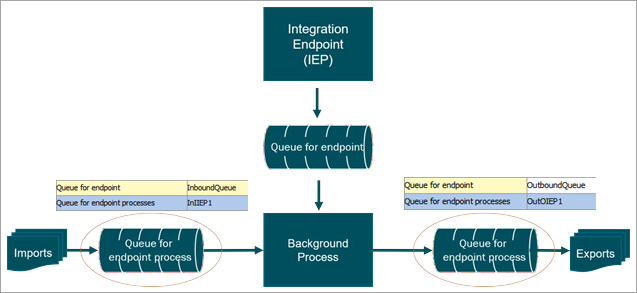
The first time you activate the endpoint, a queue with the specified name is created if it does not already exist. Events are not lost if a separate queue for endpoint process is defined.
When changing the Queue for the endpoint process for IIEPs, each IIEP background process uses this named queue for the actual import. This means that the IIEPs run simultaneously and not wait for other OIEPs to finish processing. Do not use this when IIEPs require sequential export processing.
Recommendations
Configure separate Queue for endpoint processes (to handle the actual import) for all high-priority or long-running IIEPs that do not require sequential processing (imports).
See the Background Processes and Queues topic (here) in the System Setup / Super User Guide documentation for examples of parallel and multi-threading properties.
Optimize STEP Setup for Import Performance
Use the following setup recommendations to optimize import performance.
- Remove inactive and unused IIEPs (which includes queues, background processes, and import files, etc.) on operational production environments. When an IIEP is removed, the corresponding background processes are also removed.
- Set hotfolder and REST Receiver IIEPs to remove files after import using the 'Keep file after load' parameter, as defined in the Hotfolder Receiver topic of the Data Exchange documentation here.
- Set IIEPs to limit the number of background processes kept after import using the 'Maximum number of old processes' and 'Maximum age of old processes in hours' parameters, as defined in the IEP Auto Delete Settings section of the Create a Background Processes Maintenance Plan topic here.
- Use the standard asset importer, instead of the legacy asset importer is used, as defined in the Importing Assets topic within the Digital Assets documentation here.
- Assets and other objects are not imported into a single folder, as defined in the Hierarchy Builder topic within the Digital Assets documentation here.
- Evaluate the import schedules of all imports and schedule long running imports sequentially (one after the other) to balance the STEP system load.
- Review high-priority integrations and integrations with long-running processes. Typically, these integrations should have their own queue for endpoint processes where the background process handles the actual import. The queue is automatically created on the system if it does not already exist. For more information, see the IIEP - Configure Endpoint topic within the Data Exchange documentation here.
- Consider In-Memory to improve import performance, as defined in the In-Memory Database Component for STEP topic in the Resource Materials section of online help here.
- Limit the number of OIEPs listening on modify events to avoid excessive checking of event validity, as defined in the Events topic of the System Setup / Super User Guide documentation here.
- Use the 'Relaxed' locking policy for commonly-referenced products to improve performance of imports, as defined above.
- Use parallel imports only as needed, considering the performance degradation to the rest of the system, as defined above.