Binds allow you to reference an object and/or value within the JavaScript code.
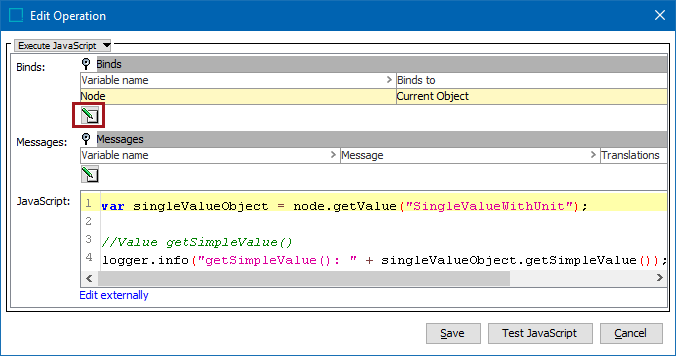
- Open the Edit Operation dialog for an existing JavaScript business rule.
- On the Binds parameter, click the Edit button (
 ) to display the Edit Binds dialog.
- Click the Add Bind button (
 ) and a new bind row is added to the list.
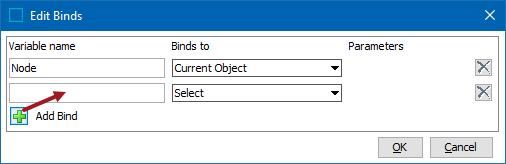
- Add the following information:
- Variable name text box - Type text that will be used in the JavaScript code to identify the bound element.
- Binds to dropdown - allows selection of the element to be bound. For information about available binds, see the JavaScript Binds topic here.
- Parameters picker - when required by the 'Binds to' selection, add the necessary selection by typing into the field to use the typeahead search functionality, or click the ellipsis button (
 ) to display the appropriate dialog. Use search or browse to select the item, then click the Select button. For example, when Attribute Value is selected for Binds to, the Select Attribute dialog is available.
 - X button - removes the bind on the row.
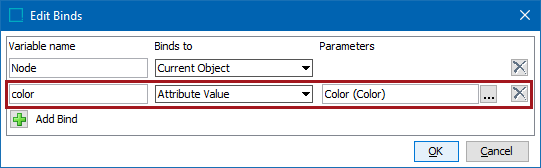
- Click the OK button to save the binds.
- Add JavaScript code that includes the variable name for the bind. This is demonstrated below where the 'Node' variable name (which returns the Current Object) is used to get an attribute value on the current object.
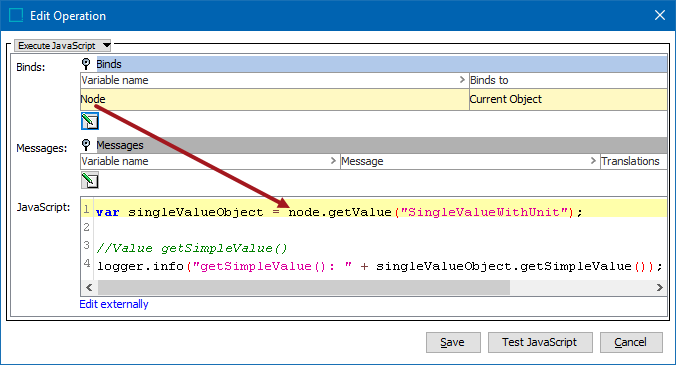
- Click the Save button to add the binds and JavaScript code to the business rule editor.