The PDX Submission Context bind allows submission of objects to a PDX channel directly from a business action including nodes, recipient mails, and channel ID data. For more information, see the Publishing Only Sufficient Products to PDX topic in the Web User Interfaces / Web UI Getting Started documentation here.
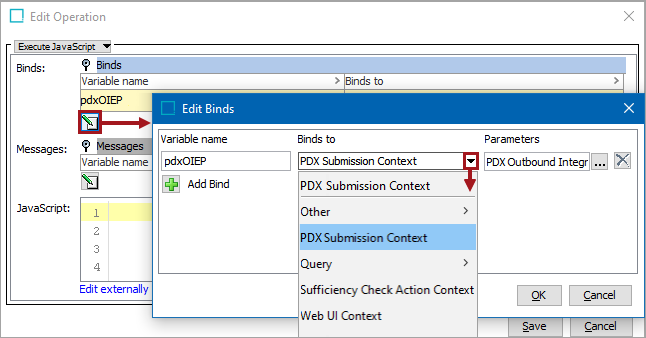
The bind can be found within the 'Binds to' dropdown as shown below.
Configuration
To use any bind:
- Create a business rule as defined in the Creating a Business Rule or Library topic here.
- Edit the business rule as defined in the Editing a Business Rule topic here.
- In the Edit Operation dialog, add the bind to a business rule, as defined in the Adding a Bind topic in the Reference Materials documentation here.
- In the Edit Operation dialog, optionally add Messages, as defined in the Adding a Localized Business Rule Message topic here.
- In the Edit Operation dialog, add JavaScript to call the bind.
JavaScript Methods
The bind exposes the method:
/**
 * Allows to submit products to channel with recipient mails and a comment via scripting API
 *
 * @param channelId
 * @param productIds
 * @param recipientMails
 * @param comment
 * @return submission summary object
 * @throws PDSServiceException thrown when during communication between STEP and PDX submission fails
 */
@Public
PDSSubmissionSummary submitProductsToChannel(String channelId, Set<String> productIds, Set<String> recipientMails, String comment) throws PDSServiceException;
The PDSSubmissionSummary result interface exposes following methods:
String getSubmissionID();
String getURL();
Set<String> submittedProducts();
String getValidationResultsJSON();
Example
The following is an example JavaScript that uses this bind.
Important: The example scripts should not be used as-is without thorough testing, including updating the script to match object and link types that exist on your system. JavaScript variable names are case-sensitive.
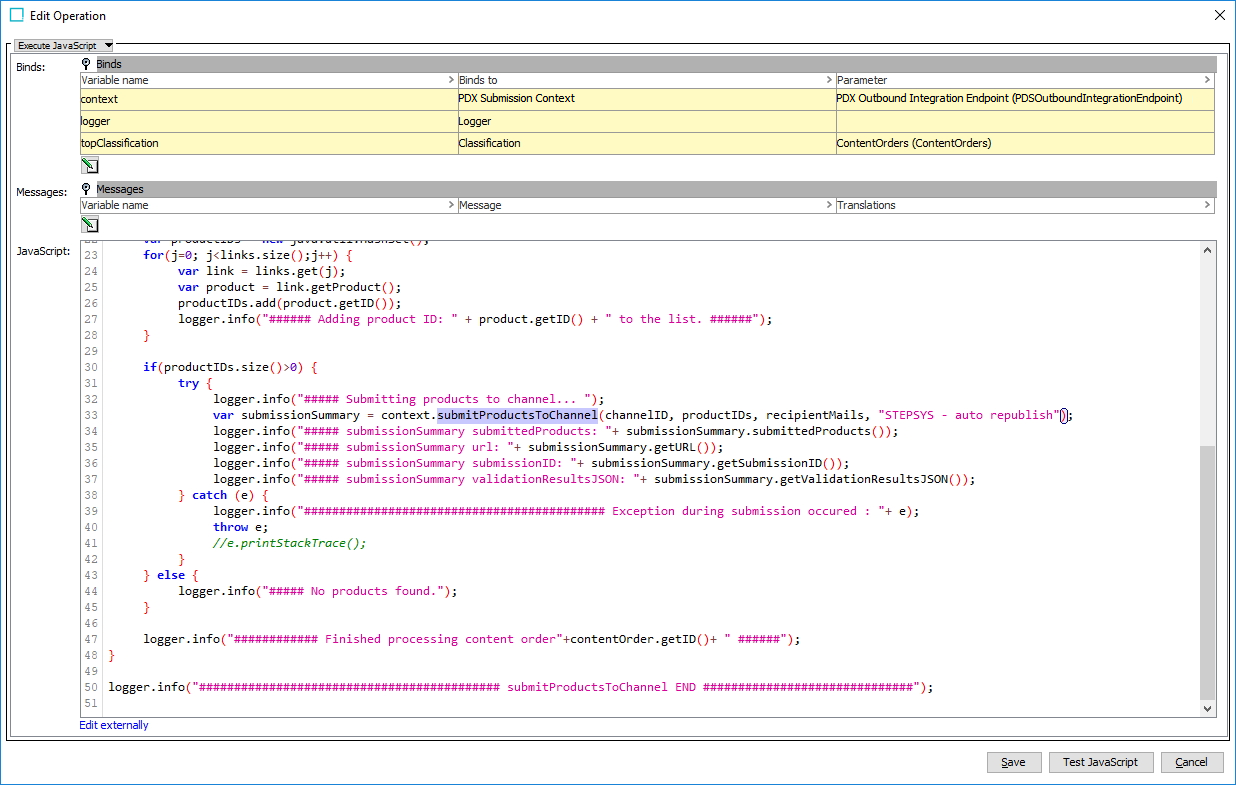
As shown in the image below, the following JavaScript code snippet:
var submissionSummary = context.submitProductsToChannel(channelID, productIDs, recipientMails, "STEPSYS - auto republish"); is used to trigger the republish action of objects from the classification identified in the bind parameter.