The External Processing operation is designed specifically for list processing.
After importing a list (defined in the Creating Lists topic here), users can process the list externally via an asynchronous service configuration (ASC) and a List Processing Configuration (defined in the Configuring List Processing in Workbench topic here).
External Processing
External processing allows list files to be exchanged with external services or applications using hotfolders. Selected records of a list are exported to an outbound hotfolder, the external service retrieves the list, processes and updates the record data, and returns the list in an inbound hotfolder. When new returned lists are detected, the record data will be imported and updated in STEP. Exported files are compressed by default. For returned files, external processing supports both compressed and uncompressed.
-
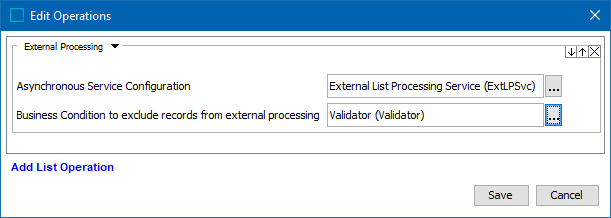
Asynchronous Service Configuration - The Asynchronous Service Configuration (ASC) manages the external processing integration to a specific external service. The ASC defines how lists are exported, imported, updated, and which hotfolders are used to exchange lists with the external service. For details, see the Create Asynchronous Service Configuration topic.
Important: To correlate exported records with returned records, the record ID attribute must be included in the exported records as well as in the records returned by the external service.
-
Ensure the record <ID> is included in the export configuration as well as is mapped to the record <ID> attribute again in the import configuration.
-
Records IDs must NOT be modified by the external service, otherwise the process of updating records internally will fail.
-
Business Condition to exclude records from external processing - An optional business condition can define records that should be excluded from the external processing.
Important: The generated export file name starts with a 'message ID' in the form of the BGP number and a hash sign (#). For example, the message ID 'BGP_416690#' is the first part of the export file named: BGP_416690#csv.csv. Files received from the external service must also include this same message ID as the first characters of the return file name.
Create an Asynchronous Service Configuration for List Processing
An Asynchronous Service Configuration (ASC) manages integration to a specific external service. The ASC for list processing defines how lists are exported, imported, updated, and which hotfolders are used to exchange lists with the external service.
Prerequisites
-
Determine the STEP application server location for your system hotfolders as defined by the Install.HotfolderRoot property. For more information, see the Configuration topic in the Administration Portal documentation here.
Within the identified hotfolder directory on the STEP application server, manually create the following folders:
-
Hotfolder - the parent folder that houses both the In and the Out folders. Use a descriptive name, like the name of the external processing service or provider.
-
Out folder - the folder to hold files pending external processing. The external processing operation places export files in this folder and the external source retrieves files from this folder.
-
In folder - the folder to hold completed externally processed files. The external service places files in this folder and STEP retrieves files from this folder to resume processing by importing and updating record data.
Note: Inbound hotfolders must be unique for each ASC. An ASC Poller BGP monitors the In folder of it's own ASC only and cannot resolve return files across multiple ASCs.
-
In workbench, identify or create the following elements:
-
Verify the required one-time setup is complete for the ASC setup group root node and ASC object type. For details, see the Create the Asynchronous Services Object Type topic here.
-
A list processing export configuration that includes the record <ID> attribute mapped to a record ID field in the export file.
-
A list processing import configuration that includes the record <ID> field of the return file mapped to the internal record <ID> attribute.
-
A business action to update internal records using information from the corresponding returned and processed records. The JavaScript should include the Current Object bind and the List Processing External Response Source Object bind, as defined in the JavaScript Binds topic of the Resource Materials section of online help here.
Configuration
The Asynchronous Service Configuration (ASC) stores details about how to integrate with a specific external service.
-
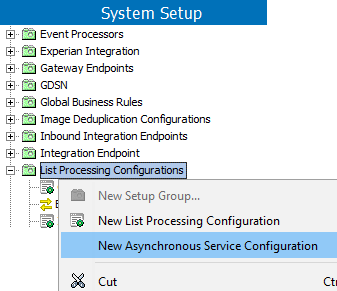
In workbench on System Setup, open a root node valid for ASC (such as the List Processing node or the Asynchronous Services node), right-click and choose New Asynchronous Service Configuration. In this example, the ASC is added to the 'List Processing Configurations' root node but your name can be different.
-
On the Asynchronous Service Configuration Wizard dialog Service step, complete the following parameters:
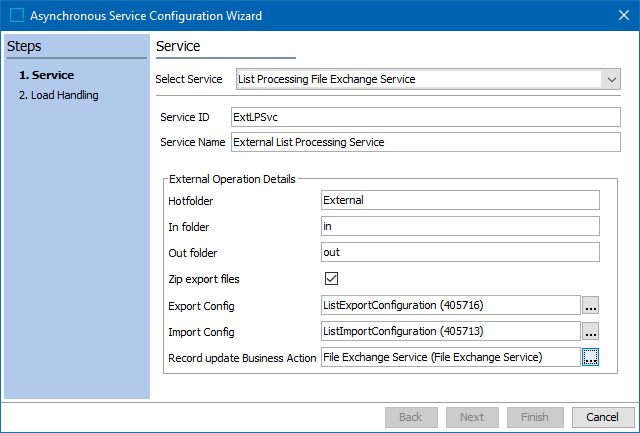
For information on a parameter, hover over the parameter field to display help text.
-
For Select Service, choose List Processing File Exchange Service from the dropdown.
-
For Service ID and Name, add text to identify the specific external service for integration with the List Processing Configuration (created above).
-
For Hotfolder, add the path to the hotfolder used for this external service. The path must be relative to STEP’s main hotfolder as configured in the sharedconfig.properties file. For details, see the Prerequisites section above.
-
For In folder, add the inbound subfolder used by the external service to return files with processed records.
-
For Out folder, add the outbound subfolder to place the export files containing the records to be processed externally.
-
For Zip export files, check to use file compression on files being delivered to the external service.
-
For Export Config, click the ellipsis button (
 ) and select the configuration required to generate the file sent to the external processing service. Alternatively, begin typing the ID or name of the configuration in the field and select from the available options displayed.
Note: When completing the Map Data step for the configuration, ensure the record <ID> attribute is mapped to a record <ID> field in the export file.
-
For Import Config, click the ellipsis button (
) and select the configuration required to process the file returned from the external processing service. Alternatively, begin typing the ID or name of the configuration in the field and select from the available options displayed.Note: When completing the Map Data step for the configuration, ensure the record <ID> field of return file is mapped to the internal record <ID> attribute.
-
For Record update Business Action, click the ellipsis button (
) and select the business action used to update internal records using information from the corresponding returned and processed records. Internal records must be manipulated with a JavaScript business action using the 'Current Object' bind. The associated returned record is manipulated using the 'List Processing External Response Source Object' bind. These binds are defined in the JavaScript Binds topic of the Resource Materials documentation in online help here. -
Click the Next button.
-
On the Load Handling step, complete the following parameters:
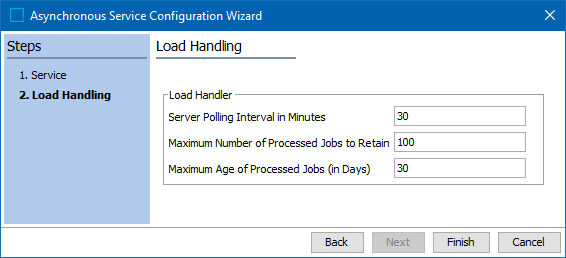
For information on a parameter, hover over the parameter field to display help text.
-
For Server Polling Interval in Minutes, update from the default of 30 minutes if needed. This is the time between attempts to poll the 'In folder' for an external file that has been processed. The minimum is 1 minute.
-
For Maximum Number of Processed Jobs to Retain, update from the default of 100 if needed. This is the number of BGPs to be retained. When the maximum is reached, the oldest job is deleted automatically.
-
For Maximum Age of Processed Jobs (in Days), update from the default of 30 if needed. A BGP is automatically deleted when its age reaches the maximum number of days.
Note: The processed jobs are retained until either the maximum number of processed jobs or the maximum age of processed jobs limit has been met, whichever comes first.
-
Click the Finish button.
-
Right-click the new configuration and choose Start Poller to activate monitoring of return files in the inbound hotfolder.
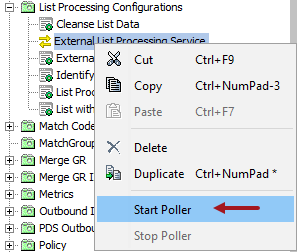
The ASC icon is green ( ) to indicate it is running on the specified directories at the specified interval.
-
After adding all necessary operations, continue with Web UI setup as defined in the Configuring List Processing in Web UI topic here.