Business rules can be applied during the import process, enabling validation of data while it is being imported. Business actions allow changes to data during import, and can cause other changes as well.
Conditions can be used to reject object creations and modifications to existing objects. Conditions are tested against data as it would appear in STEP assuming the import succeeded. Thus, the test is not limited to data in the import file.
Actions will only be executed during import if all conditions evaluate to true or a warning is reported. Thus, contrary to the approval process described in the Business Rules on Approval section (here), actions cannot make changes that make the conditions become true.
The business rules available depend on your system setup. New business rules must be created in System Setup, which also shows if a business rule is used by an import configuration. If a business rule is used by an import configuration, you cannot delete the rule.
To determine if a business rule is used in an Import Configuration:
- In System Setup, expand the Business Rules node.
- Select the relevant business rule, and click the Usage tab.
Add a Business Rule to an Import
Business rules can be added with the inbound data tools: Import Manager and IIEPs.
Import Manager
Business rules are configured on the Select Business Rules step of the Import Manager wizard. For more information, see Import Manager - Select Business Rules topic in the Data Exchange documentation here.
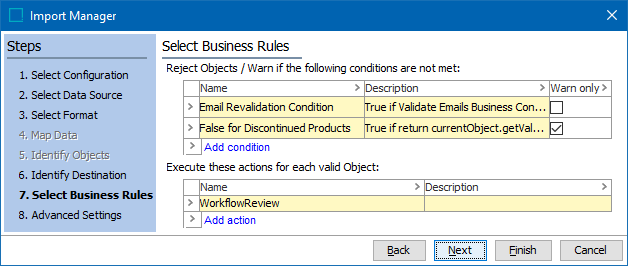
The saved import configuration includes any selected business rules. For more information, see Maintaining a Saved Import Configuration topic in the Data Exchange documentation here.
IIEP
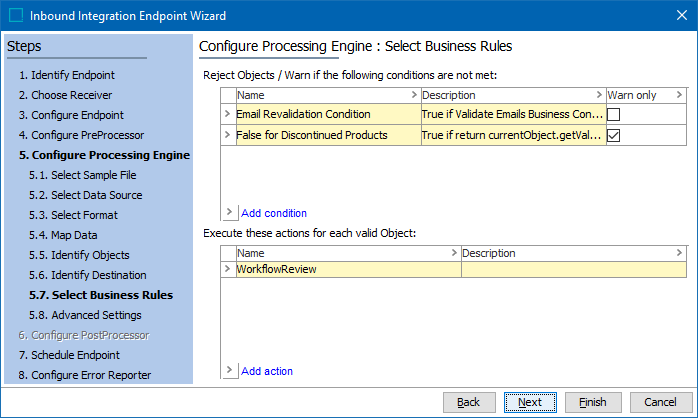
Business rules are configured for the STEP Importer processing engine, on the Select Business Rules step of the IIEP wizard. The selected business rules can be modified by editing the IIEP configuration. For more information, see IIEP - Configure Processing Engine topic in the Data Exchange documentation here.
Applying Business Rules
Business rules can be applied to products, classifications, entities, and assets. If business rules are applied to other object types, the rules are not evaluated.
The order of business rule execution for each imported object is first conditions without 'Warn only' enabled, then conditions with 'Warn only' enabled, and finally actions.
- Conditions - During the import, both changed and unchanged objects are validated against the business conditions. If the validation fails, the change is rejected unless the 'Warn only' parameter is enabled for the condition. When 'Warn only' is not enabled, the changes are not imported, and an error message is logged in the Import Execution Report. When 'Warn only' is enabled, the changes are imported, and a warning message is logged in the Import Execution Report.
Note: Objects are always validated, even if they are unchanged, to prevent Actions from running. The business rule itself can react on whether the object is detected as unchanged by the Import (e.g., to avoid rejecting unchanged data). Conditions cannot access the object as it was created prior to the import change.
- Actions - Actions primarily modify the imported objects. Ensure that the actions do not affect other objects. Actions are executed in the order specified in the import configuration. If a business action results in an error, the import skips the object. Errors are logged in the Execution Report. If too many errors occur, it may stop the import process. It is therefore important that business rules are created to handle expected exceptions.
For performance reasons, the Import Manager sometimes evaluates the same business rule twice for the same object.
Detecting Changes
JavaScript business rules access the imported objects using the 'Current Object' bind and the special 'Import Change Info.'
For each object, the import process detects if there are any changes. This information is provided to the business rules, and the business rules react based on this information.
In JavaScript the 'changeInfo' object contains two members:
- 'isUnmodified()' is true when object is not changed during the import.
- 'getChanges()' allows the business rule to retrieve a list of attribute IDs using 'getAttributes()' where the values have changed.
Business Rule Limitations
- Objects must be imported one at a time for the validation mechanism to work. It is therefore not possible to import nested STEPXML documents when you are using business rules.
- If one or more business rules are selected, the Import Manager uses domain mode.
- Based on the Condition Handling Option selected for each business condition, business conditions will run in the following sequence: those with 'Reject and Include Error' selected, those with 'Import and Include Warning' selected, and those with 'Reject and Include Information' selected.
- Changes are not detected for references and links. Objects with references in the import are therefore always reported as changed.
- Sometimes imported references are deferred if they depend on objects that have not been imported yet. As a consequence, the deferred parts of an imported object are not present while it is being validated by business rules. (The references are deferred until after the business rules have run.) Therefore, use caution when using business conditions to validate references.
- When actions are used, the 'Approve Import Changes' on Advanced step is disabled - importer cannot automatically auto approve imported data because side effects from business actions are unknown. However it is still possible to approve imported objects via a business action.