Completing the Import Manager wizard in workbench includes an option to save an import configuration (see Running a Data Import here). Viewing a saved configuration allows you to confirm the current settings. Editing a saved configuration affects future imports and can be a valuable step in the process of creating and testing an import to ensure the correct data is received in the proper manner.
View a Saved Import Configuration
After clicking the Finish button on the Import Manager wizard, the option to save the configuration is displayed. Although all classification folders are available, using a specific folder for import configurations makes it easier to locate them for review.
Note: If you know the name of the configuration, use the Goto search option to find it anywhere in the Tree.
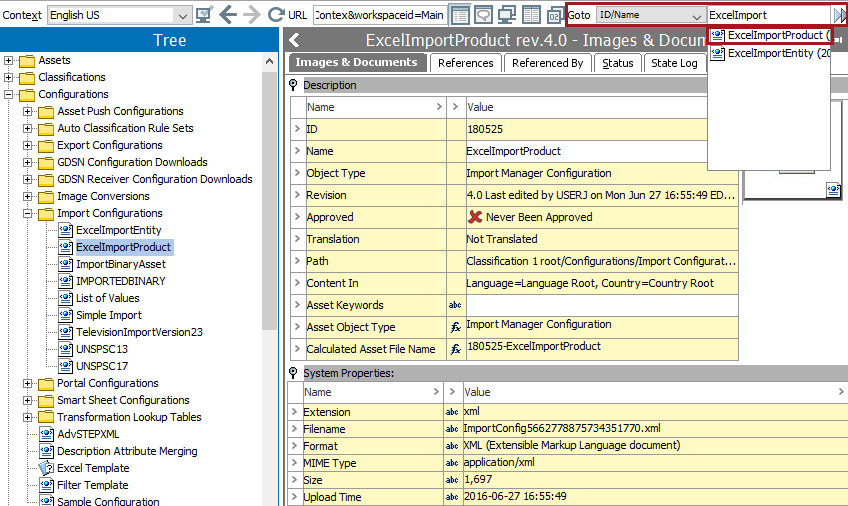
Edit a Saved Import Configuration
These editing options are available to update the selected configuration.
- To change only the name of the configuration, edit the Name field in the configuration editor.
- To edit an existing configuration and save with a new name, see the steps in the Running a Data Import section here.
- To change the settings of the existing configuration parameters, follow the steps below.
- Select an import configuration, right-click and select Edit import configuration option.
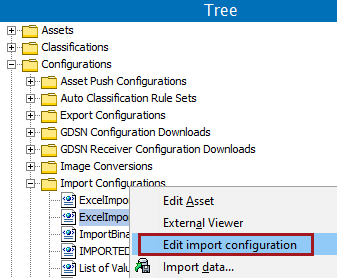
- The Import Manager wizard opens on Select Data Source.
- Make all changes and click the Finish button to update the selected configuration.