Match Criteria
When configuring a matching algorithm the actual matching logic is defined under the 'Match Criteria' flipper of the matching algorithm.

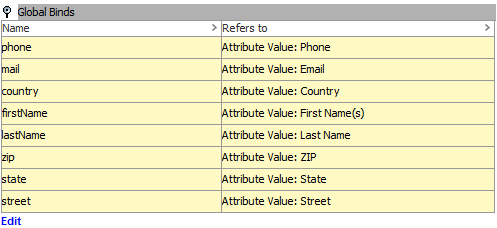
Binds used in the matching logic can be defined under the 'Global Binds' flipper.
String Comparison Algorithms
While developing your matching, linking, and merging strategy, a string comparison algorithm must be chosen to serve as the foundation for the matching process. The available string comparison algorithms include:
- Levenshtein distance - A metric for how many edits (substitution, insertion, deletion) it takes to make one string look like another. For example, the Levenshtein distance between the strings 'AXR55487' and '8XRT5487' is 2 because the first and fourth digits are different. In STEP terms, the strings would be 75 percent alike (6/8*100).
- Damerau-Levenshtein distance - Similar to Levenshtein distance except that the transposition of two adjacent characters counts only as one edit, not two. For example, the Levenshtein distance between the strings 'AA67' and 'A6A7' is 2 while the Damerau Levenshtein distance is 1.
- Jaro / Jaro-Winkler distance - Outputs 0 or 1 where 0 is no similarity and 1 an exact match. Note that these algorithms are available and can be made accessible in STEP via JavaScript, but are not currently included in the STEP core.
Note: The Levenshtein / Damerau-Levenshtein distance has to be converted into a percentage manually.
Matching Algorithm Criteria
As is often the case, it may be that the preferred string comparison algorithm is not sufficient. To compensate for this, it is possible to define criteria that apply the Levenshtein / Damerau-Levenshtein distance directly to strings you build using STEP functions and automatically output an equality metric. Several criteria can be added and given weights that are used when calculating the total equality. The available criterion types are described bellow.
Multi Word Damerau-Levenshtein Distance
The Multi Word Damerau-Levenshtein distance is equal to the Damerau-Levenshtein distance except that transposition of two words does not count as an edit. For example, the distance between 'Paul Johnson' and 'Johnson Paul' is 0. This criterion can come in handy when working with names where first name and surname are in the same attribute value yet the order differs from object to object.
Number Distance
The Number Distance criterion returns the relative distance between two numbers expressed as a percentage: lowest number / highest number * 100. For example, with this simple way of calculating a difference, the numbers 1 and 2 will be as different or equal as 50 and 100.
Special cases:
- If one or both strings are not numerical values, the criterion returns '0'
- If only one of the strings is '0', the criterion returns '0'
- If both are '0', the criterion returns '100'
- If both strings are negative the calculation is the highest number / lowest number * 100
- If one value is positive and the other negative, the criterion returns '0'.
The data to apply the number distance calculation to is generated via STEP functions.
JavaScript
The JavaScript criterion allows you to define your own algorithm for comparing objects. The only requirement is that the result is a number between 0 and 100 (as before, representing the percentage of equality).
From the JavaScript criterion you can draw upon functions defined in business libraries in addition to six objects made available via bindings.
For more information, see the JavaScript Binds section of the Matching, Linking, and Merging documentation here.
Decision Table
Decision Tables let you break the complexity of matching objects into smaller, more manageable parts. The algorithm is defined using various comparisons between the two objects and a set of rules that govern the conditions for the outcome.
For more information on decision tables, see the Decision Tables documentation here.
Global Binds
The matching process can strain performance, and when large sets of data are to be processed, there is potentially a significant performance gain if the matching functionality can pre-fetch the values it has to work on. This way, the system will not have to build complete Java objects for the pairs being compared. This is possible via global binds configured on the matching algorithm, where attributes used in the matching algorithm logic can be bound to specific variable names. Values for the attributes will then be pre-fetched before the matching logic is applied, and can be referenced from both JavaScript and STEP functions. For these reasons, it is common setup to use global binds.
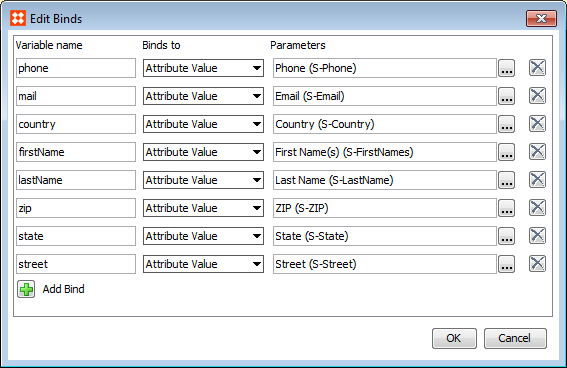
When working in JavaScript it is optimal to use only global binds, rather than the 'First Match Object' and 'Second Match Object' bindings which are designed for Find Similar. For more information on Find Similar functionality, see the Find Similar section of the Using a Web UI documentation here.