Configuration Example - Advanced
This use case example focuses on more advanced matching logic that could be required when working with data that doesn't have any obvious identifiers.
The source objects for this case, for which duplicates are to be identified, are 200 'Subscriber' objects similar to the one shown below. Each object has the following significant attributes:
- City
- Country
- First Name(s)
- Last Name
- Phone
- State (Region)
- Street
- ZIP
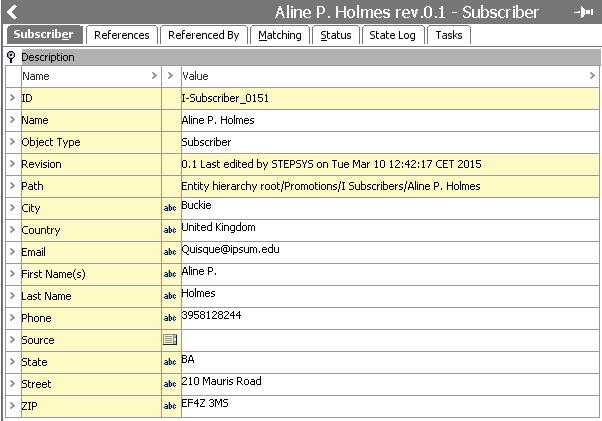
Data Profile Analysis
When inspecting the data via the Data Profile functionality, the following can be observed:
- Data is almost complete with a few email addresses and phone numbers missing
- Country is always either 'United Kingdom' or 'United States'
- Street values are not standardized (e.g., different abbreviations are used)
- Phone numbers are standardized and match a uniform pattern (10 digits)

For more information on data profiles, see the Data Profiles section of the Data Profiling documentation here.
There are a multitude of different cases to account for when deduplicating data like this. To give an idea, for this example, the following will be dealt with:
- Nicknames might be used ('Bob' and 'Robert' might be the same person)
- Middle names might be missing or abbreviated in 'First Name(s)' values
- Case (lower / upper) may differ in entered values
- Some names are more common than others
- Subscribers could have changed phone number and/or email address
- Subscribers could have moved
- Street values might have been entered in very different ways
Single field street values are notoriously hard to deal with, so for the strategy detailed, these will only be used as a last resort. Instead, matching will be attempted based primarily on names, phone number, and email address, the logic being that if you have a match on these three pieces of information, there is a high probability that it is in fact the same person. Still, we also need to account for the cases where people have changed either email or phone number.
Library Functions
For the matching process, this example uses a number of JavaScript functions have been declared in a business library with ID 'MatchingFunctions'. These functions can be drawn upon for both pure JavaScript matching algorithms and JavaScript in decision tables. The functions are described below.
Important: The below functions are examples and likely cannot be used in their current form for your business case. Test thoroughly with your own data before implementing in your production STEP system.
Some functions give access to lookup tables. For more information on lookup tables, see the Transformation Lookup Tables topic in Resource Materials online help here.
normalizeValue
The normalizeValue function puts a text in lowercase and removes everything but letters and digits. It can be specified whether the function should only process and return the first word in the text.
function normalizeValue(value, handleFirstWordOnly) { if(value) {var normVal = value + "";
if(handleFirstWordOnly) { normVal = normVal.split(" ")[0];}
normVal = normVal.toLowerCase();
normVal = normVal.replace(/[^\w]|_/g, "");
return normVal;
}
else {return "";
}
}
normalizeStreet
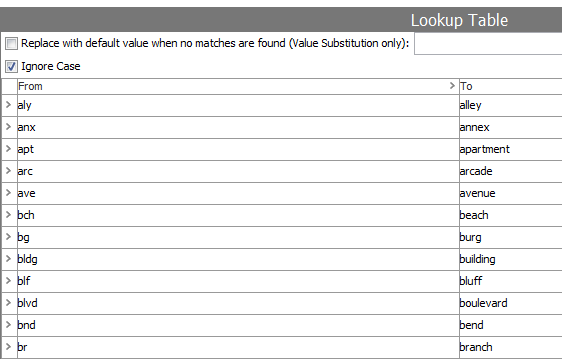
The normalizeStreet function applies basic normalization to 'Street' values and uses a transformation lookup table with ID 'AddressAbbreviations' to replace common abbreviations like 'rd', 'ave' and 'ap' with their full word counterpart.
The logic reads:
- Convert input to JavaScript string
- Convert to lowercase
- Remove all instances of (.), (,), and (#) (more characters should probably be removed, but be careful removing dashes if used in street number ranges)
- Split the string by space characters and loop through the array of words applying the lookup table
- Piece together the string again and return it
function normalizeStreet(input, lookupTableHome) {var output = "";
if(input) {input = input + "";
input = input.toLowerCase();
input = input.replace(/[\.\,#]|_/g, "");
var inArr = input.split(" ");var outArr = [];
for(var i = 0; i < inArr.length; i++) {outArr.push(lookupTableHome.getLookupTableValue("AddressAbbreviations", inArr[i]));}
for(var j = 0; j < outArr.length; j++) {output += outArr[j];
if(j != outArr.length - 1) {output += " ";
}
}
}
return output;
}
nameComparison
The purpose of the nameComparison function is to produce a value between 0 and 1 indicating how good a match a name is. Apart from 'manager' and 'lookupTableHome' that are passed as arguments (because you cannot create bindings from library functions), the function takes six arguments:
- firstName1 – Normalized value of the 'First Name(s)' attribute for the first of the two objects being compared (normalized via normalizeValue returning only first word)
- lastName1 – Normalized value of the 'Last Name' attribute for the first of the two objects being compared (normalized via normalizeValue)
- firstName2 – Normalized value of the 'First Name(s)' attribute for the second of the two objects being compared (normalized via normalizeValue returning only first word)
- lastName2 – Normalized value of the 'Last Name' attribute for the second of the two objects being compared (normalized via normalizeValue)
- commonNameFactor – A number between 0 and 1 indicating how hard common names like 'John Smith' should be punished. The lower the number, the harder the punishment. Typical range between 0.8 and 9.9.
- nicknameMatchFactor – A number between 0 and 1 indicating how hard nickname matches should be punished. The lower the number, the harder the punishment. Typical range between 0.8 and 1.
- lastNameWeightFactor – A number between 0 and 1 indicating how important a rare last name is compared to a rare first name
Basically, the function first produces a string for each object being compared. It consists of the normalized first name, a colon, and the normalized last name. If the two strings are identical, the function will call the function getFullNameWeight passing commonNameFactor and lastNameWeight as arguments. This function will return a value between 0 and 1 based on how common the name is and this value will also be the return value for nameComparison. 'John Smith' will produce a low value while a more uncommon name will produce a higher value. The functionality of getFullNameWeight is described further down.
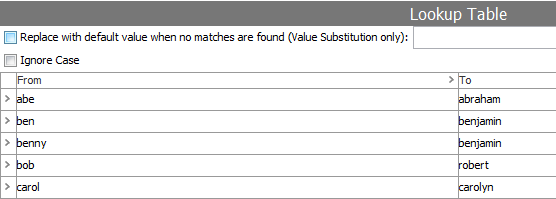
If the two generated strings are not identical, nameComparison will check whether the last names are identical. If this is the case, a transformation lookup table with ID 'Nicknames' will be used to check if there is a match when common nicknames, like 'Bill', are replaced with full names like 'William'. If there is a match after the nickname replacement, the getFullNameWeight function is used again to produce a common name weight and this weight is multiplied with the nicknameMatchFactor and returned. It should be noted that in this simplified setup, cases like 'Ben', mapping to both 'Benjamin' and 'Benedict' are not handled in the nickname matching.
If none of the above is true, a value of 0 indicating no match is returned. The complete function can be seen below.
function nameComparison(normFirstName1, normLastName1, normFirstName2, normLastName2, manager, lookupTableHome, commonNameFactor, nicknameMatchFactor, lastNameWeightFactor) {var nameMatchValue = 0;
var normName1 = null;
if(normFirstName1 && normLastName1) {normName1 = normFirstName1 + ":" + normLastName1;
}
var normName2 = null;
if(normFirstName2 && normLastName2) {normName2 = normFirstName2 + ":" + normLastName2;
}
if(normName1 && normName2) { if(normName1 == normName2) {nameMatchValue = getFullNameWeight(normFirstName1, normLastName1, manager, lookupTableHome, commonNameFactor, lastNameWeightFactor);
}
else if(normLastName1 && normLastName2 && normLastName1 == normLastName2) { var lookup1 = lookupTableHome.getLookupTableValue("Nicknames", normFirstName1) + ""; var lookup2 = lookupTableHome.getLookupTableValue("Nicknames", normFirstName2) + ""; if(lookup1 == lookup2) {var fullNameWeight = getFullNameWeight(lookup1, normLastName1, manager, lookupTableHome, commonNameFactor, lastNameWeightFactor);
nameMatchValue = fullNameWeight * nicknameMatchFactor;
}
}
}
return nameMatchValue;
}
getNameWeight and getFullNameWeight
In order to produce a metric for how common a name is, the getFullNameWeight function mentioned above and its helper function getNameWeight uses two transformation lookup tables: 'FirstNameFrequencies' and 'LastNameFrequencies' that contain frequency information for the most common first names and last names.
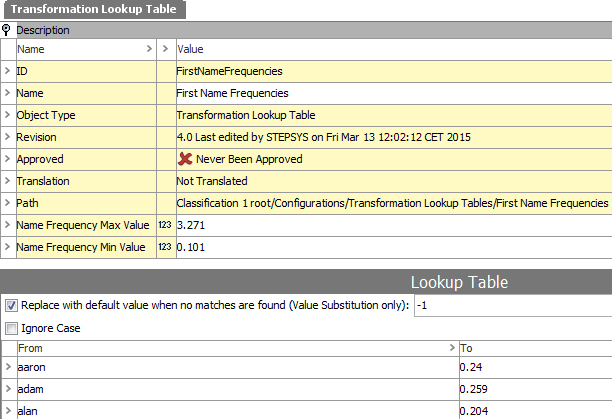
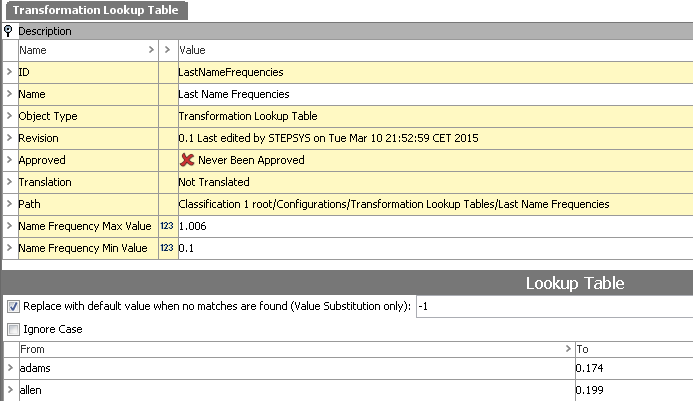
Note: The frequencies are obtained from U.S. Census and are thus, strictly speaking, not representative for UK names. However, for this example they will suffice.
The getNameWeight function is called from getFullNameWeight and works either on a first name or a last name using the appropriate lookup table to produce a metric. In this simplified setup, the function produces a number between 1 and commonNameFactor (initially supplied to nameComparison as an argument) based on the frequencies in the lookup table. If a name is not on the list, it will get a value of 1 indicating that it is an uncommon name.
getFullNameWeight uses lastNameWeightFactor (also supplied to nameComparison as an argument) to produce a weighted average of the first name and last name weight. Both functions are shown below.
function getNameWeight(name, manager, lookupTableHome, isFirstName, minWeight) {var newMax = 1;
var newMin = minWeight;
var lookupTableID;
if(isFirstName) {lookupTableID = "FirstNameFrequencies";
}
else {lookupTableID = "LastNameFrequencies";
}
var lookupValue = parseFloat(lookupTableHome.getLookupTableValue(lookupTableID, name));
var returnValue;
if(lookupValue == -1) {returnValue = newMax;
}
else { var origMax = parseFloat(manager.getAssetHome().getAssetByID(lookupTableID).getValue("NameFrequencyMaxValue").getSimpleValue());var newRange = newMax - newMin;
returnValue = ((-1 * (newRange / origMax)) * lookupValue) + 1;
}
return returnValue;
}
function getFullNameWeight(firstName, lastName, manager, lookupTableHome, minWeight, lastNameWeightFactor) {var firstNameWeight = getNameWeight(firstName, manager, lookupTableHome, true, minWeight);
var lastNameWeight = getNameWeight(lastName, manager, lookupTableHome, false, minWeight);
return (firstNameWeight * (1 - lastNameWeightFactor)) + (lastNameWeight * lastNameWeightFactor);
Matching Algorithm Configuration
In this example, the matching algorithm logic will be implemented via a decision table drawing upon the library functions described above.
For more information on configuring matching algorithms, see the Configuring Matching Algorithms Overview documentation here.
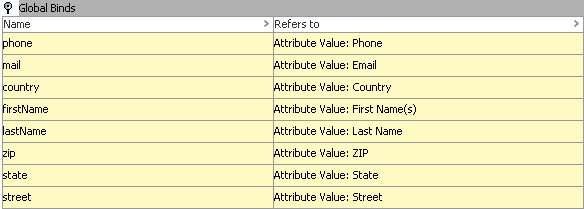
Global Binds
For performance reasons, all attribute values used in the decision table comparison will be obtained via global binds. The configuration can be seen below.
Transformer Expressions
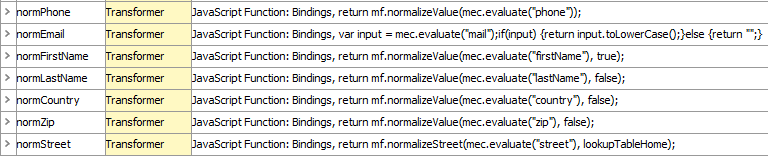
When using decision tables, it is recommended to separate the different parts of the logic, making it easier to maintain and fine tune. In this example, transformer expressions are used for normalization, and thus, this part of the logic is separated from the comparison part. The transformers are described below:
- normPhone Transformer Expression
This transformer uses the normalizeValue library function to normalize phone number values obtained via the 'phone' global bind ('Match Expression Context' is bound to 'mec').
return mf.normalizeValue(mec.evaluate("phone"), false);
- normEmail Transformer Expression
For email, normalizeValue cannot be used, as punctuation should not be removed. Instead, values are put in lowercase.
var input = mec.evaluate("mail");if(input) {return input.toLowerCase();
}
else {return "";
}
- normFirstName Transformer Expression
Similar to normPhone, normFirstName uses the normalizeValue library function but normalizes and returns only the first word in the first name values.
return mf.normalizeValue(mec.evaluate("firstName"), true);
- normLastName Transformer Expression
Similar to normPhone.
return mf.normalizeValue(mec.evaluate("lastName"), false);
- normCountry Transformer Expression
Similar to normPhone.
return mf.normalizeValue(mec.evaluate("country"), false);
- normZip Transformer Expression
Analog to normPhone.
return mf.normalizeValue(mec.evaluate("zip"), false);
- normStreet Transformer Expression
For normStreet the normalizeStreet library function is used. 'Lookup Table Home' is bound to 'LookupTableHome' and passed as an argument along with the street value.
return mf.normalizeStreet(mec.evaluate("street"), lookupTableHome);
Constants
To make it easier to fine tune the matching logic, all constants used in the algorithm are represented as constant expressions. The constants are described below.
- commonNameFactor Constant Expression
Constant used for punishing common names. Most common names would get a value equal to or close to this number. Rare names will get a value of 1. Initially set to 0.9.
- nicknameMatchFactor Constant Expression
Constant used for punishing nickname replacements. Initially set to 0.85.
- nonMatchingPhoneOrEmailFactor Constant Expression
Constant used for punishing non-matching phone or emails. Initially set to 0.95.
- nonMatchingPhoneAndEmailFactor Constant Expression
Constant used for punishing cases where neither phone or email match. Initially set to 0.8.
- lastNameWeightFactor
Importance of last name compared to first name. Initially set to 0.6. In the getFullNameWeight library function, the constant will be used as follows: ([First Name Weight] * (1 – lastNameWeightFactor)) + ([Last Name Weight] * lastNameWeightFactor)
Comparator Expressions
- phoneMatch Comparator Expression
The phoneMatch Expression works on normalized phone numbers and returns 1 (true) if there is a phone value for both objects being compared and they are identical. Otherwise 0 (false) is returned.
var phone1 = mec.evaluate("normPhone", "first");var phone2 = mec.evaluate("normPhone", "second");return (phone1 && phone2 && phone1 == phone2) ? 1 : 0;
- emailMatch Comparator Expression
The emailMatch Expression is identical to the phoneMatch Expression described above, but works on normalized email values instead.
var email1 = mec.evaluate("normEmail", "first");var email2 = mec.evaluate("normEmail", "second");return (email1 && email2 && email1 == email2) ? 1 : 0;
- nameMatchValue Comparator Expression
The nameMatchValue Expression invokes the nameComparison library function and returns the result. Notice how the constants described above are referenced via the match expression context.
return mf.nameComparison(
mec.evaluate("normFirstName", "first"), mec.evaluate("normLastName", "first"), mec.evaluate("normFirstName", "second"), mec.evaluate("normLastName", "second"),manager,
lookupTableHome,
parseFloat(mec.evaluate("commonNameFactor")), parseFloat(mec.evaluate("nicknameMatchFactor")), parseFloat(mec.evaluate("lastNameWeightFactor")));
- countryZipMatch Comparator Expression
countryZipMatch works in the same way as phoneMatch and emailMatch, but concatenates on the country and zip values before comparison.
var country1 = mec.evaluate("normCountry", "first");var country2 = mec.evaluate("normCountry", "second");var zip1 = mec.evaluate("normZip", "first");var zip2 = mec.evaluate("normZip", "second");if(country1 && country2 && zip1 && zip2) {return (country1 + zip1) == (country2 + zip2) ? 1 : 0;
}
else {return 0;
}
- streetEditDistance Comparator Expression
streetEditDistance uses the built-in levenshteinDistance function to get the edit distance between normalized street values. 'Matching Functions' have been bound to 'coreMatchingFunctions'.
var street1 = mec.evaluate("normStreet", "first");var street2 = mec.evaluate("normStreet", "second");return coreMatchingFunctions.levenshteinDistance(street1, street2);
Rules Setup
Based on the expressions described above, the rules shown below can be configured. Notice that this is just an example and that equally good or better rules could be configured. Also, notice how only STEP functions can be used for calculations in the Result column. Thus expression values are referenced via the STEP function mcevaluate("ExpressionID").

The rules state the following:
- If there is a match on both phone and email, there is a very high probability that it is the same person, and '99.9' is returned regardless of how well the name and address values match.
- If there is a match on phone only, the nameMatchValue is multiplied with 100 and the nonMatchingPhoneOrEmailFactor value, and returned.
- If there is a match on email only, the nameMatchValue is multiplied with 100 and the nonMatchingPhoneOrEmailFactor value, and returned.
- If neither phone nor email match, but there is a match on name (nameMatchValue > 0) AND a match on country and zip AND the edit distance between street values is less than 2, nameMatchValue is multiplied with 100 and the nonMatchingPhoneAndEmailFactor value, and returned.
Match Code Configuration
Given the logic outlined above, you will need to make sure that subscriber objects get compared if they either have the same email, same phone number, or same name and approximate location. To this end, if data is complete for a subscriber object, three match codes will be generated:
- Prefix 'PHONE-' concatenated with the phone number
- Prefix 'MAIL-' concatenated with the email
- Prefix 'NAMEADDR-' concatenated with normalized first name, last name, country, and zip
Notice that with a big data set, the last match code probably would not work as it would cause too many comparisons. For example, John Smiths with the same ZIP Code.
A JavaScript version of the match code formula is shown below. Based on the match codes, the matching can be run with a Window Size of 1. In the code below, it is assumed that 'Current Object' has been bound to 'node' and that a dependency to the 'Matching Functions' library has been declared, giving access to the library via the JavaScript variable 'mf'.
var normFirstName = mf.normalizeValue(node.getValue("S-FirstNames").getSimpleValue(), true);var normLastName = mf.normalizeValue(node.getValue("S-LastName").getSimpleValue(), false);var normCountry = mf.normalizeValue(node.getValue("S-Country").getSimpleValue(), false);var normZip = mf.normalizeValue(node.getValue("S-ZIP").getSimpleValue(), false);
var nameAddr = "";
if(normFirstName && normLastName && normCountry && normZip) {nameAddr = normFirstName + ":" + normLastName + ":" + normCountry + ":" + normZip;
}
var mail = node.getValue("S-Email").getSimpleValue();var phone = node.getValue("S-Phone").getSimpleValue();
var mcArr = [];
if(nameAddr) mcArr.push("NAMEADDR-" + nameAddr);if(mail) mcArr.push("MAIL-" + mail);if(phone) mcArr.push("PHONE-" + phone);
if(mcArr.length > 0) return mcArr;
else return "";
For more information of configuring match codes, see the Configuring Match Codes documentation here.