Data Profiles
The Category / Data Profile functionality provides a detailed overview of data in a specific branch of the hierarchy in Tree. Each profile contains information about the profiled data and provides easy access to correcting data errors.
Note: For entities, classifications, and collections, these profiles are called 'Data Profiles.' For products, they are called 'Category Profiles.'
With a data profile, users can view information about the profiled data such as:
- The degree to which the attributes used in the hierarchy are populated.
- The most / least frequently used values for a given attribute, value ranges, used characters, and more.
- The approval and translation status of the profiled objects.
- The degree to which reference types are populated.
- The average product completeness (the degree to which important attributes, references, and product to classification links exist and have values.)
These profiles are generated on demand, and are context and workspace specific.
For an example of using data profiles, see the Configuration Example - Basic topic in the Matching, Linking, and Merging documentation here.
View Data Profiles
- In the Tree, select the relevant hierarchy, and then click the Category Profile / Data Profile tab.
- If no profile exists, click Generate Profile, otherwise click Update Profile

Enable Profiling on an Object
Objects can be flagged for profiling via object type configuration.
- In System Setup, expand Object Types & Structures.
- Select the relevant object type, then click the Object Type tab. Next, in the Enable Profiling field, select Yes. Note that you can only make changes if you have the proper privileges. For more information see the Action Sets section of the System Setup / Super User Guide documentation here.
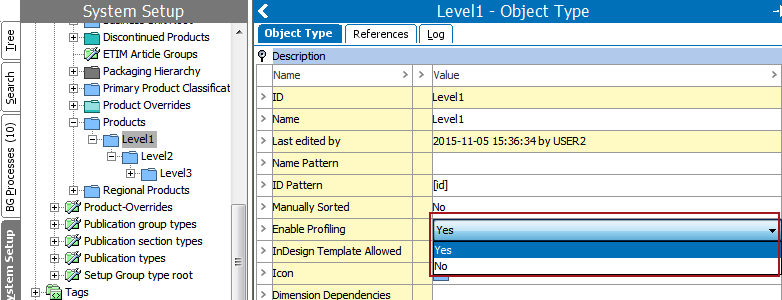
Because this configuration is made via object type, data / category profiles can be made on any level in the hierarchy.
Note: Information about product override objects is not included in category profiles.
Data Profiles in Web UI
Data profiles can also be viewed in the Web UI via the Data Profile component screen. This screen displays much of the same information found in the workbench and provides a list of 'Top Findings.' The 'Top Findings' list highlights outliers in the data such as missing attribute values, irregular value patterns, overly-frequent values, and more.
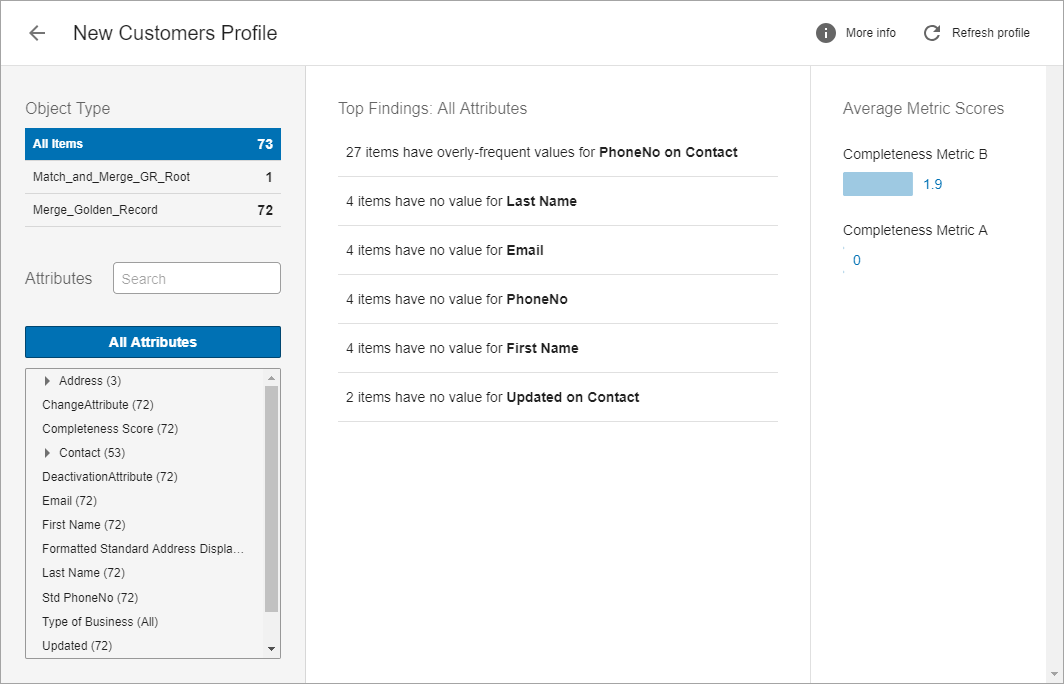
For more information on using data profiles in Web UI, see the Data Profiling in Web UI section of the Data Profiling documentation here.