Errors may occur during the import of a TecDoc Data file. When errors occur, detailed error messages display within a BGP Execution Report. This section describes an error that can occur by listing an overview of the error, error message template, error message example, where the error messages can be viewed, and how best to address the error.
Important: The handling of validation errors can be configured by enabling / disabling the 'Continue on Error' parameter on the Validation state of each import workflow. By default, the 'Continue on Error' parameter is disabled. For more information, refer to the Validation Error Handling topic within the Importing Automotive Data section.
Overview
This type of error occurs when an import file attempts to import values for a particular LOV but the values in the import file do not match the validation rules set by STEP. For more information about STEP validation rules, refer to the Validation Rules topic.
When a user views the error message, this can be understood because the message template states: The value 'Value’ isn't valid for LOV 'LOV ID': Length: 60 does not fit: ‘Value’.
Error Message Template
Error in this import [import file name] setting completed with errors - Error: The value [imported LOV value] isn't valid for LOV [LOV ID]: Length: [Maximum Length value] does not fit: [imported LOV value].
Error Message Example
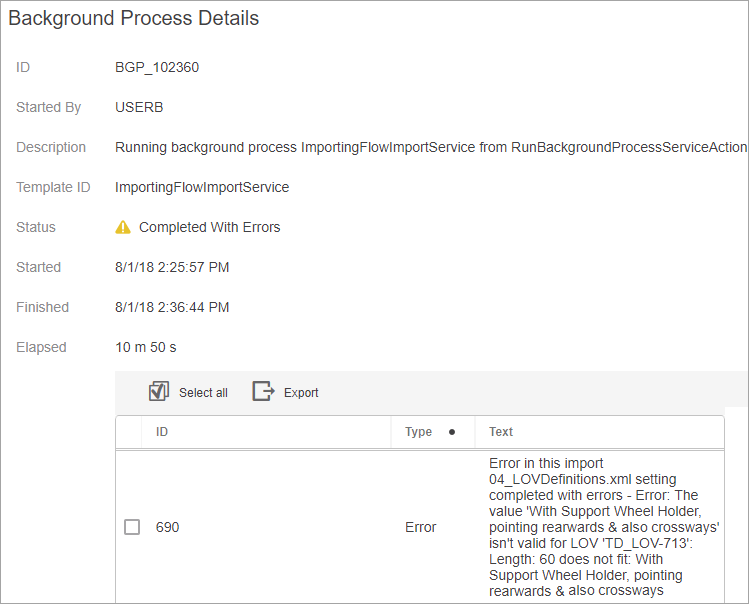
Error in this import 04_LOVDefinitions.xml setting completed with errors - Error: The value 'With Support Wheel Holder, pointing rearwards & also crossways' isn't valid for LOV 'TD_LOV-713': Length: 60 does not fit: With Support Wheel Holder, pointing rearwards & also crossways
Viewing the Error Message
The screenshot below displays this error message example within a Background Process Details Web UI screen.
Explanation
Because this error pertains to LOV validation in STEP, and LOV Values are listed within the TecDoc Reference Data file Data Table 030, it is important to understand Data Table 030.
For this explanation, the following example data from a Reference Data file Data Table 030 is used. The Delta Key within the Reference Data file that pertains to this error type (Bez) is displayed with red text.

Understanding Data Table 030
This section describes the important Delta Key within this Data Table.
Bez: Maximum 60 character text representing an LOV Value (also known as 'Descriptions' in the 'TecAlliance: TecDoc Data Format' file).
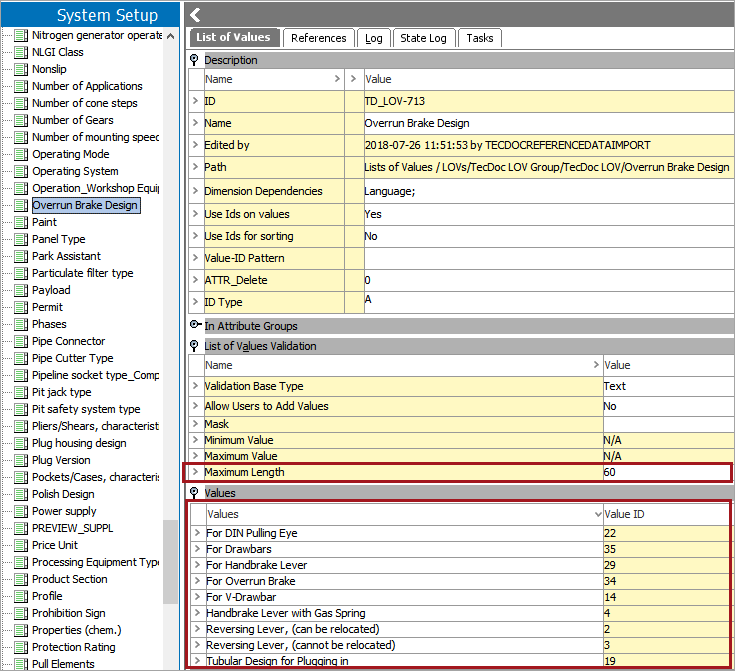
In the example below, LOV ‘Overrun Brake Design’ (TD_LOV-713) is configured to have a 'Maximum Length' of 60. Because the import file contains the value ‘With Support Wheel Holder, pointing rearwards & also crossways’ which has 62 characters, STEP displays a validation error, and the LOV Value is not imported into STEP. Therefore, it does not display within the 'Values' flipper.
Resolution
To resolve the error, edit the text within the description to be less than the defined character limit, or adjust the character limit in STEP.