The intention of this topic is to introduce the basic AutoCare ACES file structure and the way the objects are built in the system when the ACES file is imported into the system.
Currently, the Automotive solution supports import and export of three versions of ACES files. Namely, ACES 3.0, ACES 3.2, ACES 4.0, ACES 4.1 and ACES 4.2. For better understanding, ACES 3.2 is considered to be an example throughout this topic.
The ACES file shall include only plain text delimited by 'valid' XML tags (as defined below). A CR/LF (ASCII 13,10 decimal) should separate lines and it is recommended that the text should use UTF-8 character encoding. However, ISO-8859-1 is also accepted.
File Naming
It is a good practice that the external file name of the ACES file shall include the company, a short catalog title, the delivery date (yyyy-mm-dd), and the word 'FULL' or 'UPD', or 'TEST' in a sequence all separated by underlines and an "xml" extension. Below is an example of how an ACES file can be named.
ACMESupply_BrakeHardware_2001-01-18_FULL.xml
Zipped File Imports
When more than one file is imported simultaneously into the system or when the ACES file contains a million records so you would want to reduce the size of the file, users can use an archiving program (such as WinZip, or Windows XP 'Compressed (zipped) Folders') to compress the files into a single ZIP archive. Again, it is a good practice to name the archive as above but without the catalog title and with a '.zip' extension.
Note: When more than one ACES files are zipped, and the user drop the zip file into the hotfolder, those ACES files will not get processed simultaneously unless it is configured for the ACES import to be able to run in parallel (the default is that only one file will be processed at a time).
Delivering ACES Files
Sample File structure
Below is a sample ACES 3.2 file with two application records
<?xml version="1.0" encoding="ISO-8859-1"?>
<ACES  version="3.2">
<Header>
	<Company>ACME</Company>
	<SenderName>Katherine Jenkins</SenderName>
	<SenderPhone>6777978488</SenderPhone>
	<TransferDate>2018-04-21</TransferDate>
	<BrandAAIAID>DKGX</BrandAAIAID>
	<DocumentTitle>ACES FILE</DocumentTitle>
	<EffectiveDate>2018-04-21</EffectiveDate>
	<SubmissionType>FULL</SubmissionType >
	<MapperCompany>Maps R Us</MapperCompany>
	<MapperEmail>maps@maps.com</MapperEmail>
	<VcdbVersionDate>2018-04-20</VcdbVersionDate>
	<QdbVersionDate>2018-04-20</QdbVersionDate>
	<PcdbVersionDate>2018-04-20</PcdbVersionDate>
</Header>
    <App action="A" id="1">
        <BaseVehicle id="5289"/>
        <MfrBodyCode id="2765"/>
        <EngineBase id="1305"/>
        <Qty>1</Qty>
        <PartType id="5696"/>
        <MfrLabel>ChkEngSens</MfrLabel>
        <Part BrandAAIAID="DKGX">VC36009</Part>
    </App>
    <App action="A" id="2">
        <BaseVehicle id="5289"/>
        <BodyNumDoors id="5"/>
        <EngineBase id="1305"/>
        <Qty>2</Qty>
        <PartType id="5696"/>
        <MfrLabel>ChkEngSens</MfrLabel>
        <Part BrandAAIAID="DKGX">VC36112</Part>
    </App>
    <Footer>
        <RecordCount>2</RecordCount>
    </Footer>
</ACES>
The whole ACES file is divided into three required sections: Header, Body, and Footer.
Header
This constitutes the initial section of the file. This section includes generic file information such as company details, sender details, mapper details, version details of Vehicle, etc. Header information is present within the <Header> tags.
The order of the tags within the header is defined by the XML schema. In the Header section, the <Company>, <SenderName>, <SenderPhone>, <TransferDate>, <EffectiveDate>, <SubmissionType>, <VcdbVersionDate>, <QdbVersionDate>, <PcdbVersionDate> and <DocumentTitle> tags are required to be populated and cannot be left empty.
Body
The Body section contains catalog data that should only include the information necessary to unambiguously select the correct part (PIES Item). Each application record will be surrounded with the <App> tags and can contain some or all of the following details.
- Application Record Number
- Base Vehicle ID
- Make
- Model
- Years
- Submodel
- Engine Base ID
- Part number
- Part Type (Numeric ID of the Part type)
- Position
- Part Quantity
- Note
- Action (‘A’ or ‘D’, 'A' indicates to add the application record and 'D' indicates to delete the application record).
- Asset ID
- Asset name
-
All other attributes / vehicle options that exist for any application record create and populate a unique column.
Of the above listed details, the following information is required for each application:
-
Base Vehicle ID
-
Part Type
-
Part Number
-
Part Quantity
A sample ACES XML body structure and the details in how it is populated on the STEP system is displayed below
     <App action="A" id="2">
        <BaseVehicle id="5289"/>
        <BodyNumDoors id="5"/>
        <EngineBase id="1305"/>
        <Qty>2</Qty>
        <PartType id="5696"/>
        <MfrLabel>ChkEngSens</MfrLabel>
        <Part BrandAAIAID="DKGX">VC36112</Part>
    </App>
App Action value '’A'’adds a new ACES application (if it was the value ‘D’ instead of 'A' then it would notify the system to mark the application for deletion).
Note: The automotive importers do not delete any objects, it just marks objects as new, delete, or change through change flags.
ID value '2' signifies the sequential order of parsing for the applications.
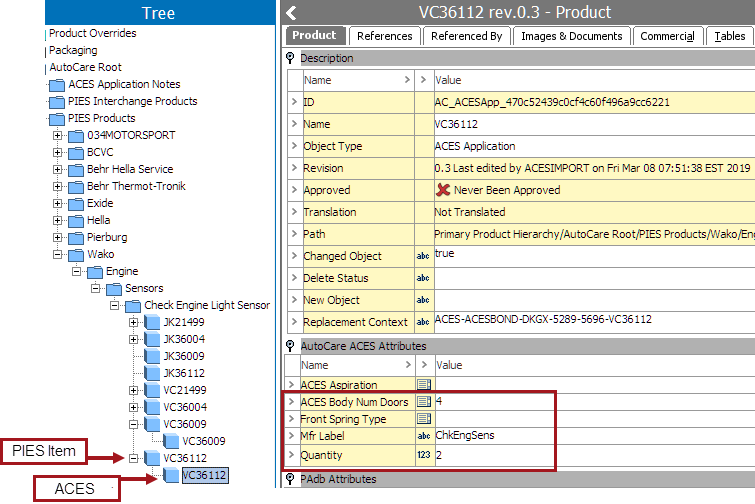
The value in the <part> tag is extracted to identify the parent for the application item. The application will be created / modified under the ‘VC36112’ PIES Item. <BodyNumDoors id="5"/>, </MfrLabel>, and <Qty>, populates the respective attribute values as displayed in the screenshot below.
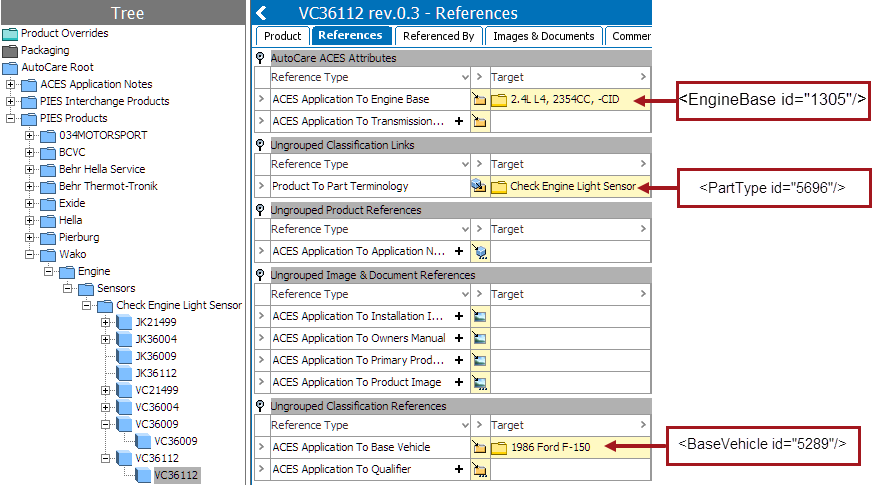
<BaseVehicle id="5289"/> and <EngineBase id="1305"/> creates a reference to the objects within the Vehicle Configuration (VCdb) classification and <PartType id="5696"/> creates a reference to the object within the Parts Categorization (PCdb) classification in the STEP system as displayed in the screenshot below.
Footer
The Footer section indicates the end of the data and provides a count of the applications that is being transferred in the file.
<Footer><RecordCount>2</RecordCount></Footer>