The following enhancements and changes have been made for all SaaS environments and may be further documented in the User Guide section of the SSUI documentation. These improvements have been made available between the 2026.1 update and the 2026.2 update.
-
The 'Control Service API' gives administrators programmatic access to monitor and control the STEP platform for production environments, non-production environments, or both. Logs can be integrated with existing monitoring and/or auditing software, and Modular Service Platform (MSP) extensions can also be managed via Control Service API.
The SSUI now includes the 'Control Service API' page, allowing administrators to create and manage Control Service API credentials directly in the SSUI, replacing the previous manual provisioning process. Administrators can create dedicated clients, assign each to production, non-production, or both environment types, and revoke or renew credentials. This new functionality ensures credentials are scoped appropriately for each environment type. Expiration dates are set at creation, providing clear visibility into credential validity.
The SSUI 'User activity log' now includes login events and changes performed by Stibo Systems; the log is also available through the Control Service API for integration with external auditing and monitoring tools.
-
The 'Update preview sandbox' option now supports restoring a sandbox environment backup, giving teams a repeatable starting point — with a fixed configuration and dataset — for testing the latest STEP updates. With this additional option, downtime for the selected environment is also avoided.
-
The 'Configuration properties' tab now allows users to configure Content Security Policy (CSP) headers — a browser security feature that tells the browser which sources it is allowed to load content from on a given STEP web page. The following properties:
-
Http.Security.ResponseHeader.ContentSecurityPolicy.Context.* — An admin can control the Content-Security-Policy (CSP) response header of a specific context. Headers are cached in memory at startup.
-
Http.Security.ResponseHeader.ConfigurationValidityInMinutes — By default, the header is valid for one day (1440 minutes) after which the system will attempt to reload the configuration. The default can be increased if needed to limit reloading or reduced for testing.
-
-
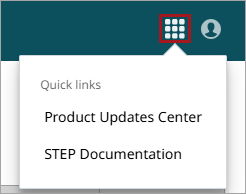
A 'Quick links' button is now available in the SSUI title bar, providing access to the Product Updates Center and to STEP Documentation.
-
'Modular services' platform extensions can now access the default STEP mail server to send emails with attachments, using the same 'from' address as the one configured for other mail-sending features, including STEP business rules.
-
Both the 'Security events' tab on the 'Environments' page and the 'Logs' tab on the 'Modular services' page now provide filtering options to include or exclude log entries based on text.
-
All SSUI pages now display the hosting region for STEP environments in the lower left corner; this information also appears at the bottom of the 'Calendar' page. For more information on hosting regions, refer to the Environments - STEP IP Access Control List Tab topic of the SSUI documentation.
-
For SFTP public keys, spaces are now allowed in the comment portion of the required OpenSSH format. Refer to the Environments - SFTP Access Control Tab topic of the SSUI documentation for more information.