Open topic with navigation
Creating a Dataset Definition
The dataset definition specifies the STEP data to which a policy may apply. Follow the steps below to create an entity dataset definition.
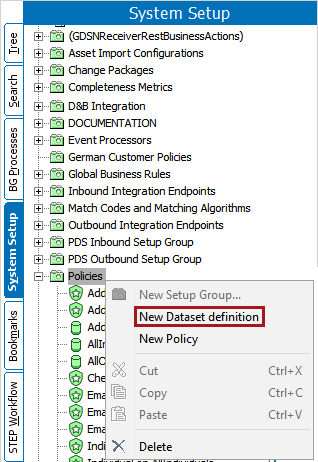
- Navigate to System Setup > Policies. Right-click on the Policies folder and select 'New Dataset definition.'
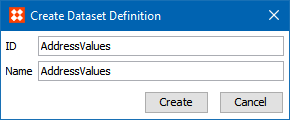
- A 'Create Dataset Definition' dialog will display. Enter an ID and Name for the dataset definition, and click the Create button to display the Dataset Definition.
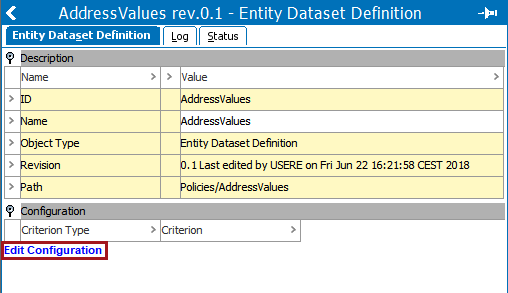
- Click 'Edit Configuration' to add parameters to the dataset definition and open the Policy Dataset Configuration dialog.
- Click the 'Add another dataset criteria' button to display the Dataset Criteria group.
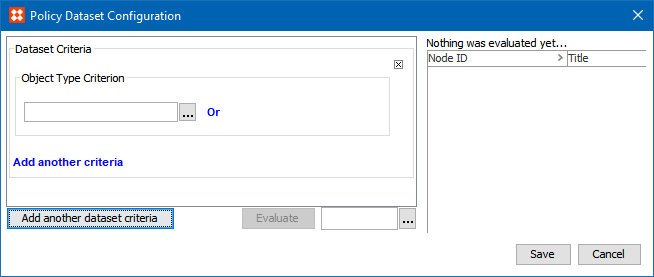
- Click the ellipsis button (
 ) for the Object Type Criterion field. From the objectTypeSelectorField dialog, select the desired object type.
- If another criterion should be evaluated, click the 'Add another criteria' link, select an option from the dropdown, and configure it. Select the desired criterion and configure it. For descriptions of all these criteria, see the Explanations of Criteria topic of this documentation here.
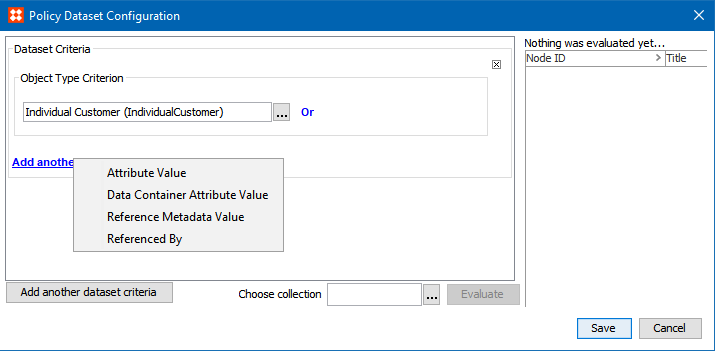
- Once all criteria have been configured, click Save to close the Policy Dataset Configuration dialog.
- The Dataset Configuration allows for bulk evaluation of the dataset definition against any collection of nodes. To evaluate your dataset, click the ellipsis button () to choose a collection next to the Evaluate button in the bottom of the dialog.
- Once a collection is selected, press 'Evaluate.' The first 100 nodes of that collection will be evaluated against the dataset, and results presented in the right hand side of the dataset editor.
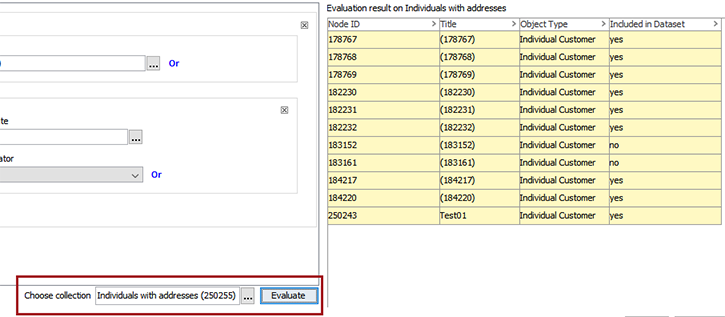
- Click 'Save' to save the dataset definition.
Policies can now be applied to the newly created Dataset Definition. To add this dataset definition to a policy as described in the Creating a Data Policy topic in this documentation here.
2020, Stibo Systems – Confidential