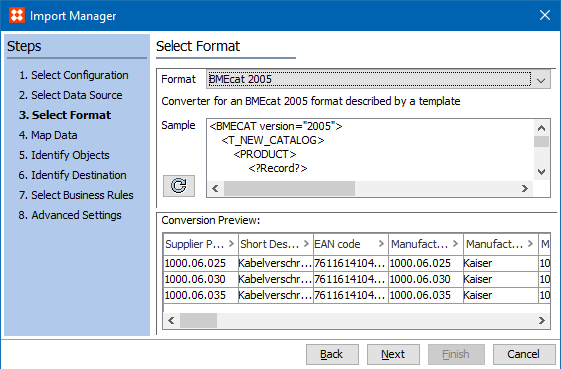
Both BMEcat® (version 1.2) and BMEcat® 2005 are supported in STEP and use an XML-based standard for electronic data transfer by electronic catalogs. For more information about the standard, search the web.
BMEcat 2005 requires the 'X.Import.BMEcat2005' license and / or the 'X.Export.BMEcat2005' license. The ‘bmecat’ add-on component is required to activate either license. Instructions for installing components can be found in the SPOT Program topic in the System Administration documentation here.
For more information on BMEcat (version 1.2), see the BMEcat Format documentation here.
BMEcat 2005 is available for selection in:
This format requires creating a data map between STEP and the data being processed, and may also include data transformations. For details, see Data Mapping here.
BMEcat 2005 and BMEcat 1.2 are the only formats that allow access to Product Attribute Link metadata attributes, via the transformation aspect 'Closest Attribute Link Meta Data.' For details, see Aspect - Transform Outbound here.
Note: When using the auto map option in the BMEcat 2005 format to input eCl@ss or ETIM data, the auto map will initially try to match the attribute IDs in the import file with the IDs of attributes in the system. If no match is found, the auto map then adds the prefix 'eClass_ or 'ETIM_' to the input attribute's IDs that failed to match to attribute IDs in the system, and attempts to match the attribute IDs again. If no match is found, the user must manually map the attribute.
For more information on auto mapping, see the Inbound Map Data - Auto Map topic in the Data Mapping documentation here.
Inbound Parameters
The following parameters are displayed on the inbound wizards:
Import Manager
IIEP

Exporting the BMEcat format involves supplying header data and catalog / product data via the parameters displayed on the Select Format step and during the Map Data step. Some information is required, as is indicated on the Map Data step. Although the export process can be run while mandatory fields are missing, the background process (BGP) will fail.
For details on configuration of BMEcat 2005 for ETIM data, see the BMEcat 2005 for ETIM Data Configuration topic here.
Outbound Parameters
Note: For more information on Generic XML instructions, see the Generic XML Outbound Processing Instructions topic in the Generic XML Format documentation here
For example, setting this parameter to Yes enables all ETIM attributes, even those without a value in STEP, to be exported. Additionally, when ETIM values exported via BMEcat are empty, they should be represented by a dash (-). For information on transforming an empty attribute value to a text string, see the Replace the whole value section in the Transformations topic of the Resource Materials online help here.
Note: To successfully validate against the XSD, the sample file must include 'fd' option (as shown in two places in the images below).
Export Manager

OIEP

2020, Stibo Systems – Confidential