
Stibo Systems' solutions enable organizations to turn master data into a trusted asset by more effectively managing, gathering, sharing, and publishing master data across the information supply chain.
The online documentation accessible on this page is organized into main topics that cover the concepts and procedures recommended for using the MDM Platform, add-on components, and product line specific functionality.
The MDM Platform is a dynamic tool and under continuous development. Because of Stibo Systems' dedication to improving its software offerings to meet our customers' evolving needs, it is possible your system may contain additional functionality not yet described in this online help. As with our software, the online help is under continuous development. Updates to the online help are typically released with each maintenance patch and feature release.
Important: Some functionality is controlled via licenses and therefore may not be available on your specific system. For additional information on licensing, contact your Stibo Systems' account manager or partner manager.
Styling on the workbench and Web UI images within the online help vary based on the operating system. While the same dialog in your own system may not look exactly like the one in online help, the functionality is not altered by the cosmetic differences.
Email address hyperlinks within online help require that you have a default email program / app. For assistance in assigning a default, search for the 'default email client' on your computer or the web.
When looking for documentation within online help, there are some simple tips and tricks for finding the information that you need:
The information above will help you quickly find the information you need. Keep reading for more detailed information about using the online help search features and common words to avoid using in the search field.
The following table illustrates searched words and the results returned by the online help search option. Online help search is not case sensitive and matches may include varying endings. As an example, entering the word 'search' returns 'search,' 'searches,' and 'searching.'
|
Text in search field |
Results include topics containing |
Description |
|---|---|---|
|
"data quality" |
'data quality' but not 'quality data nor 'data for enhanced quality' |
" " (double quotes) indicate an exact phrase and an exact order match is required Note: If searching multiple keywords and any of them, but not all, contains some sort of formatting (e.g., data quality), then that instance will not be considered an exact match. |
|
data quality data + quality |
both words 'data' AND 'quality' regardless of the order in which they appear |
When separating terms with a blank space, the AND is always inferred. Additionally, the + (plus sign) between words indicate both words must appear in the same topic. |
|
data | quality |
either word 'data' OR 'quality' |
| (the pipe symbol) indicates that only one of the words must appear in a topic |
|
data ^ quality |
the word 'data' and NOT the word 'quality' |
^ (the caret symbol) indicates that the following word must not appear in a topic |
|
data + (sort | tools) |
the word 'data' AND either the word 'sort' OR the word 'tools' |
( ) (parentheses) combines multiple search functions |
|
data + "sort tools" |
the word 'data' AND the phrase 'sort tools' |
multiple search function with an exact phrase search |
Within the list of returned topics, matches of the searched word(s) are typically highlighted. In some cases there is no search highlighting. One example where search results are not highlighted is when doing a 'Web UI' search versus a 'Web-UI' search, both return the same results but the 'Web-UI' search results do not have highlighted content.
Within online help, some words are used interchangeably (like BGP and Background Process), and some have been updated over time (Portal and Web UI). To account for these scenarios, synonyms allow you to find the topics that likely address the search you are performing. For example, the words 'environment' and 'platform' are recognized as synonyms in online help. Searching for 'environment' can return topics where that word is not found, but 'platform' is, and it is likely that the topics include data about environments and/or platforms.
The common words in the table below are ignored when entered alone in the online help search field. If you use the words within a multi-word search, then you will get results. For example, entering "Create From Template" in the search field yields the expected results, but searching for the word 'From' as a standalone word will return zero results.
| Words not searched | |||||
|---|---|---|---|---|---|
| a | been | have | may | several | under |
| about | between | he | me | she | until |
| after | but | her | med | some | use |
| against | by | his | more | such | was |
| all | can | however | most | than | we |
| also | come | in | near | that | were |
| among | do | include | no | the | when |
| an | during | into | non | their | where |
| and | each | is | not | then | which |
| are | early | it | of | there | who |
| as | for | its | on | these | with |
| at | found | late | only | they | you |
| be | from | later | or | this | your |
| became | had | made | other | through | |
| because | has | many | over | to | |
If configured to authenticate, you were prompted to enter a STEP username and password to enter online help. If you were not prompted to enter your login details, the functionality can be enabled by adding the property OnlineHelp.Documentation.Authentication.Enabled=true to the sharedconfig.properties file. Authentication is disabled by default.
Note: The authentication option will not work with any Single Sign On (SSO) solutions other than LDAP.
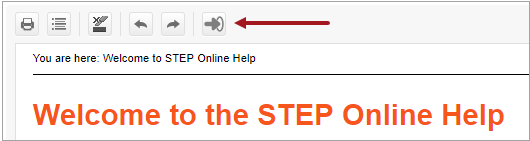
When you are done with online help, you should click the Logout icon / button located on the far right of the online help toolbar. Upon logging out, you will be taken back to the documentation login screen.
If authentication is disabled, the Logout button will still display. In this scenario, clicking on the button will take you to the Online Help welcome page.
2019, Stibo Systems – Confidential