The Move Units to Header transformation enables a header row or header column to be built from unique units that appear on values inside the table. One use for this transformation would be for tables that contain highly technical product information; for example, for electronic components that use units such as Ohms (Ω). Additionally, it helps to save space on column widths or table heights.
The transformation parses through the actual column units of a table and, if all units are the same, a header row or header column is built from the unique unit. When moving the units to the header, either a new header is built using the unique unit, or the unit text is appended to the text of an existing header. In either instance, the units are removed from the values within the table after they are moved to the header.
The instructions in this topic assume that you know how to add a transformation to your table by following the instructions in the Add a Transformation to a Table or Table Type subsection of the Table Transformations topic here.
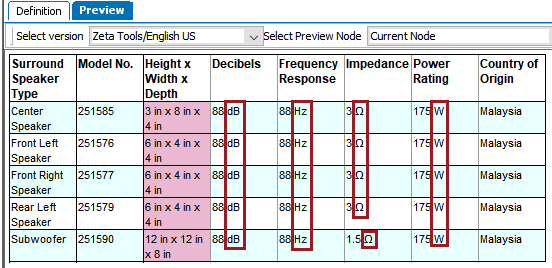
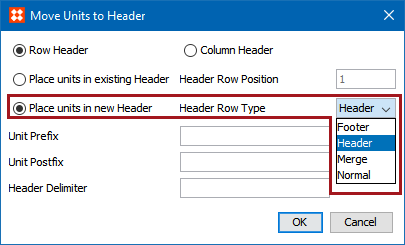
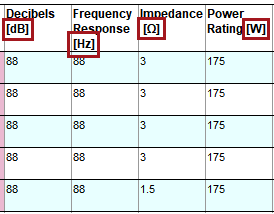
The following example uses a table that contains technical specifications about a set of surround speakers. The included units are Decibels (dB), Hertz (Hz), Ohms (Ω), and Watts (W). To keep the units from appearing multiple times in the table, they will be moved to the header row. This example uses an existing header and does not create a new one. However, configurations are present in the transformation that can allow for a new header to be created, e.g., if the units should appear in a subheader row.
Before
This is how the table appears before the units are moved to the header row.
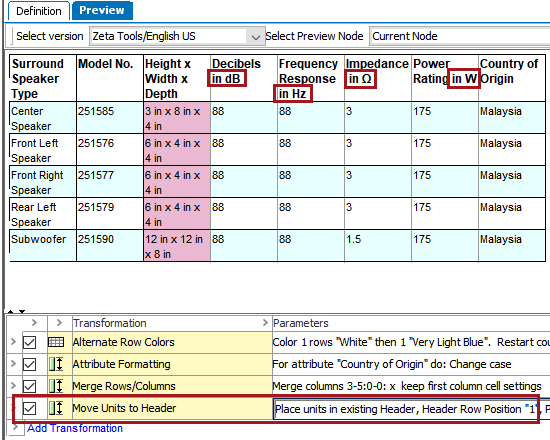
After
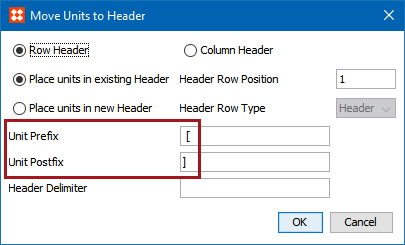
This is how the table appears after. The units are moved to the header and a delimiter of ' in ' is applied so that the header columns read, for example, 'Frequency Response in Hz" instead of 'Frequency Response Hz.'
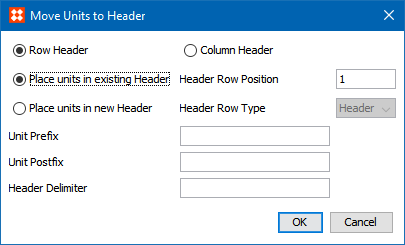
 ). The Move Units to Header dialog displays.
2019, Stibo Systems – Confidential