Three cell text formatting transformations are available that can sort values, consolidate ranges, and remove duplicate values within table cells. These are:
Note: Though these text transformations also appear in the list of transformations available for attribute transformations created in System Setup, they are only used to transform content within table cells. As such, they serve no purpose for attribute values that display outside of tables. For more information on other attribute transformations and what they do, see the Transformations topic in the Resource Materials online help here.
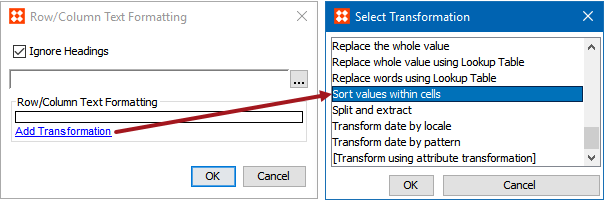
The Sort values within cells text transformation is used to sort multiple values when they are contained within a single table cell. It is available as a selection under 'Add Transformation' within the Attribute Formatting and Row/Column Text Formatting table transformations, as shown below:
Entries within a cell may be sorted alphabetically, numerically, or by fractional values, and in ascending or descending order. Since the sorting affects multiple values within a single cell, a separator (value delimiter) must be placed between the values to differentiate them. If a hard return should separate the entries in a cell, the delimiter of \n should be used.
The following examples use the pipe character (|) as the delimiter:
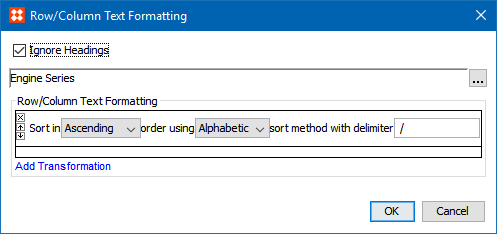
The following example shows a table in which this transformation will be applied to sort values in ascending alphabetic order using the '/ ' delimiter. As shown in the field with the ellipsis button, the transformation has been selected to apply to cells within the 'Engine Series' column.
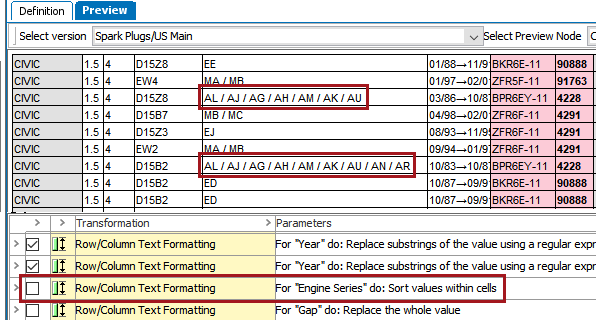
Before the transformation is applied, the values in the Engine Series column (column 5) display in non-alphabetical order, e.g., AL / AJ / AG / AH / AM / AK / AU.
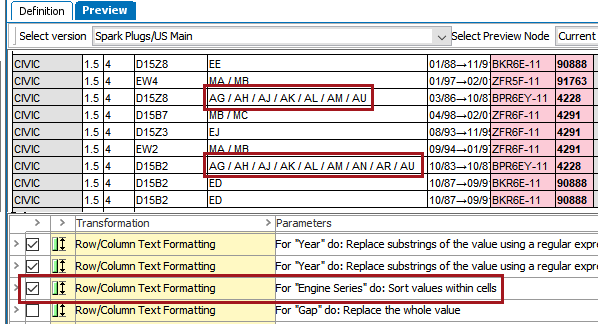
After the transformation is applied, the values display in alphabetical order, e.g, AG / AH / AJ / AK / AL / AM / AU.
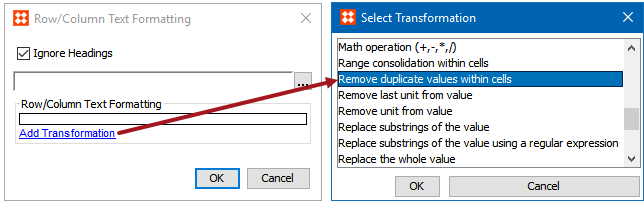
The Remove duplicate values within cells text transformation is used to remove duplicate values when they are contained within a single cell of a table. Like the 'Sort values within cells' transformation, it is available as a selection under 'Add Transformation' within the Attribute Formatting and Row/Column Text Formatting table transformations, as shown below:
This transformation is useful when consecutive rows in a table have been consolidated into one row. When this is done, the resultant row will often have cell entries of merged data that require some cleanup and/or consolidation.
Duplicates are removed by specifying a value delimiter. For example, using the pipe character (|) as the delimiter, the string 'DC9|DC9|DC7|DC12|DC9|DC7' becomes 'DC9|DC7|DC12'. If a hard return separates the entries in a cell, the delimiter of \n should be specified.
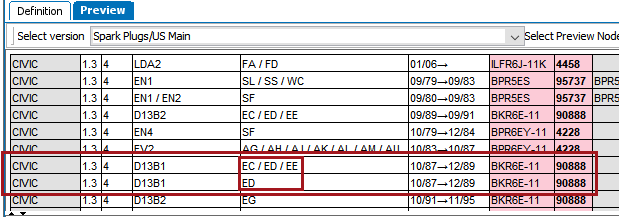
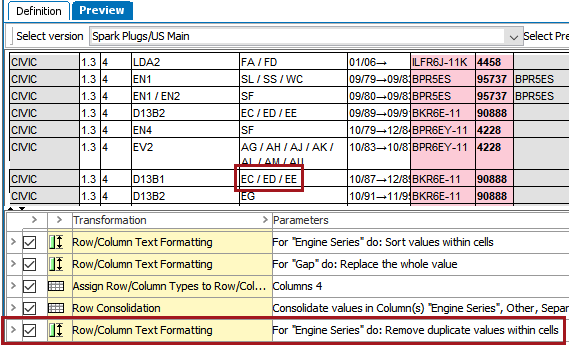
The following example shows a table with two adjacent rows that contain identical information except for in one column (Engine series, column 5).
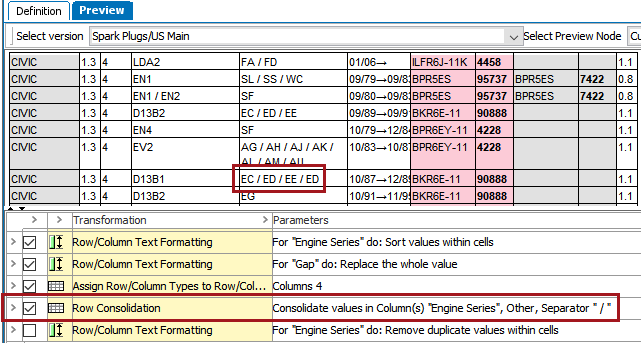
After a Row Consolidation transformation is applied, the value 'ED' appears twice in the Engine Series column.
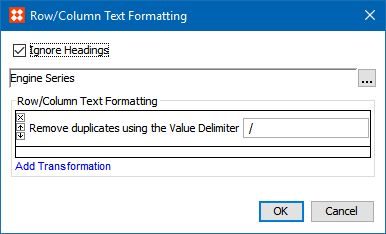
To remove this duplicate value, the 'Remove duplicate values within cells' transformation is applied as part of the Row/Column Text Formatting transformation. It is configured to remove values from the Engine Series column that are separated by the ' / ' delimiter.
After the transformation is applied, the duplicate 'ED' values are removed and consolidated into a single value.
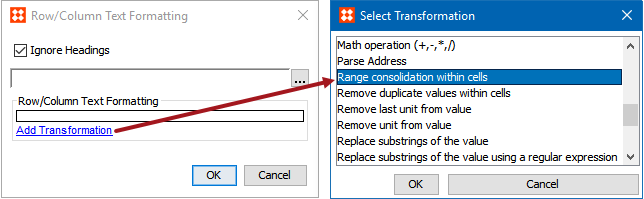
The Range consolidation within cells text transformation is used to consolidate ranges of data that might exist within a single cell of a table. Like the 'Sort values within cells' and 'Remove duplicate values within cells' transformations, it is available as a selection under 'Add Transformation' within the Attribute Formatting and Row/Column Text Formatting table transformations, as shown below:
As part of the consolidation process, the transformation allows users to provide delimiter characters to be used between values, as follows:
The following examples assume the value delimiter is the pipe character (|) and the range delimiter is a hyphen (-):
Note: This transformation only operates on numbers or single characters in the ASCII range 'A to Z' or 'a to z.'
The following example shows a table in which a cell contains a range of values after a Row Consolidation transformation has been applied. The values are both unsorted and separated by '\\ ' as a delimiter.
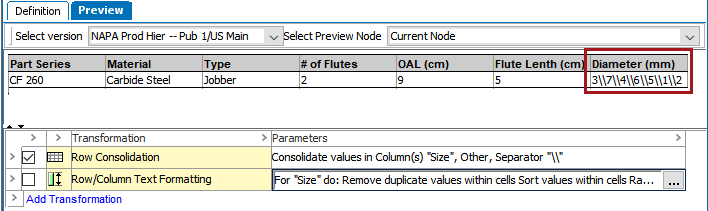
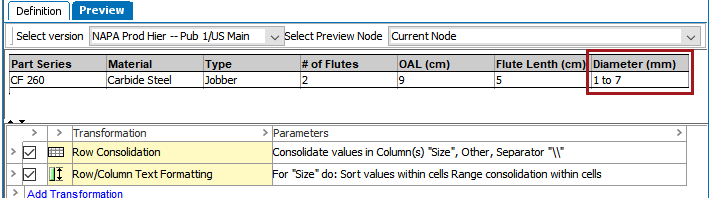
To sort these values and convert them into a range, two transformations are applied. The Sort values within cells text transformation is first applied to sort the numbers in ascending numeric order. Next, Range consolidation within cells is applied, which has been configured to remove the \\ value delimiters and replace them with 'to.'
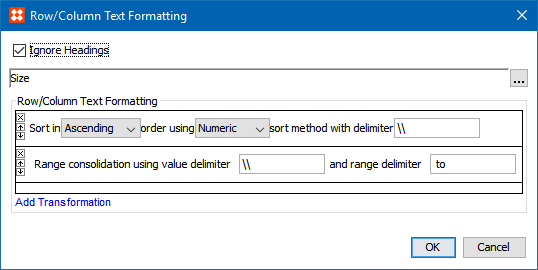
After the transformations are applied, the values are consolidated into a range.
2019, Stibo Systems – Confidential