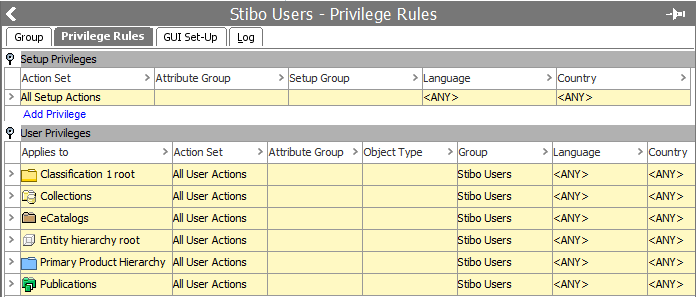
Privilege rules are maintained in System Setup: Users & Groups > Groups
Privilege Rules are rules that specify a set of permitted Actions that members of a specific group can perform an a specified set of data. There is no limit to the number of Privilege Rules that can be applied to the same Group.
Each Privilege Rule is defined by specifying:
Each Group must be assigned Privilege Rules, defining which Actions the members of that Group are allowed to perform, and which data the members of the Group is allowed to work with. Defining the Privilege rules forms one part of the Privilege control system settings. The second part, defining Action Sets, is performed in System Setup under Action Sets. For more information about Action Sets, see System Setup > Action Sets
Important: Privilege Rules applied a User Group will be inherited to sub User Groups. This means it is possible to apply general Privilege Rules on a top level and only specify local Privilege Rules on sub User Groups. GUI setup applied a top User Group will not be inherited to any sub User Group. It is to be recommended to apply all general Privilege Rules as high as possible in the User Groups Hierarchy to simplify management of the Privilege Rules.
There are two types of Privilege rules:
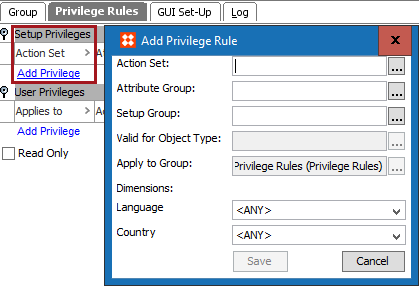
Setup Privileges: These are usually actions that are usually performed by a System administrator.
User Privileges: For actions that should be performed by the users of a specific group.
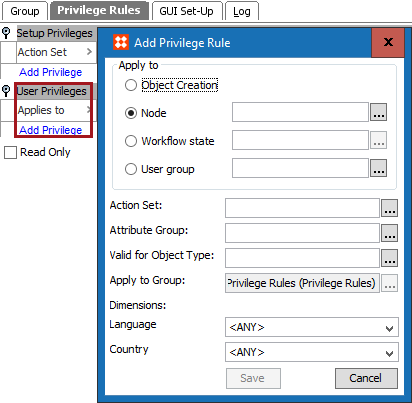
Actions can be restricted to:
Any number of rules may be set up for the same Group, granting permissions for specific Actions Sets on a number of hierarchy nodes and Dimension Points.
Note: A User may be a member of multiple Groups. The User will accumulate the Privilege rules from all these Groups, so a restriction from one Group is ignored if the corresponding Action is permitted via another Group membership.
If a Privilege rule permits the editing of a specific Attribute Value for Products linked to a specific Classification node, this Attribute Value can also be edited through other Classification nodes that these Products may be linked to.
If a Group has permission to work with a specific Classification node, Attribute Values can be edited for all Products linked to (or below) that node. However, access to the Classification node does not grant the privilege to link new Products in the Product hierarchy. To do that, the Group must have permission to work with the specific Product node as well.
2019, Stibo Systems – Confidential