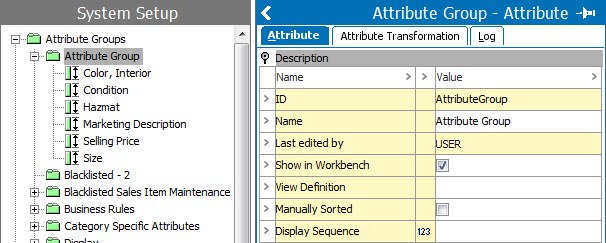
Attribute groups that contain reference types and product to classification link types can have their views defined. The customized view defines general aspects, meta data attributes and attributes on referenced objects. These referenced objects appear in the References editor on products, classifications, and assets.
Important: Approving a reference or product to classification link on a product, classification, or asset having a customized view defined will approve all general aspects and metadata attributes defined on the reference. Additionally, it also approves all general aspects and metadata attributes defined on the reference type or product to classification link type.
 ). Then click the ellipsis button () to specify the appearance of reference types and product to classification link types linked into the attribute group. The View Definition Dialog appears.
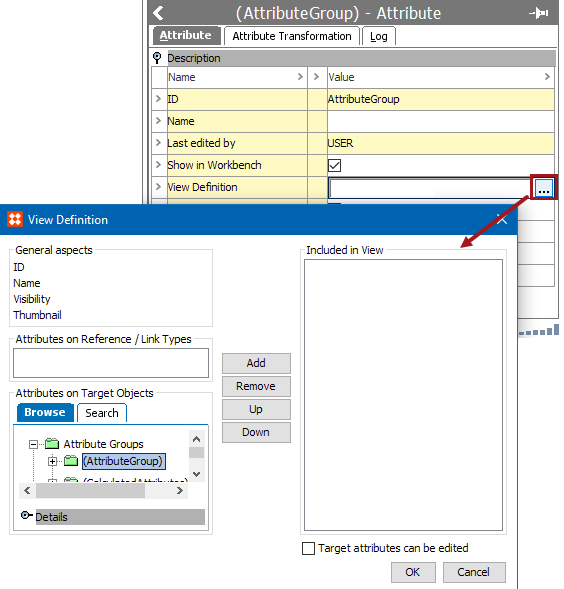
Note: A saved view definition does not influence attributes linked into the attribute group.
|
General Aspects |
Definition |
|---|---|
|
ID |
ID shows the ID of the referenced / linked object. |
|
Name |
Name shows the name of the referenced / linked object |
|
Visibility |
Visibility shows in which contexts a reference or product to classification link is visible. Reference types or product to classification link types that are dimension dependent are editable by users with the required privileges. |
|
Thumbnail |
For product to product References and product to image references, a thumbnail of the primary image of the target object is shown. |
|
Attributes on References / Link Types |
Definition |
|---|---|
|
Metadata Attributes |
This field lists the metadata attributes that have been applied to the reference types and product to classification link types linked into the attribute group. |
|
Attributes on Target Objects |
Definition |
|---|---|
|
Description Attributes or Specification Attributes |
In Attributes on Target Objects you can search or browse for attributes. When you add an attribute to the view from this field, it displays the attribute value in the reference editor. Each reference type establishes the hierarchical position among the referenced objects. The direction will identify one object as the master and the referenced object as the subordinate. A master object is the object that the reference is made from. A subordinate object is the object that the reference is made to. Attributes applied from this field are values from the subordinate object. Checking 'Target Attributes can be edited' enables maintenance of the values of the selected attributes from the reference editor. Editing is allowed in the reference editor if the user privileges allow maintenance of the attribute values. |
2019, Stibo Systems – Confidential