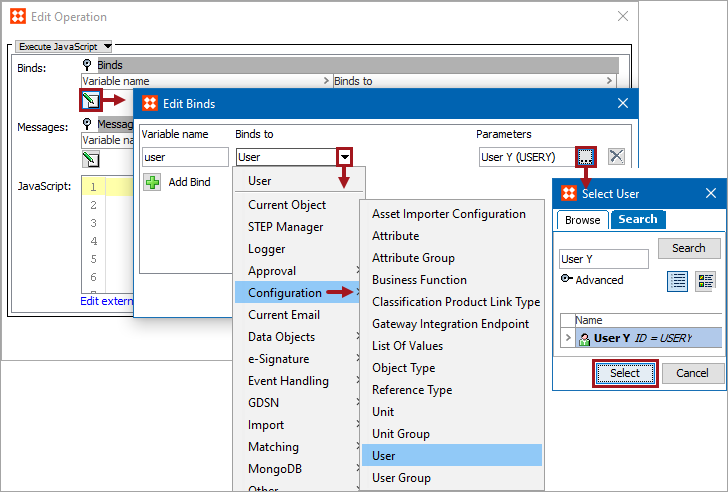
Business rules can use the following binds to access a specified user or user group. For example, this is useful when a particular user or user group is required to approve a specific object type. The User bind can be used to provide the condition by requiring a specific user.
The binds can be found within the 'Binds to' dropdown as shown below.
Each bind is defined in the sections below.
Configuration
To use any bind:
This binds the selected user to the action or condition variable. Click the ellipsis button ( ) in the Parameters field to display the Select User dialog. Use Browse or Search to locate a user, select it, and click the Select button.
This binds the selected user group to the action or condition variable. Click the ellipsis button () in the Parameters field to display the Select User Group dialog. Use Browse or Search to locate a user group, select it, and click the Select button.
2019, Stibo Systems – Confidential