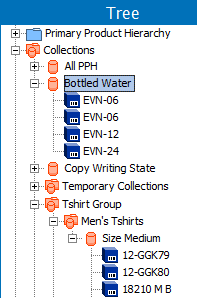
Collections provide a valuable tool for data maintenance tasks. Collections are containers for storing sets of objects from Tree and System Setup, independently of their placement in the hierarchies. A collection can be created via a search or import, and all objects in a collection can be updated at the same time. Collections and collection groups are found in the Collections hierarchy on the Tree tab.
When multiple collections need to be grouped together, they can be put into a 'collection group'. Collection groups can also hold other collection groups. See Creating Collections (here) or Creating Collection Groups (here) in this documentation for more information on each topic.
For more on data maintenance of collections and collection groups, see the Maintaining Collections topic here.
Dimension Dependency and Collections
Collections and search results are dimension dependent. A search in one context can display different objects than the same search in another context.
The following example illustrates how creating a collection from search results can return different objects, based on the dimension dependent values in the context being searched.
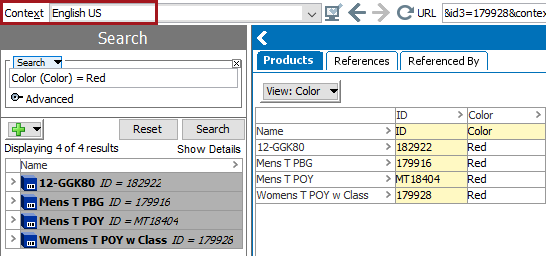
This search is performed in the 'English US' context for the value 'red' in the 'Color (Color)' attribute. The search finds four objects with the value.
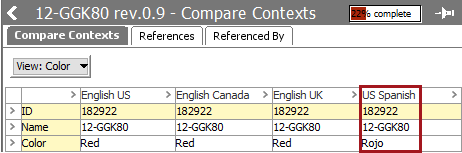
One of those objects has a translated value of 'rojo' for the language dimension point in the 'US Spanish' context. the other objects have no value for the attribute.
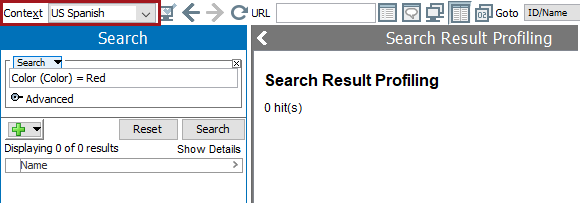
Performing the search again in the 'US Spanish' context returns no records since the value of 'red' does not exist for any of the records in the searched context.
2019, Stibo Systems – Confidential