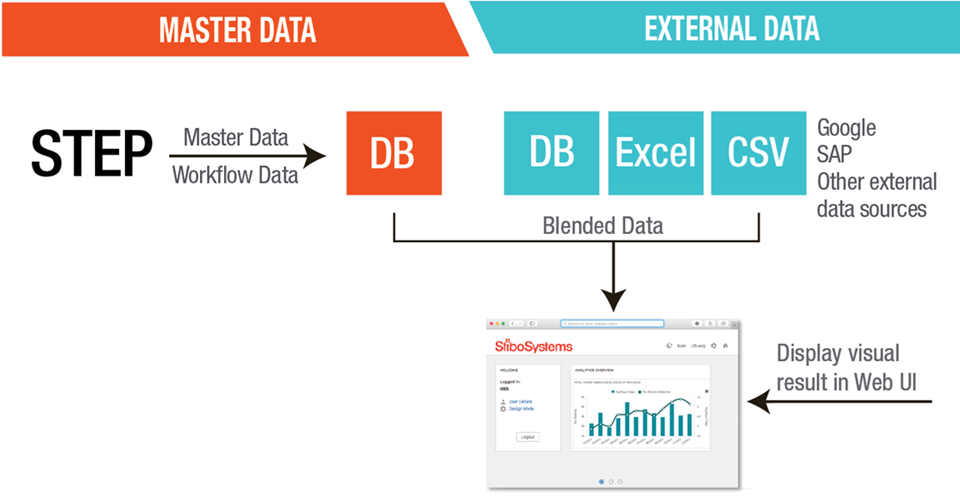
The Embedded Analytics Platform (EAP), powered by Sisense, provides users with an end-to-end, one-stop analytics solution to capture, analyze, and visualize data obtained from a mixture of STEP and external systems, such as ERP, CRM, and sales forecasting systems. The EAP can create relationships between this data, then perform ETL (Extract, Transform, and Load) processes in preparation for analysis and visualization.
The EAP utilizes the Audit Message Framework (AMF) and the Export Manager to embed MDM data and, optionally, blend external data directly into the Web UI through widgets and screens. Preconfigured default dashboards and widgets help users get up-and-running quickly, providing valuable insights around workflow and process optimization, vendor performance, and advanced data quality analysis, both at a high-level and in a more detailed view.
The Embedded Analytics Platform allows you to analyze and explore your data with a robust, industry-leading BI data analytics visualization platform, providing you with:
Analyzed data is embedded within the Web UI through the Embedded Analytics Platform Screen and Embedded Analytics Platform Widget components, which are detailed in the following topics in this guide:
This guide focuses primarily on the actions that can be taken in the STEP Web UI. For additional information about configuration actions specifically related to the embedded platform, including how to gather information from external data sources, refer to: https://documentation.sisense.com/#gsc.tab=0.
For more information on the Audit Message Framework functionality included with the EAP solution, see the Audit Message Framework documentation in the Resource Materials section of the STEP online help here.
For more information on the Export Manager, see the Export Manager section of the Data Exchange documentation here.
To access the Embedded Analytics Platform, an 'embedded-analytics-platform' add-on component must be activated on your system. Additional setup tasks and system configurations must also be performed by Stibo Systems' Technical Services team upon initial setup. See your Stibo Systems representative for more information.
2019, Stibo Systems – Confidential