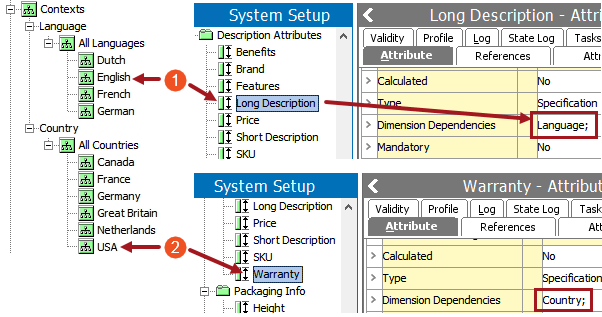
When attribute values need to be dimension dependent—typically for translation purposes—they are made dimension dependent on a one-by-one basis on the attributes themselves.
Note: Dimension dependency can be applied to the attribute object type—and not just to individual attributes—if you need the attribute names translated. This is a global setting, which means that all attribute names should be translated. For more on this see the Maintaining Dimension Dependent Object Types topic in the System Setup / Super User documentation here. Additionally see the Dimension Dependent Attribute and Attribute Group Best Practices topic here for more information on how to work with dimension-dependent attribute object types.
An example of an attribute where the values are dimension dependent on language could be 'Primary Color.' The following also applies to values contained in STEP names of objects.
The below screenshot shows two more examples of dimension-dependent attributes, one dependent on a language dimension and one dependent on a country dimension.
A context that uses the language dimension point of English and the country dimension point of USA would contain an English-language long description and USA-specific warranty content. Additionally, Warranty could be made both country and language dependent to ensure that the warranty text is always in English.
No dimension dependency means that data is stored in the All level (also known as the Root level) of all dimensions. The following also applies to values contained in STEP names of objects.
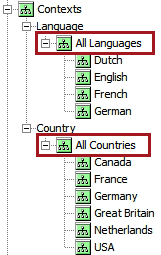
Note: If you have information that will never vary by language or country, you should never assign a dimension dependency on it. When you do have information that truly will be different by language or country, assign the dimension dependency right away. If you later apply a dimension dependency to an attribute, new data will be stored in the dimension point that you specified and existing data will remain at the ‘All’ level and should be moved. This can be very difficult to correct later on. For more information on this problem and how to correct it, see the Adding a Dimension Dependency After Loading Data topic here.
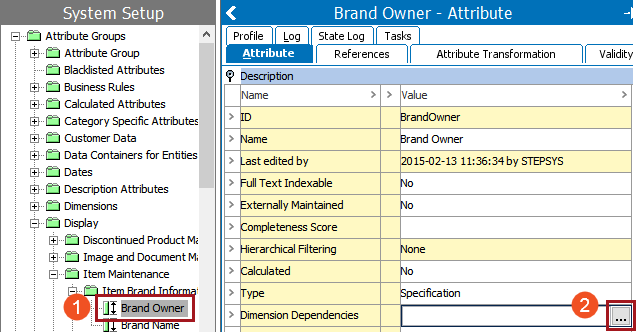
 ).
).
There sometimes may be a need for parent / child relationships between dimensions if you need to maintain many versions of an 'almost the same' language, as pictured in the below screenshot.
Note: This is not recommended. In most circumstances, dimension points should be created at the same level. For more information on best practices with regard to dimensions, see the Dimension and Dimension Points Best Practices topic
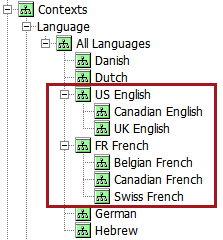
There may be valid use cases to maintain several versions of the same language, for example, US English, Canadian English, and UK English. Since maintaining translations requires effort and carries a cost, it may be of benefit to maintain a base version of English and then only translate a small percentage of the content for Canadian English and UK English. In these cases, there must be a clear owner of the parent language.
The most simple explanation of inheritance of values from dimension points can be explained using the example of a US English parent language dimension and a UK English child language dimension. Inheritance within dimension points behaves exactly like inheritance in other nodes in STEP, such as the inheritance of attribute values from parent to child product objects.
For example, the value of Long Item Description in the parent US English language dimension (which is used by the English US context) looks as follows:

Before translation, the content will inherit to the child context of UK English as-is. Inheritance of the value is indicated by a purple triangle. When the triangle is hovered over, the help text 'Text, inherited from other context' displays.

It is worth noting that, in the Web UI, the indicator of an attribute with a value inherited from another context is a downward-pointing red arrow.

After translation, the content for UK English appears as follows. The purple triangle is gone, as the value is no longer inherited but has been overwritten by the inherited content. If the UK English content is deleted, the US English content will reappear.

This can save on translation costs because, instead of sending US English content to a translation company to convert it to UK English, the US English content could be exported from STEP, a user could run a find and replace operation on the content to replace a certain subset of words within the content (such as changing 'color' to 'colour'), then the newly 'translated' content can be re-imported into the UK English context to overwrite the US English content.
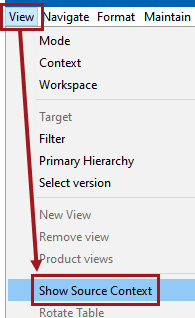
For an inherited attribute value, you can check to see what parent dimension it is inherited from by using the Show Source Context feature. This is useful for translation purposes to confirm what language owns the content.
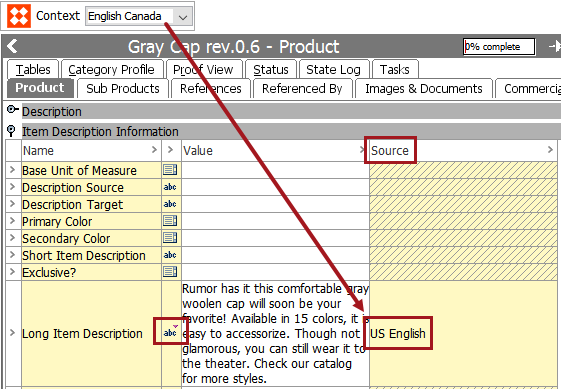
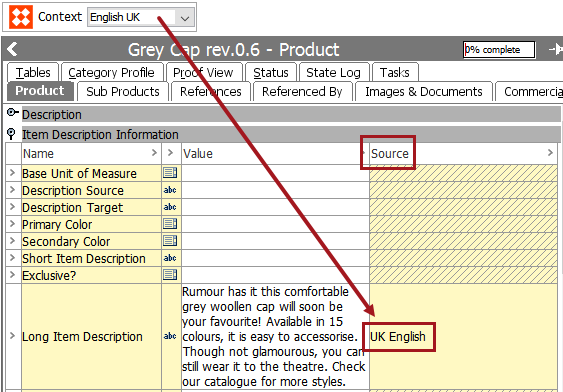
Continuing from the example used in the previous section of this topic, the following steps illustrate the content of the Long Item Description attribute as viewed from the English Canada context and from within the English UK context.
In this example, the content that exists in the English Canada context is inherited from the US English language dimension point.
In the next example, the content that exists in the English UK context is not inherited from the US English language dimension point, since it has been placed directly into the UK English language dimension point and has overwritten the content that would have been inherited from the US English language dimension point.
2019, Stibo Systems – Confidential