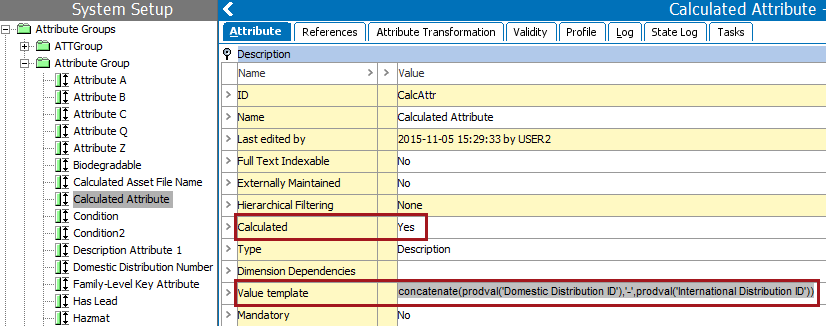
Calculated attributes are a special type of attributes whose values are not written in the database, but are calculated on the fly, based on other data in the system. The foundation for a calculated attribute is a functional programming language very similar to the language used for defining functions in Excel.
For assistance in determining if a calculated attribute is the most efficient way to meet your requirements, see the Calculated Attribute Considerations topic in the Calculated Attributes section of the System Setup / Super User Guide documentation here.
The value of a calculated attribute is determined by a value template which can be written in the Function Editor. Many functions can include an argument, which specifies the STEP data to be accessed. Functions can access information from references, compare data between objects, round numbers, modify text, and many other options. For a step-by-step guide to creating a calculated attribute, see the Creating a Calculated Attribute topic in the Calculated Attributes section of the System Setup / Super User Guide documentation
As an example, the following functions and arguments are included in the workbench image below:
For additional use cases for calculated attributes, see the Calculated Attribute Use Cases topic here.
In Web UI, calculated attributes can be identified and their values can be overridden on the Attribute Management screen as described in the Calculated Attributes in Web UI section of the Web User Interfaces documentation
2019, Stibo Systems – Confidential