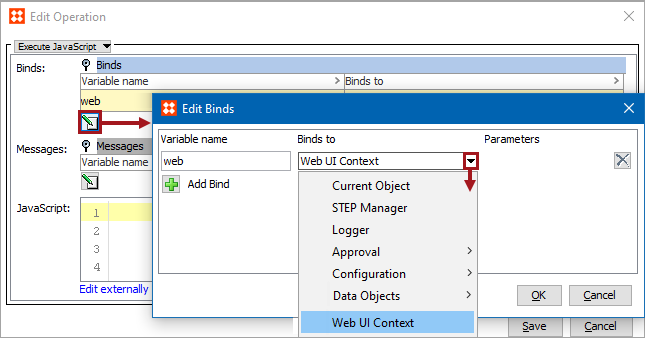
The Web UI Context bind can be used to apply business rules to components in the Web UI. This bind can be found within the 'Binds to' dropdown, as shown below.
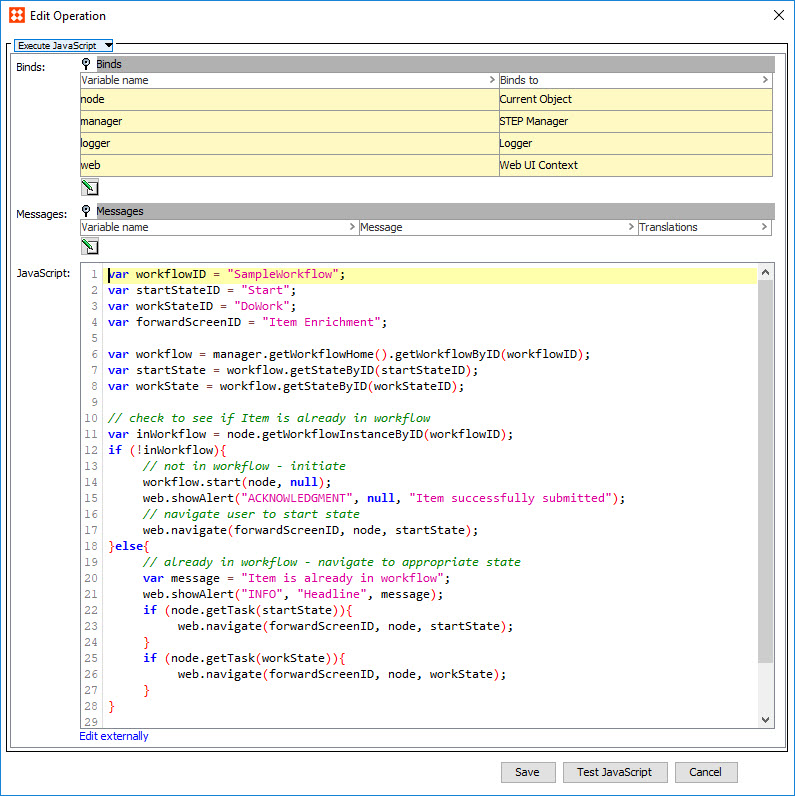
The Web UI Context bind acts as a bridge between business actions and the Web UI that enables business actions to initiate changes in the Web UI. For instance, a business action using this bind can be configured on a Business Action with Web UI Bind button component to auto-navigate a user in a workflow from one screen to another by clicking the component button. The business action described in this example is pictured in the business action screenshot example below.
Configuration
To use any bind:
Example
The following is example JavaScript that uses this bind.
Important: The example scripts should not be used as-is without thorough testing, including updating the script to match object and link types that exist on your system.
For more information on the Business Action with Web UI Bind component, see the Business Action with Web UI Bind Component topics in the Web User Interfaces documentation here.
2019, Stibo Systems – Confidential