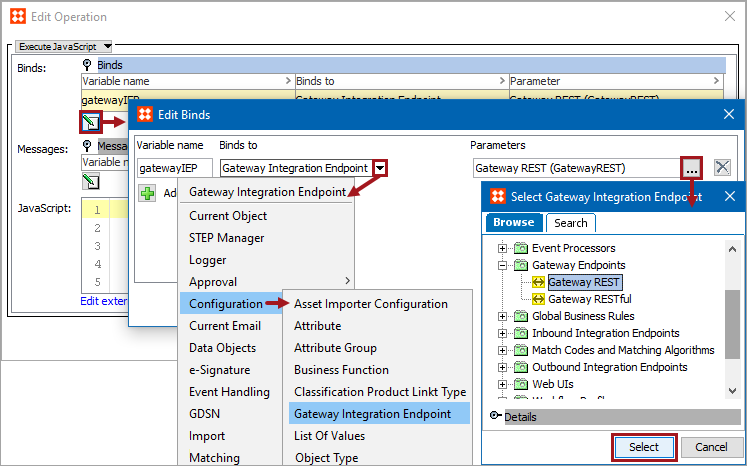
Gateway Integration Endpoints provide real-time inbound and outbound integration under STEP’s control. The Gateway Integration Endpoint bind is accessed from JavaScript in business rule conditions and actions. The bind can work with the REST methods included in the Gateway REST Methods section below.
Note: A gateway IEP functions as an HTTP client and supports all of the standard HTTP methods. Therefore a sound basic understanding of the HTTP protocol is essential to be able to configure and use a gateway IEP.
Configuration
To use any bind:
Gateway REST Methods
This bind can work with the following REST methods. For more information about these methods, click the STEP API Documentation button on the STEP Start Page.
|
REST Method |
Syntax Example |
|---|---|
delete |
delete().path("products").pathQuery({workspace: "Approved", context: "GL"}).body("Test").invoke();
|
get |
get().path("products").pathQuery({ workspace: "Approved", context: "GL"}).invoke(); |
head |
head().path("products").pathQuery({ workspace: "Approved", context: "GL"}).invoke(); |
options |
options().path("products").pathQuery({ workspace: "Approved", context: "GL"}).invoke(); |
post |
post().path("products").pathQuery({ workspace: "Approved", context: "GL"}).invoke(); |
put |
put().path("products").pathQuery({ workspace: "Approved", context: "GL"}).body("Test").invoke();
|
Example
The following is example JavaScript that uses this bind.
Important: The example scripts should not be used as-is without thorough testing, including updating the script to match object and link types that exist on your system.
The following example uses a REST gateway integration endpoint to access the external server for information.
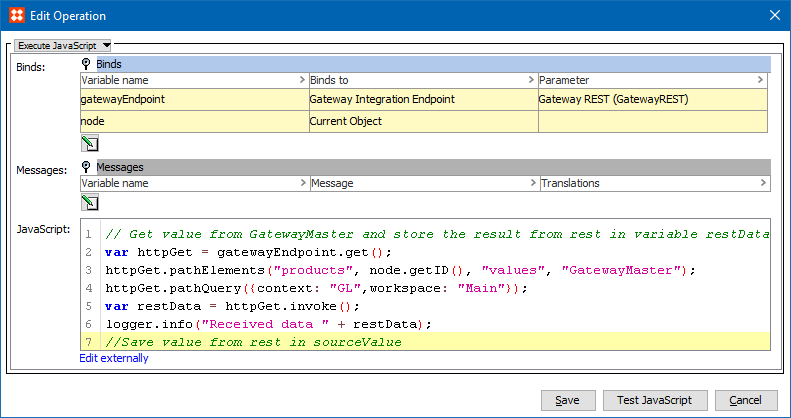
When the business action is executed, the gateway endpoint is accessed. The gateway endpoint Statistics tab displays an overview of executed REST methods. For more information, see the Gateway Integration Endpoint Statistics section here.
2019, Stibo Systems – Confidential