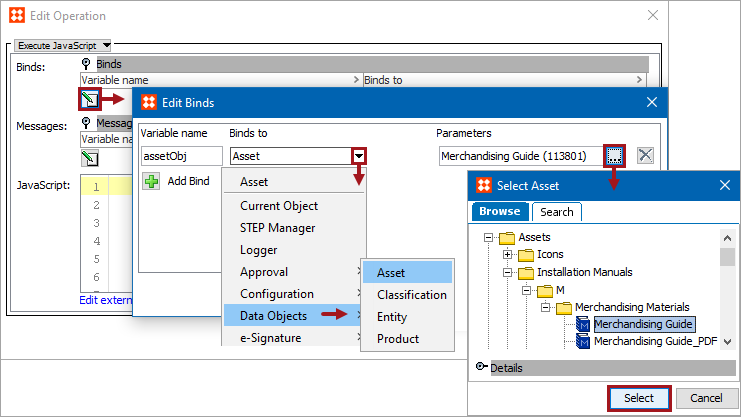
Business rules can use the following simple binds to gain access to an object on the Tree. These binds are especially useful when a particular object is needed repeatedly in the JavaScript.
Each bind is defined in the sections below.
Configuration
To use any bind:
This binds the selected asset to the action or condition variable. Click the ellipsis button ( ) in the Parameters field to display the Select Asset dialog. Use Browse or Search to locate an asset, select it, and click the Select button.
This binds the selected classification to the action or condition variable. Click the ellipsis button () in the Parameters field to display the Select Classification dialog. Use Browse or Search to locate a classification , select it, and click the Select button.
This binds the selected entity to the action or condition variable. Click the ellipsis button () in the Parameters field to display the Select Entity dialog. Use Browse or Search to locate an entity, select it, and click the Select button.
This binds the selected product to the action or condition variable. Click the ellipsis button () in the Parameters field to display the Select Product dialog. Use Browse or Search to locate a product, select it, and click the Select button.
2019, Stibo Systems – Confidential