Open topic with navigation
Recycle Bin for Tree
This topic describes the functionality available for objects within the Tree Recycle Bin. For information on the System Setup Recycle Bin, see the Recycle Bin for System Setup topic in the System Setup / Super User Guide here. For information on deleting objects from Tree, see the Deleting Objects in Tree topic within this Getting Started / User Guide here.
Note: Objects in the Recycle Bin are not searched when a user performs a search in workbench and Web UI. This limitation also applies to searches done using the workbench Goto functionality. Additionally, attribute values of objects in the Recycle Bin cannot be edited. If editing is required, the object needs to be revived.
When an object is deleted from Tree, it is moved to the Recycle Bin located on the Tree tab. To revive or permanently delete an object, right-click on it in the Recycle Bin and choose one of the options described below.
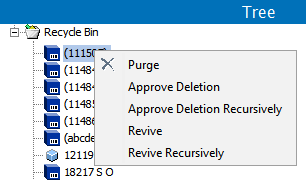
- Purge: Permanently deletes the object, with no subsequent option for revival. It is recommended to approve deletions prior to purging them, though it is not required. However, purging an object without first approving the deletion will NOT result in a deletion event being captured. Therefore, if deletion events need to be recorded for sending to downstream systems, the deletion should always be approved prior to the purge action being carried out. For more information on events, see Events in the System Setup / Super User Guide here.
- Approve Deletion: Deletes the selected object from the Approved workspace, and passes a deletion event for that object. This option is only enabled on objects that are workspace revisable.
- Approve Deletion Recursively: Deletes the selected object and all of its children from the Approved workspace, and passes a deletion event for all impacted objects. This option is only enabled on objects that are workspace revisable.
- Revive: Revives the selected object, returning it to the location in Tree from which it was deleted. Note that object revival has some dependencies and objects may not always be revived exactly as they were prior to deletion. For example, if an object had references to other objects which have subsequently been deleted, those references will not be present upon revival.
- Revive Recursively: Revives the selected object and all child objects to their previous location in Tree. Note that object revival has some dependencies and objects may not always be revived exactly as they were prior to deletion. For example, if an object had references to other objects which have subsequently been deleted, those references will not be present upon revival.
2019, Stibo Systems – Confidential