Open topic with navigation
Available Widgets
All available category / data profile dashboard widgets are detailed below. These widgets are also available in Web UI unless noted otherwise. For more information about configuring dashboard widgets in Web UI, see the Data Profile Widgets in Web UI section of the Web User Interfaces documentation here.
Approve Status
This widget displays the approval status of objects in the data profile.
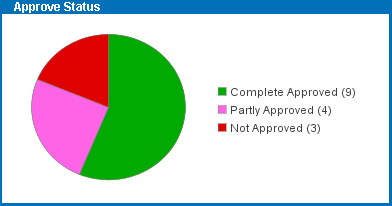
Configuration options include:
- Title - Changes the name that displays on the widget's title bar.
- Context - Pulls data from the specified context.
- Workspace - Pulls data from the specified workspace.
- Object Type - Filters data via object type.
Attribute Values
This widget shows the distribution of values for the specified attribute across objects in the data profile.
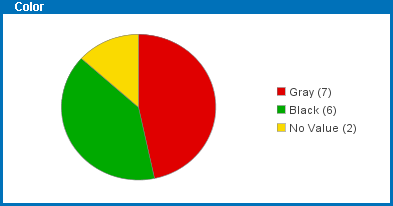
Configuration options include:
- Title - Changes the name that displays on the widget's title bar.
- Context - Pulls data from the specified context.
- Workspace - Pulls data from the specified workspace.
- Object Type - Filters data via object type.
- Attribute ID - Specifies which attribute to pull values from. Defining this configuration is mandatory.
- Chart / Dashboard Type - Determines whether to display the data as a pie chart or bar chart.
- Max Number of Values / Max Values - Specifies the maximum number of distinct values to display. By default this field is set to -1, which means 'all values.' If the specified maximum is exceeded, the remaining (smaller) values will be placed in the "Other values" group.
- Show No Values - Displays the number of products that have no value for the specified attribute when the box is checked.
Important: Any attribute that is full text indexed, multi-valued, calculated, or has values with inline references is not compatible with this widget.
Average Object Completeness
This widget shows the average object completeness in the data profile.
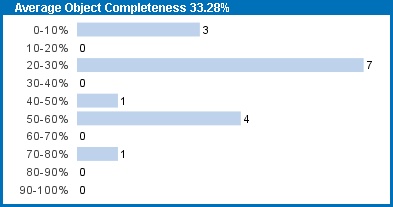
Configuration options include:
- Title - Changes the name that displays on the widget's title bar.
- Context - Pulls data from the specified context.
- Workspace - Pulls data from the specified workspace.
- Object Type - Filters data via object type.
- Completeness Metric - Determines which completeness metric to evaluate the data with. Note that the completeness metric must be specified in the Profile Configuration and data must have been profiled using that configuration before the widget can show any data. For more information, see the Profile Configuration section of the Data Profiling documentation here.
- Intervals - Displays the bars of the graph in intervals of 2, 4, 5, 10, or 20.
Business Condition Status
This widget displays the result of testing a business condition during profiling.
Note: If the test of the business condition results in an error, the test is reported as failed.
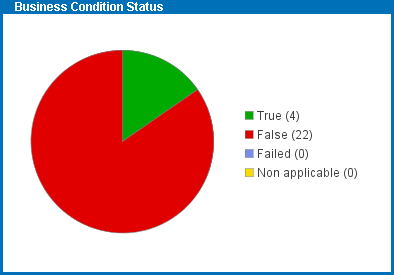
Configuration options include:
- Title - Changes the name that displays on the widget's title bar.
- Context - Pulls data from the specified context.
- Workspace - Pulls data from the specified workspace.
- Object Type - Filters data via object type.
- Condition - Determines which business condition to test when profiling. Note that the condition must be specified in the Profile Configuration and data must have been profiled using that configuration before the widget can show any data. For more information, see the Profile Configuration section of the Data Profiling documentation here.
Last Edited By
This widget shows which users last edited the object in the data profile.
Note: Not available in Web UI.
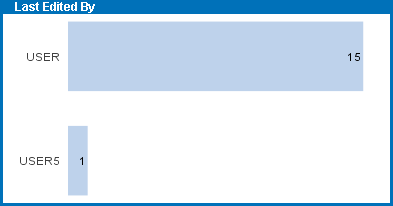
Configuration options include:
- Title - Changes the name that displays on the widget's title bar.
- Context - Pulls data from the specified context.
- Workspace - Pulls data from the specified workspace.
- Object Type - Filters data via object type.
- Sort Order - Sorts the data in descending order by users with the most frequent edits or by users with the rarest.
- Chart Type - Determines whether to display the data as a pie chart or bar chart.
- Max Number of Values - Specifies the maximum number of distinct values to display. By default this field is set to -1, which means 'all values.' If the specified maximum is exceeded, the remaining (smaller) values will be placed in the "Other values" group.
Last Modified Time
This widget shows the last time each object in the profile was edited.
Note: Not available in Web UI.
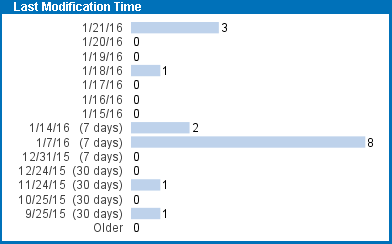
Configuration options include:
- Title - Changes the name that displays on the widget's title bar.
- Context - Pulls data from the specified context.
- Workspace - Pulls data from the specified workspace.
- Object Type - Filters data via object type.
Least Complete Attributes
This widget displays the five least complete attributes in the data profile. Completeness is rounded to the nearest whole percentage and attributes with the same completeness are presented in the order in which they are retrieved from the database. Inherited values are included in the calculation.
Note: This widget has no relation to the Completeness Metric defined in the Profile Configuration and will evaluate all attributes in the data profile.
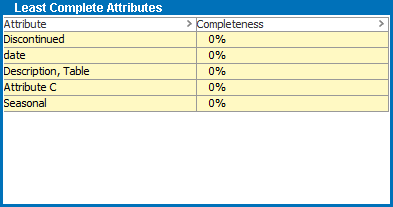
Configuration options include:
- Title - Changes the name that displays on the widget's title bar.
- Context - Pulls data from the specified context.
- Workspace - Pulls data from the specified workspace.
- Object Type - Filters data via object type.
Most Complete Attributes
This widget lists the five most complete attributes in the data profile. Completeness is rounded to the nearest whole percentage and attributes with the same completeness are presented in the order in which they are retrieved from the database. Inherited values are included in the calculation.
Note: This widget has no relation to the Completeness Metric defined in the Profile Configuration and will evaluate all attributes in the data profile.
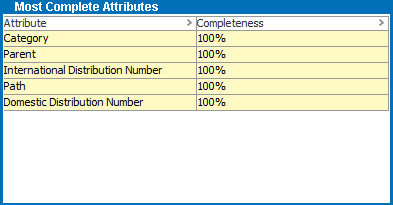
Configuration options include:
- Title - Changes the name that displays on the widget's title bar.
- Context - Pulls data from the specified context.
- Workspace - Pulls data from the specified workspace.
- Object Type - Filters data via object type.
Object Count
This widget displays the number of objects in the data profile.
Note: If any objects being profiled are linked multiple times in the sub-tree, they are also counted multiple times. This only applies to sub-trees under classifications and entities, as products can only link to other products once in a parent / child relationship.
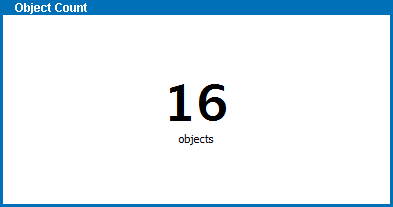
Configuration options include:
- Title - Changes the name that displays on the widget's title bar.
- Context - Pulls data from the specified context.
- Workspace - Pulls data from the specified workspace.
Object Type Count
This widget displays the distribution of object types in the data profile.
Note: Only the five most common types are displayed as separate entries. The remaining types are grouped in "Other object types."
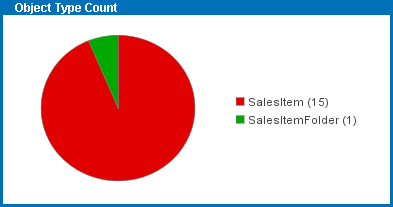
Configuration options include:
- Title - Changes the name that displays on the widget's title bar.
- Context - Pulls data from the specified context.
- Workspace - Pulls data from the specified workspace.
- Chart Type - Determines whether to display the data as a pie chart or list.
Translation Status
This widget displays the translation status of the objects in the data profile.
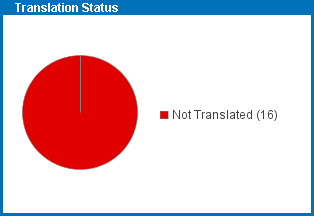
Configuration options include:
- Title - Changes the name that displays on the widget's title bar.
- Context - Pulls data from the specified context.
- Workspace - Pulls data from the specified workspace.
- Chart Type - Determines whether to display the data as a pie chart or list.
Note: The KPI Table Widget has been deprecated.
2019, Stibo Systems – Confidential