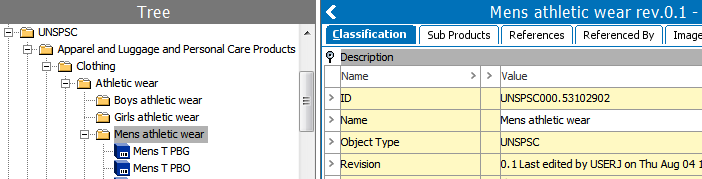
United Nations Standard Products and Services Code® (UNSPSC) is a global classification framework for products and services in all industry sectors. Importing a UNSPSC file into STEP creates a set of multi-level classification folders, depending on the contents of the import file. For detailed information about UNSPSC, search the web.
When a UNSPSC classification exists in STEP, you can make product / service identification easier by using Bulk Update to add a 'product-to-classification link type' reference between your products / services and the UNSPSC classification system. This displays your products / services within the UNSPSC folder as shown in the image below. For more information, see the Bulk Updates documentation here.
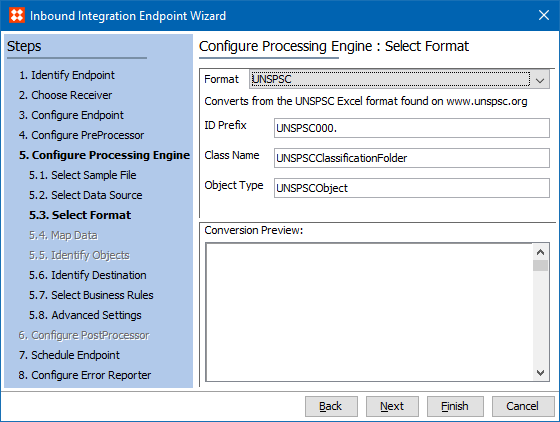
UNSPSC is available for selection in:
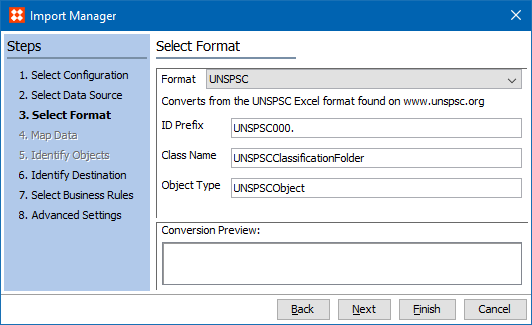
This format does not require a data map.
The UNSPSC file to be imported into STEP can be retrieved from the member's area of the UNSPSC website. The Download Type selection should be 'Prepackaged complete download.'
All data included in the file selected for import will be imported; selection of particular classifications is not available.
The content and required preparation of a UNSPSC file depends on the UNSPSC version, as described below:
|
Version |
File Types Included in ZIP |
File Prep Required |
File to Import |
|---|---|---|---|
|
13 |
One (1) Excel file with six (6) tabs |
Extract before import |
Excel file |
|
17, 18, 19, 20 |
Six (6) individual .TXT files |
None |
.ZIP file |
Multiple versions of UNSPSC classifications can exist simultaneously in STEP, provided different UNSPSC classification ID prefixes are used.
Prerequisites
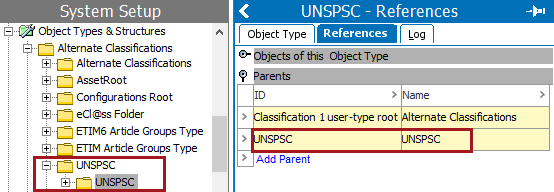
To accommodate importing multiple levels within a single classification, the UNSPSC classification object type must exist and have itself as a parent, as defined in the following steps.
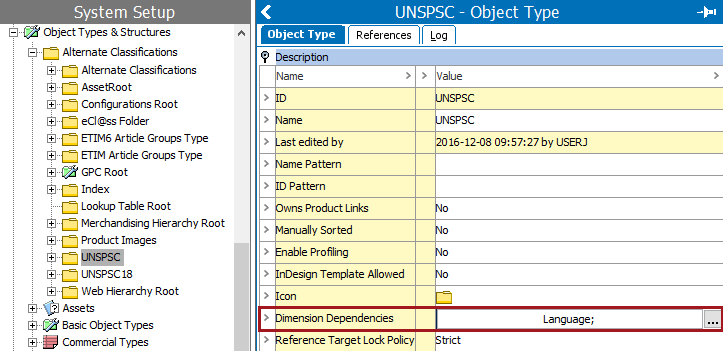
To import multiple UNSPSC languages for different contexts, on the top-level UNSPSC folder, set the Dimension Dependencies parameter to Language.
Inbound Parameters
Import Manager
IIEP
2019, Stibo Systems – Confidential