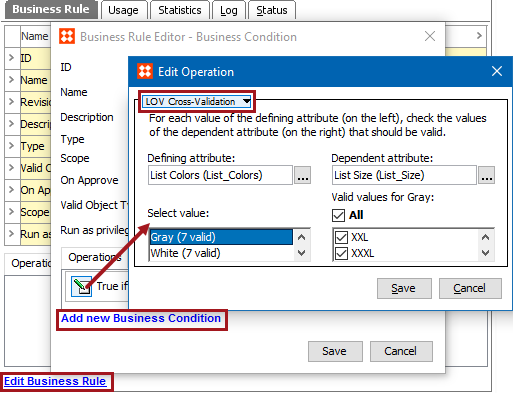
LOV Cross-Validation is a condition which specifies legal relationships between the values in two Lists of Values (LOV) attributes. Setting up the 'LOV Cross-Validation' condition requires setting a defining attribute to which the dependent attribute will be compared.
For example, an LOV attribute named ‘Shirt Color’ with values ‘Blue’, ‘Black’ and ‘Red,’ and another LOV attribute named ‘Shirt Size’ with values 'M,' ‘L’, ‘XL’, or ‘XXL.' Based on the availability of different sizes of shirt for a particular color, you can make use of the ‘LOV Cross-Validation’ business condition to specify the relationships between the two LOV attributes like ‘Blue’ > L, XL, ‘Black’ > XXL, ‘M,’ and so on.
Prerequisites
Before using this business condition:
Configuration
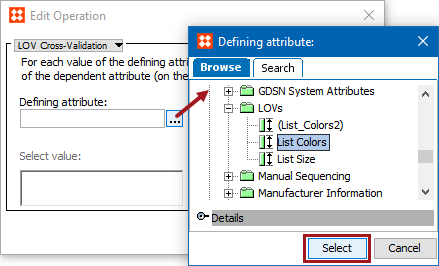
 ) to display the Defining Attributes dialog. Use the Browse or Search tab to identify the defining list of values, select the desired single-valued LOV attribute. Click Select to display this attribute as the Defining attribute.
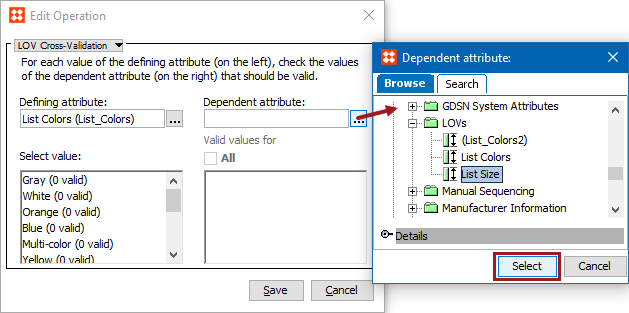
) to display the Dependent Attributes dialog. Use the Browse or Search tab to identify the dependent list of values, select the desired single or multi-valued LOV attribute. Click Select to display this attribute as the Dependent attribute.
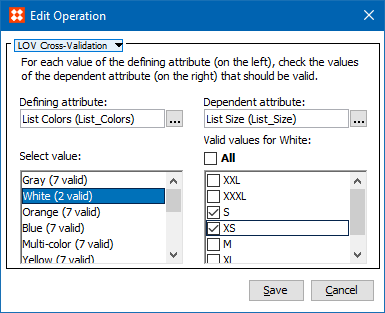
Note: The number in the parentheses next to each attribute name specifies how many values of the dependent attribute are configured to be valid. This provides an overview of the configuration without clicking through every defining value.
Note: The cross validation functionality will also work in the Web UI when the LOV Cross-Validation business condition has been configured for two editable LOV attributes inside a data container.
Important: If one or more attributes are configured in multiple business conditions, the business conditions that share attributes will not work when applied. For instance, if two LOV Cross-Validation business conditions are set and one attribute is configured in both, the cross validation functionality will not work as expected.
To setup business conditions in the Web UI, see the Business Conditions in Web UI topic in the Business Rules documentation here.
2019, Stibo Systems – Confidential