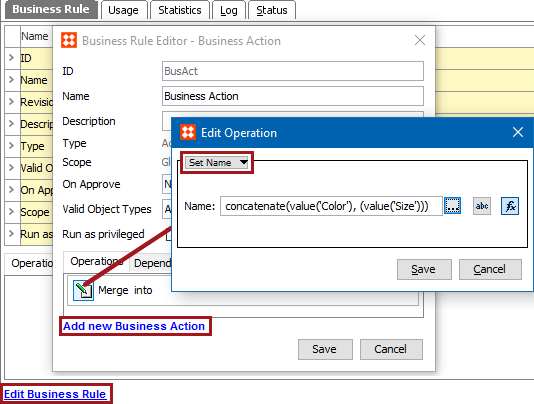
This operation can set the name of the current object to a constant value or to the result of a STEP function.
For example, when the color and size attribute values are concatenated to make the name of the object, use this action and a STEP function to generate that name.
This operation can also be run via a Bulk Update, as described in the Set Name Operation topic in the Bulk Updates documentation here.
Prerequisite
Before using this operation, create a business rule as defined in the Creating a Business Rule or Library topic here.
Configuration
 ), type in a constant value that will be used to update the name.
 ), then click the ellipsis button (
 ) to display the Function Editor dialog. Write a function to set a name and click the Select button. For more information, see the Using Function Editor topic in the Resource Materials online help here.
2019, Stibo Systems – Confidential