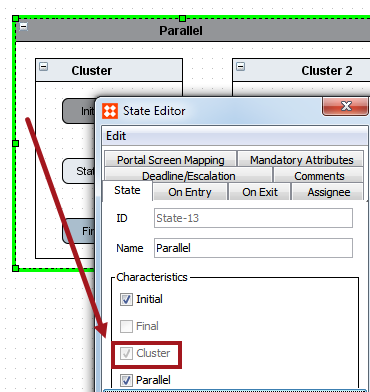
The Parallel characteristic is used for implementing two or more clusters simultaneously in the workflow. A Parallel state will automatically get the cluster characteristic indicating that it can only contain clusters as its immediate sub-states.
Once the Final states of all the clusters that are immediate children of a parallel have been reached, the parallel is automatically exited upon the next transition.
Transitions from parallels and Final states in clusters can be simultaneously and automatically triggered by using the formula Parallel ID.done to name the event. This then allows the object in the workflow to move to the next state outside of the parallel.
Note: When going through the workflow, it automatically will look for Parallel ID.done events first to be tried and performed, but if none exist it will then look for transitions with no special named events.
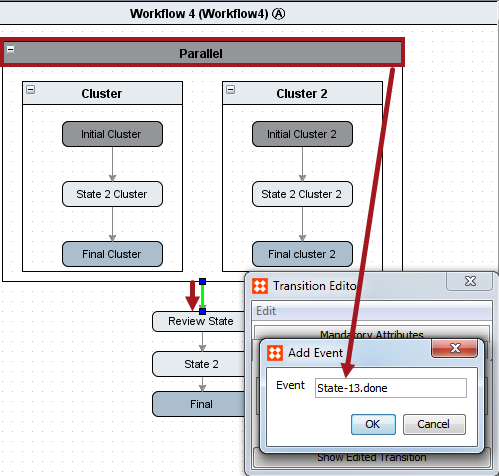
Note: Prefixing an event on a transition with the ID of the state from which the transition goes and a dot ('.') will cause the event to be hidden to users working with the workflow in the workbench. This approach should therefore be used whenever you have a 'system' event that should not be triggerable by human users.
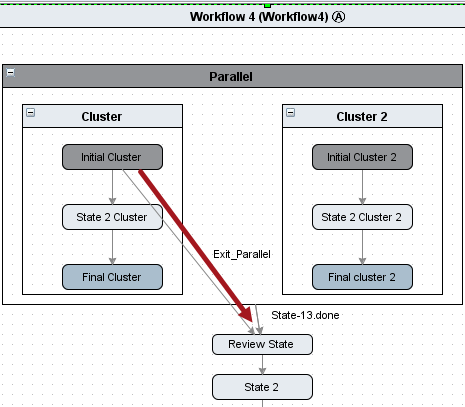
The image below shows an alternate way of configuring a parallel and transition relationship. There is a transition from Initial Cluster out of the parallel straight to Review State. If this transition is performed, the entire parallel and all its sub-states will be exited regardless of which state the object is in for Cluster 2.
Note: Parallel States are used for modeling concurrency and should only have child states with the Cluster Characteristic. Cluster and Parallel States do not typically represent human Tasks.
2018, Stibo Systems – Confidential