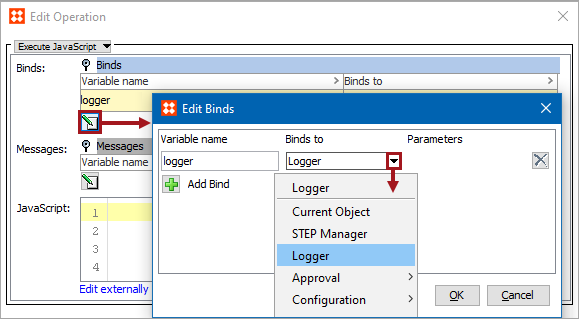
Business rules use the Logger bind to write to the main STEP log file on the application server (step.*.log) when the condition or action runs. This bind is available within the 'Binds to' dropdown, as shown below.
After development and debugging a new business rule, it is recommended to include the business rule ID and the context in the log message to aid in troubleshooting when required.
Note: When testing a business rule, Logger writes directly to the test dialog, not to the STEP log file.
Configuration
To use any bind:
Java Logger Class Shorthand
The Logger bind is shorthand for the Java Logger class. This variable is always bound in, gives access to a java.util.logging.Logger object, and allows logging of messages at the following severity levels:
logger.fine("Message to log");logger.info("Message to log");logger.warning("Message to log");logger.severe("Message to log");
By default, the STEP log does not register messages at the 'fine' severity level.
2018, Stibo Systems – Confidential