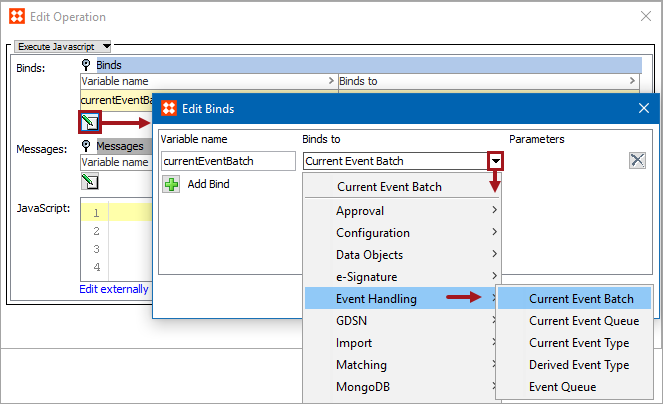
Business rules can use the event handling binds to access the selected event object. No parameter selection is required for the current object binds since they each use the current batch, queue, or type, respectively. For the Derived Event Type and the Event Queue binds, a parameter is required. Each is described below.
For examples of checking the current event and queuing a derived event via event binds and JavaScript, see the Event Bind Examples topic here.
Important: The example scripts should not be used as-is without thorough testing, including updating the script to match object and link types that exist on your system.
Configuration
To use any bind:
This bind is only available for actions used as an OIEP Preprocessor and gives access to the batch of events currently being handled. This makes it possible to examine the events in the batch and to add new objects to the batch.
For example, this JavaScript adds new product / node '(newNode)' to the current event batch.
eventBatch.addAdditionalNode (newNode);
In this example, Current Event Batch is bound to the variable 'currentEventBatch'. For each event in the batch, the code accesses the object (node) for which the event was generated, checks if it is a product, and if so, adds the parent object to the batch.
eventsList = currentEventBatch.getEvents();
for (var i = 0; i < eventsList.size(); i++) {var node = eventsList.get(i).getNode();
if (node instanceof com.stibo.core.domain.Product) {currentEventBatch.addAdditionalNode(node.getParent());
}
}
This bind is available for conditions and actions used as OIEP event filters / event generators. It gives access to the event queue tied to the OIEP and from an action makes it possible to, for example, add derived events to the queue.
For example, this JavaScript queues new product / node '(newNode)' using ‘eventType’, which is bound through Event Type bind (discussed later in this topic).
eventQueue.queuedDerivedEvent (eventType, newNode);
In this example, Current Event Queue is bound to 'currentEventQueue', Current Object is bound to the variable 'currentObject', and a derived event is bound to the variable 'myEvent' via the Event Type bind. The code queues an event for the parent of current object if current object is a product.
if (currentObject instanceof com.stibo.core.domain.Product) {currentEventQueue.queueDerivedEvent(myEvent, currentObject.getParent());
}
This binds the current event type and can be hooked into an endpoint as filters / generators to examine the current event. It is available for conditions and actions used as OIEP event filters / event generators. Use this to examine the type of the current event.
In this example, Current Event Type is bound to 'currentEventType' and the code checks whether the current event is a core 'modify' event.
if (currentEventType.equals(com.stibo.core.domain.eventqueue.BasicEventType.Modify)) {// Do something if core modify event
}
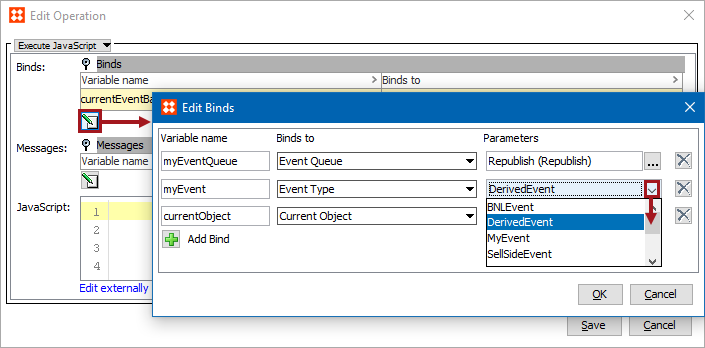
This bind is available for actions and conditions, (though more typically used in actions), and binds a specified derived event to a JavaScript variable.
The same binds and variables are used in this example as in the one above for Event Queue.
This bind is available for conditions and actions, (though more typically used in actions). Use the bind from an action to queue an event on the selected event queue in STEP.
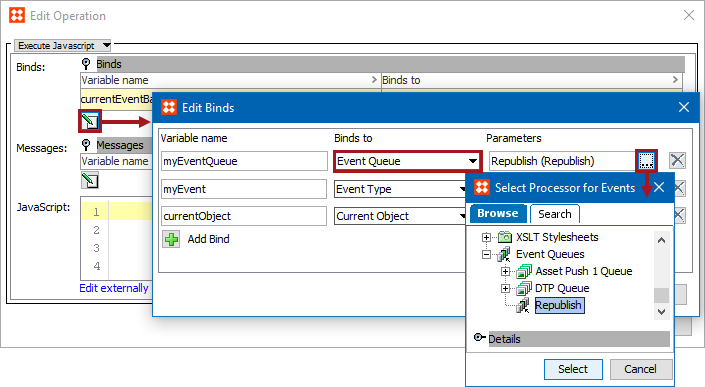
In this example, a derived event is bound to the variable 'myEvent' via the Event Type bind, an event queue is bound to the variable 'myEventQueue' via the Event Queue bind, and Current Object is bound to 'currentObject'. The example places a 'myEvent' event on the queue for current object.
myEventQueue.queueDerivedEvent(myEvent, currentObject);
2018, Stibo Systems – Confidential