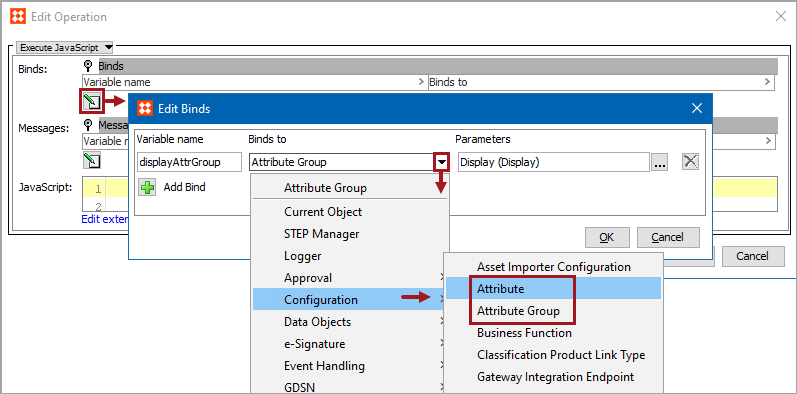
The Attribute and Attribute Group binds allow access to the selected object. These binds are found under the 'Binds to' dropdown, as shown below.
Each bind is defined in the sections below.
Configuration
To use any bind:
Note: Example scripts should not be used as-is without thorough testing, including updating the script to match object and link types that exist on your system
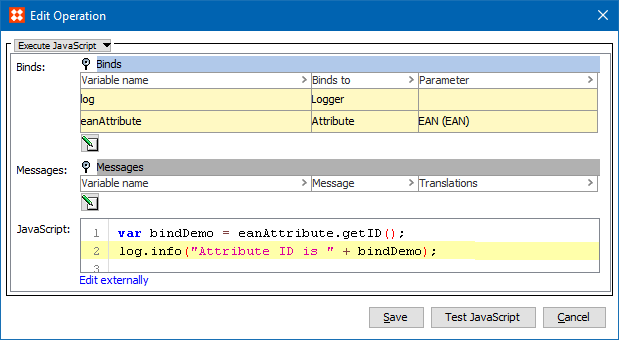
The selected attribute is bound to the variable.
In this example, the Variable Name is 'eanAttribute', the Binds to field is Attribute, and the Parameters field displays the EAN attribute. The following JavaScript returns the ID of the EAN attribute as an Info log message:
var bindDemo = eanAttribute.getID();
log.info("Attribute ID is " + bindDemo);
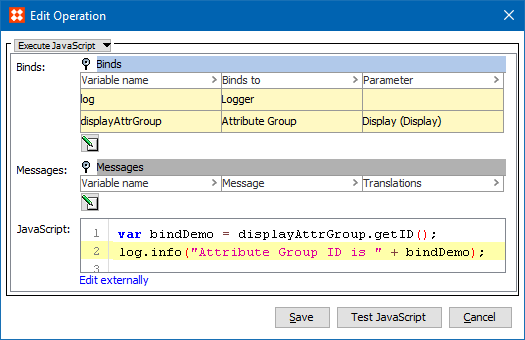
The selected attribute group is bound to the variable.
In this example, the Variable Name is 'displayAttrGroup', the Binds to field is Attribute Group, and the Parameters field shows the Display attribute. The following JavaScript returns the ID of the Display attribute group as an Info log message:
var bindDemo = displayAttrGroup.getID();
log.info("Attribute Group ID is " + bindDemo);
2018, Stibo Systems – Confidential