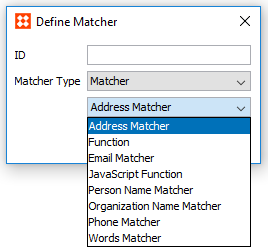
Matchers take data from two objects, apply matching logic to them, and output a rank score. Matchers can be written in JavaScript or as STEP functions.
Predefined customer data normalizer templates are also available for those with the required license. For more information on this license, ask your system administrator.
If required, Matchers can be organized into sub tables for especially complex configurations. For more information on sub tables, see the Decision Tables section of this documentation here.
When created as a JavaScript or STEP function, 'mcevaluate' and 'evaluate' are used to assess elements from the Data and Matcher sections of the decision table, and compare their results.
Standard Matchers include:
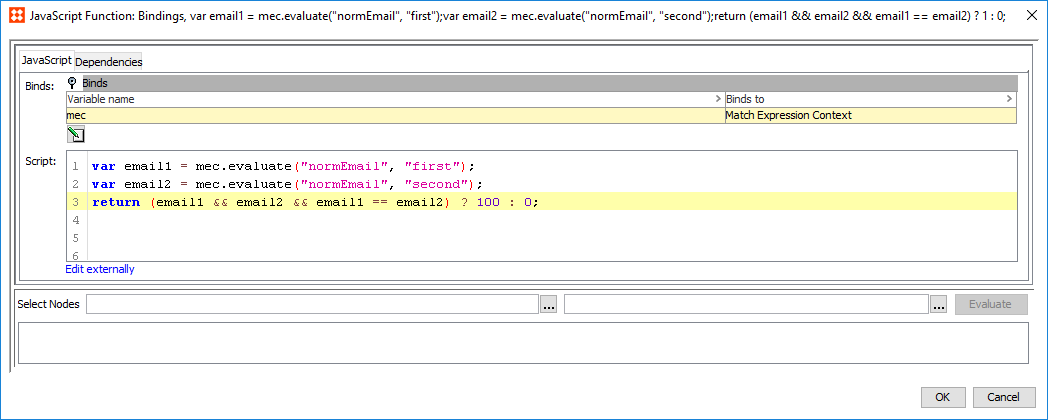
This JavaScript matcher implements a basic email matcher: It performs a plain comparison of the emails by comparing the normalized emails as text strings.
Note: The matcher does not deal with any special cases such as where the normalizer returns strings that are obviously not emails e.g., empty strings. Resolving such cases is expected to be handled by the Email Normalizer.
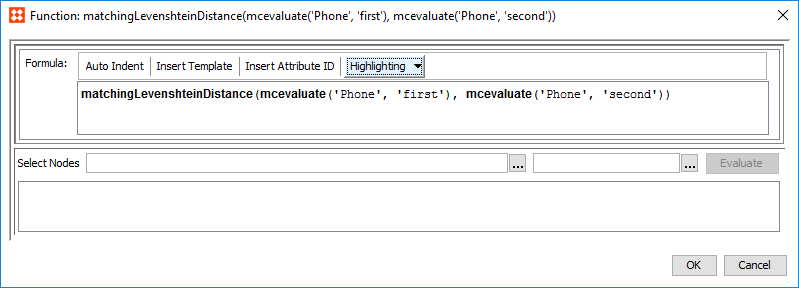
These matcher templates are intended for use in customer data solutions:
Some matchers give access to lookup tables. For more information on lookup tables, see the Transformation Lookup Tables topic in Resources Materials documentation here.
Address Matcher
The Address Matcher compares the normalized address data of two objects and outputs a rank score based on the weighted sum of relevant data elements and match factors. When applied to a rule, the resulting rank score is evaluated against a condition threshold, and returns 'True' if it meets or exceeds the minimum requirement of the threshold. If the combination of street and postcode, or street and city is a match, the Address Matcher will return a rank score indicating a match.
The Address Matcher configuration is split into two tabs: Settings, where the corresponding normalizer is mapped and the condition threshold is established, and Advanced, where different weights are applied to the relevant data elements and match factors.
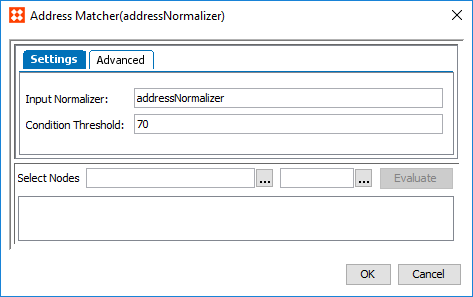
 ) in the Matcher column to access the configuration.
 Note: An empty Condition Threshold should be used if a variable threshold is required between different rules. For example, one rule requires the matcher to return a score greater than '70,' and another rule needs it to be greater than '75.'
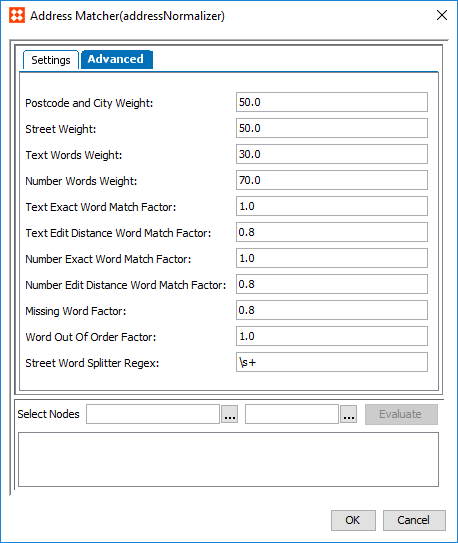
A few things to note:
Required parameters include:
Email Matcher
The Email Matcher compares the normalized email data of two objects and outputs a rank score. When applied to a rule, the resulting rank score is evaluated against a condition threshold, and returns 'True' if it meets or exceeds the minimum requirement of the threshold. If the email values are a match, the Email Matcher will return a rank score indicting a match.
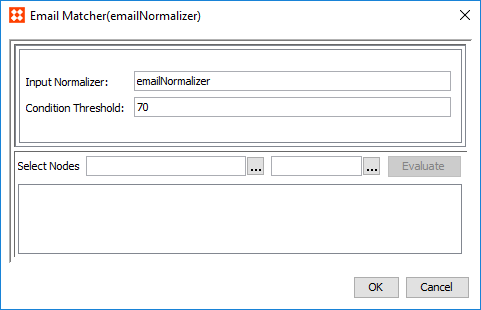
) in the Matcher column to access the configuration. Note: An empty Condition Threshold should be used if a variable threshold is required between different rules. For example, one rule requires the matcher to return a score greater than '70,' and another rule needs it to be greater than '75.'
Organization Name Matcher
The Organization Name Matcher compares the normalized organization name data of two objects and outputs a rank score based on the weighted sum of relevant data elements and match factors. When applied to a rule, the resulting rank score is evaluated against a condition threshold, and returns 'True' if it meets or exceeds the minimum requirement of the threshold. If the organization name values are a match, the Organization Name Matcher will return a rank score indicting a match.
) in the Matcher column to access the configuration.
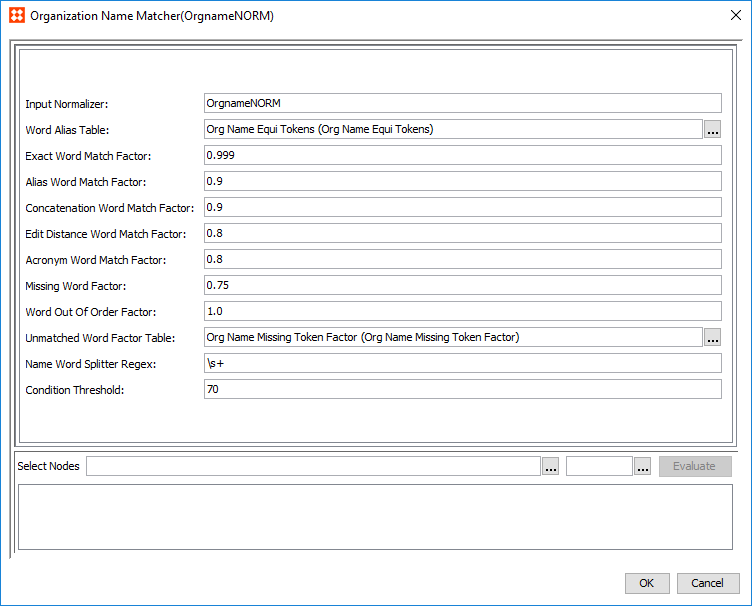
) and select a lookup table to use for substituting certain words. This substitution takes place after the string has been cut into individual words via the Splitter Regex. This parameter should be used to match words that have the same or similar meaning. For example, legal terms: inc and incorporated.) and select the relevant lookup table. Note: The Unmatched Word Factor Table is a lookup table that assigns factors to certain words.
By default, unpaired / missing words will penalize the final score using the Missing Word Factor parameter. However, if an unpaired / missing word appears in this table, it will penalize the final score using the factor in the table rather than the factor configured in Missing Word Factor parameter. This can be used to reduce or increase the penalty that certain words, depending on their significance, have on the final score if they are missing.
Note: An empty Condition Threshold should be used if a variable threshold is required between different rules. For example, one rule requires the matcher to return a score greater than '70,' and another rule needs it to be greater than '75.'
Person Name Matcher
The Person Name Matcher compares the normalized name data of two objects and outputs a rank score based on the weighted sum of relevant data elements and match factors. When applied to a rule, the resulting rank score is evaluated against a condition threshold, and returns 'True' if it meets or exceeds the minimum requirement of the threshold. If the combination of first name and middle name, and middle name and last name is a match, the Person Name Matcher will return a rank score indicating a match.
Note: If customer names are represented in a single field rather than split into First and Last, use the Words Normalizer / Matcher instead. Middle Name is not required to use this matcher.
The Person Name Matcher configuration is split into two tabs: Settings, where the corresponding normalizer is mapped and the condition threshold is established, and Advanced, where different weights are applied to the relevant data elements and match factors
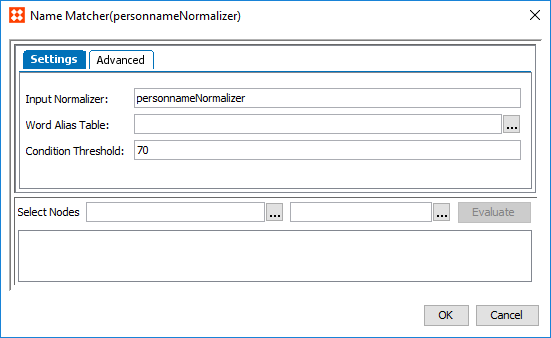
) in the Matcher column to access the configuration. ) and select a lookup table to use for substituting certain words. This substitution takes place after the string has been cut into individual words via the Splitter Regex. Note: An empty Condition Threshold should be used if a variable threshold is required between different rules. For example, one rule requires the matcher to return a score greater than '70,' and another rule needs it to be greater than '75.'
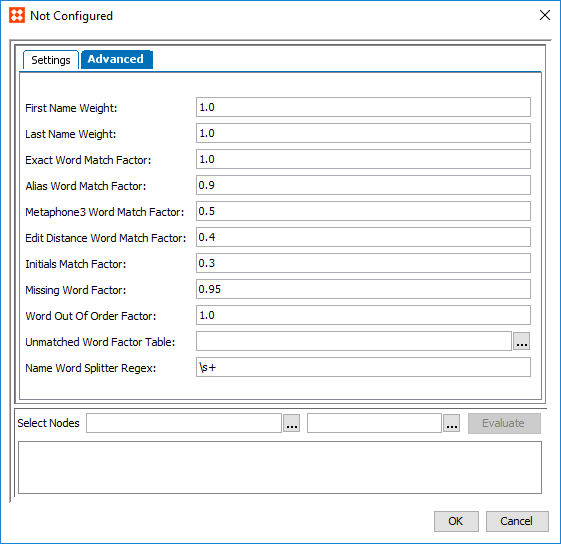
A couple things to note:
Required parameters include:
) and select the relevant lookup table. Note: The Unmatched Word Factor Table is a lookup table that assigns factors to certain words.
By default, unpaired / missing words will penalize the final score using the Missing Word Factor parameter. However, if an unpaired / missing word appears in this table, it will penalize the final score using the factor in the table rather than the factor configured in Missing Word Factor parameter. This can be used to reduce or increase the penalty that certain words, depending on their significance, have on the final score if they are missing.
Phone Matcher
The Phone Matcher compares the normalized phone data of two objects and outputs a rank score. When applied to a rule, the resulting rank score is evaluated against a condition threshold, and returns 'True' if it meets or exceeds the minimum requirement of the threshold. If the phone values are a match, the Phone Matcher will return a rank score indicting a match.
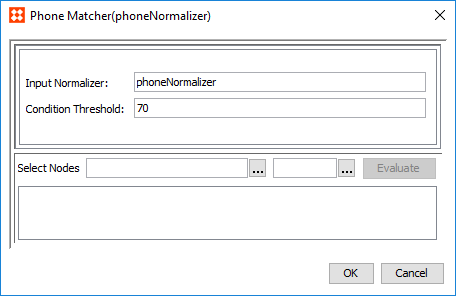
) in the Matcher column to access the configuration. Note: An empty Condition Threshold should be used if a variable threshold is required between different rules. For example, one rule requires the matcher to return a score greater than '70,' and another rule needs it to be greater than '75.'
Words Matcher
The Words Matcher compares the normalized words data of two objects and outputs a rank score based on the weighted sum of relevant data elements and match factors. When applied to a rule, the resulting rank score is evaluated against a condition threshold, and returns 'True' if it meets or exceeds the minimum requirement of the threshold. If the word values are a match, the Words Matcher will return a rank score indicting a match.
Note: The Words Normalizer / Matcher is a generic multi-word matcher that can represent a wide range of data. For example, customer names and social security numbers.
The Words Matcher configuration is split into two tabs: Settings, where the corresponding normalizer is mapped and the condition threshold is established, and Advanced, where different weights are applied to the relevant data elements and match factors
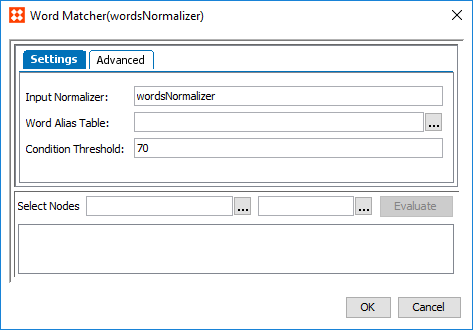
) in the Matcher column to access the configuration. ) and select a lookup table to use for substituting certain words. This substitution takes place after the string has been cut into individual words via the Splitter Regex. Note: An empty Condition Threshold should be used if a variable threshold is required between different rules. For example, one rule requires the matcher to return a score greater than '70,' and another rule needs it to be greater than '75.'
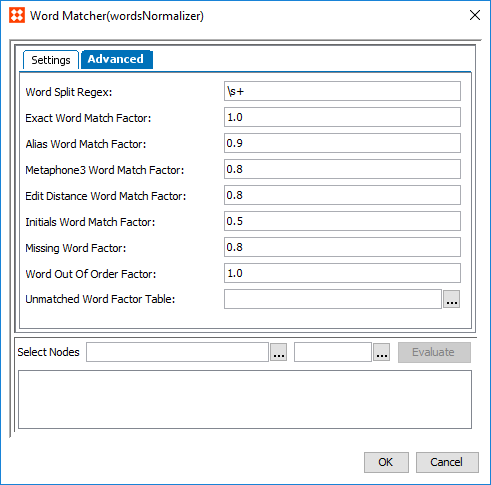
) and select the relevant lookup table. Note: The Unmatched Word Factor Table is a lookup table that assigns factors to certain words.
By default, unpaired / missing words will penalize the final score using the Missing Word Factor parameter. However, if an unpaired / missing word appears in this table, it will penalize the final score using the factor in the table rather than the factor configured in Missing Word Factor parameter. This can be used to reduce or increase the penalty that certain words, depending on their significance, have on the final score if they are missing.
Customer Data JavaScript Matchers
For especially complicated solutions, it is possible to expand the capabilities of a customer data matcher via JavaScript. These work in much the same way as basic customer data matchers, but allow for more flexibility and expanded functionality.
A typical customer data JavaScript matcher complies with the following basic steps:
Note: 'mc' is a bind to the match expression context.
For more information on customer data JavaScript normalizers, see the Decision Table Normalizers section of the documentation here.
2018, Stibo Systems – Confidential