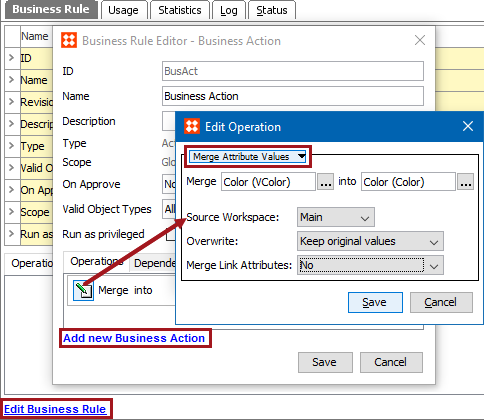
This action copies the value of one attribute into another attribute. You can specify whether to keep or overwrite existing values. This action can also be used for local attribute link metadata values.
For example, while performing data cleanup activities, to consolidate duplicate attributes, this action can be used to copy values from the duplicate attribute to the attribute that should be used to store the value.
Prerequisites
Before using this action:
Configuration
Note: The Merge Attribute Values operation does not delete any attributes, it can only update values. If desired, manually delete the source attribute once you confirm the merged data.
 ) to display the Select Attribute dialog, choose the attribute to copy values from, and click the Select button.) to display the Select Attribute dialog, choose the attribute to copy values to, and click the Select button.
Merge Results
As indicated in the following table, the source attribute value, target attribute values, and the overwrite setting together determine the end result of this action.
|
Source Attribute Value |
Target Attribute Value |
Overwrite Setting |
Target After Merge |
|---|---|---|---|
|
<empty> |
OriginalValue |
<any> |
OriginalValue |
|
NewValue |
<empty> |
<any> |
NewValue |
|
NewValue |
OriginalValue |
[Overwrite Existing] |
NewValue |
|
NewValue |
OriginalValue |
[Keep Original Values] |
OriginalValue |
For an example of merging attribute values with this action, see the Attribute Values: Merge Attribute Values Operation topic in the Bulk Updates documentation here.
2018, Stibo Systems – Confidential