Open topic with navigation
Business Action: Generate Match Codes
This action generates match code values for objects or nodes. Match codes have a formula, that when executed by a business rule, creates match codes for objects. The match codes are displayed on the System Setup match code object, on the Match Code Values tab.
Prerequisites
Before using this action:
- Ensure match code objects exist as defined in the Configuring Match Codes section of the Matching, Linking, and Merging documentation here.
- Create a business rule as defined in the Creating a Business Rule or Library topic here.
Configuration
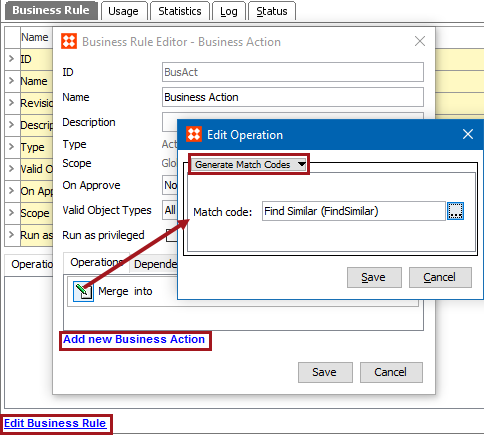
- On the Edit Operation dialog, select the Data Quality > Generate Match Codes option from the dropdown.
- For Match Code, click the ellipsis button (
 ) to display the Select a Match Code dialog, and the relevant match code.
- Click the Save button to add the operation to the business rule editor.
2018, Stibo Systems – Confidential