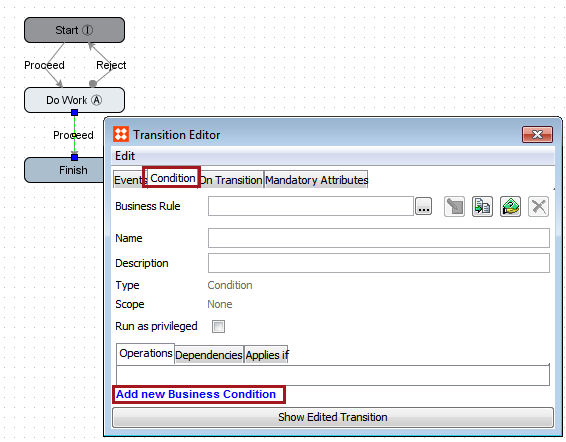
It is common for workflows to require some basic data validation to ensure that quality standards are met for the provided data. Data validation can be easily accomplished in a workflow by applying conditions on transitions.
Business conditions will always evaluate to either true or false. In workflows they can be applied on transitions, and thus determine whether or not a transition can be performed. If a condition evaluates to true, the task may take the transition. If a condition evaluates to false, the task cannot take the transition and must attempt another transition or remain in the state until the data has been corrected and the condition evaluates to true.
When using conditions for basic data validation, the transitions are generally applied on user-accessed states, so that the user sees an error when attempting to submit via a particular transition if the data does not validate. Note that conditions should not be used to validate that mandatory attributes are populated as that can be done using the built-in mandatory attribute functionality, described in the Mandatory Attributes section
Data validation can be carried out using any number of functions and/or JavaScript. Additional information on more advanced topics can be found in the Business Rules section of the documentation
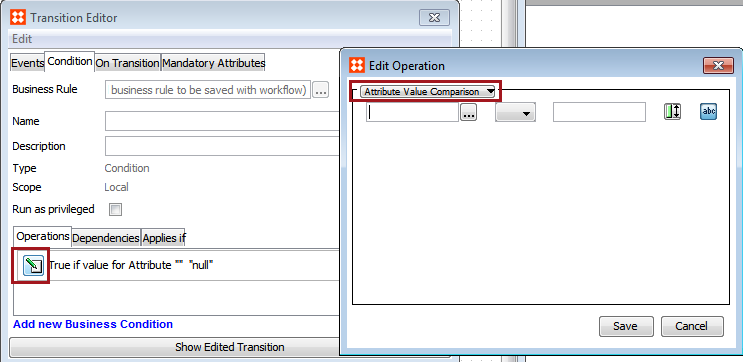
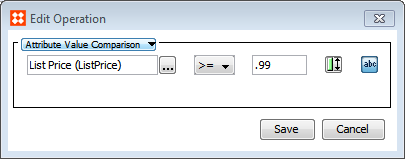
The below example will check to ensure that an attribute, List Price, has a value greater than or equal to .99. It assumes that a workflow has already been created and a transition exists on which the condition can be added.
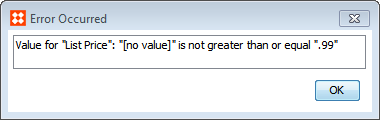
Users attempting to submit a task that does not meet the condition will receive an error.
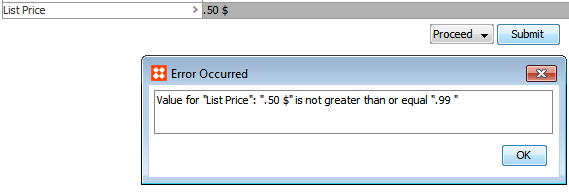
Note that by default, the condition also checks for the presence of a value, returning false when no value is present.
2018, Stibo Systems