Merge Over Empty Cells

The Merge Over Empty Cells transformation merges row or column contents over empty cells. This transformation is useful when you want to span cells with dynamically created content where you can not use the Span Cells functionality.

Note: This transformation also merges equal spanned cells.

Prequisites

The instructions in this topic assume that you have already added the transformation to your table by following the instructions in the Add a Transformation to a Table or Table Type subsection of the Table Transformations topic here.

Example

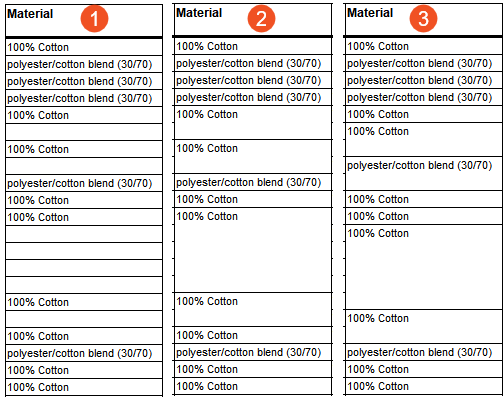
The below screenshots show three examples of the same column, before and after the application of the Merge Over Empty Cells transformation.

  1. The first is the original column, with individual empty cells.
  2. The second is how the column appears after applying the transformation. Cells are merged from top to bottom.
  3. The third is how the column appears after applying the transformation and checking the Reverse Direction box in the Merge Over Empty Cells dialog (more information is provided in the steps below). Cells are merged from bottom to top.

Steps

  1. After adding the transformation, under Parameters, click the ellipsis button (…). The Merge Over Empty Cells dialog displays.

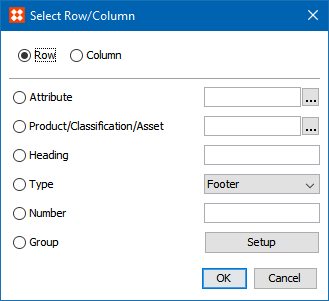
  1. Click the ellipsis (...) button to launch the Select Row/Column dialog.

The options available in this dialog have already been explained in the Row/Column Text Formatting section of the Formatting Transformations topic (here); refer to that topic for more information.
  1. Check the Reverse Direction box to merge over the empty cells from bottom to top instead of top to bottom. See the example given at the beginning of this topic for an illustration.
  2. Click OK when done.

2018, Stibo Systems