Open topic with navigation
Derived Events
A derived event is an event that is triggered based on the triggering of another event. When the trigger you need is not available as a core event, use a derived event.
For example, it is common to configure a derived event to generate when:
- An object reaches a specific state in a workflow.
- An event-based OIEP cannot discriminate the republish event from other types of events because it would also be registering events and publishing data.
- Referenced images, referenced products, parent products, or products that are linked, removed, or modified in a specific classification structure.
- The triggering object types are set up on an event-based OIEP, and then the business rules are applied to generate derived events based on the original object type triggering.
- An object does not have a change in approval status, but the inherited value changes on the children need to be published.
Prerequisites
Derived Events is an advanced topic, it is expected that anyone reading this documentation is familiar with Core Events. For more information see the Core Events section of this guide here.
Also, a thorough understanding of business rules is needed to create successful derived events. For more information, see the Business Rules section here, and see the Event-Based Example Business Rules for Derived Events section of the Data Exchange documentation here.
Add a Derived Event Type
To begin using derived events, a derived event type must exist. Below are the steps to add a derived event type.
- Go to System Setup.
- Click Derived Events.
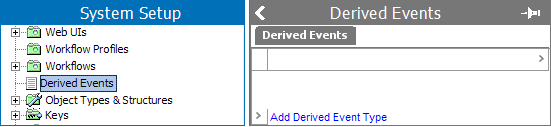
- On the Derived Events tab, click the Add Derived Event Type link, and the Add Derived Event Type dialog will display.
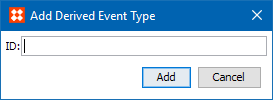
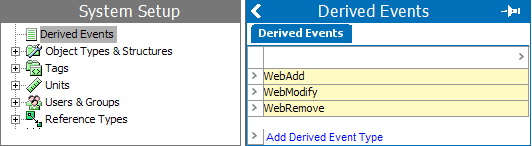
- Type an ID, click the Add button, and the Derived Events tab will list the newly added derived event type. In the example below the commonly used derived event types are listed. Once the derived event type is listed, it is available for use.
Delete a Derived Event Type
It is possible to delete a derived event type. Below are the steps to remove a derived event type.
- Go to System Setup.
- Click Derived Events.
- Find the derived event type to be removed, select the row icon, and the available options will display.

- Click Remove Derived Event Type and the Remove Derived Event Type dialog will appear.

- Click Remove and the Derived Events tab will no longer list the deleted derived event type.
2018, Stibo Systems